
Zoom's Native AI Sucks. So I Surveyed Every Open-Source Meeting Recorder
A friend asked me last week if I knew a good meeting recorder.
He uses Zoom and Teams. The native AI summaries are useless — formulaic filler with no actual insight. He's tried Granola and Krisp. Both feel polished but require subscriptions, and the free tiers tap out after a few meetings. His company is on Google Workspace but doesn't use Meet, so Gemini for Workspace's bundled note-taker — which is essentially welded to Meet — is dead weight.
I told him this is one of the simplest pipelines you can build. Capture Mac system audio, capture mic input, feed both to an STT model, hand the transcript to an LLM for summarization. Three steps. Every step is now a commodity. The open-source ecosystem has all of it.
"Someone on GitHub has done this," I said.
After a night of digging, "someone" turned out to be an entire constellation. From Meetily at 11.6k stars to weekend projects with three. All of them are racing to commoditize the same three Lego pieces.
This post is that night of digging. Which ones are real products, which ones are toys, and which one matches your specific situation — laid out in one place.
Granola and Friends Feel Great. The Subscription Is Selling Friction.
The polished SaaS tier — Granola, Krisp, Otter, Fireflies — has genuinely solid UX.
You install it, you start a meeting, you get a transcript and a summary. No BlackHole. No Multi-Output Device. No keyboard shortcut to remember. Granola's product form — take notes during the meeting, AI silently upgrades them in the background — is one of the smartest meeting-notes designs I've seen in two years.
But the pricing is right there. Granola business is $18/mo, Krisp is $16, Otter is $20, Fireflies tier two is $19. That's roughly $200 per person per year. A five-person team burns thousands annually on meeting notes.
The data ownership story is worse. Every customer call, every product brainstorm, every strategic discussion gets shipped to their servers for transcription and summarization. SOC 2 compliance and "we won't train on your data" clauses are nice, but your conversations have already left your machine.
My friend's situation is the canonical case.
Free tier insufficient, paid tier feels overpriced for what it does. He's already paying for Gsuite and Notion AI. Adding another meeting tool subscription is genuinely redundant. Zoom and Teams are already daily-driver launchers — he doesn't want a bot joining the call, and he doesn't want a round-trip through someone else's cloud.
"Can I just run this on my own Mac, transcribe and summarize locally, drop the result into my own notes?"
That's the entire open-source pitch.
Three Lego Pieces, That's the Whole Stack
Meeting recording-and-transcription, decomposed:
Audio capture. On macOS, two paths. Install BlackHole (or a similar virtual audio driver) and route system audio through it — the old way, requires user setup. Or use Apple's ScreenCaptureKit, or for newer projects, CATapDescription (macOS 14.2+, no driver install). The latter is cleaner but needs a recent OS.
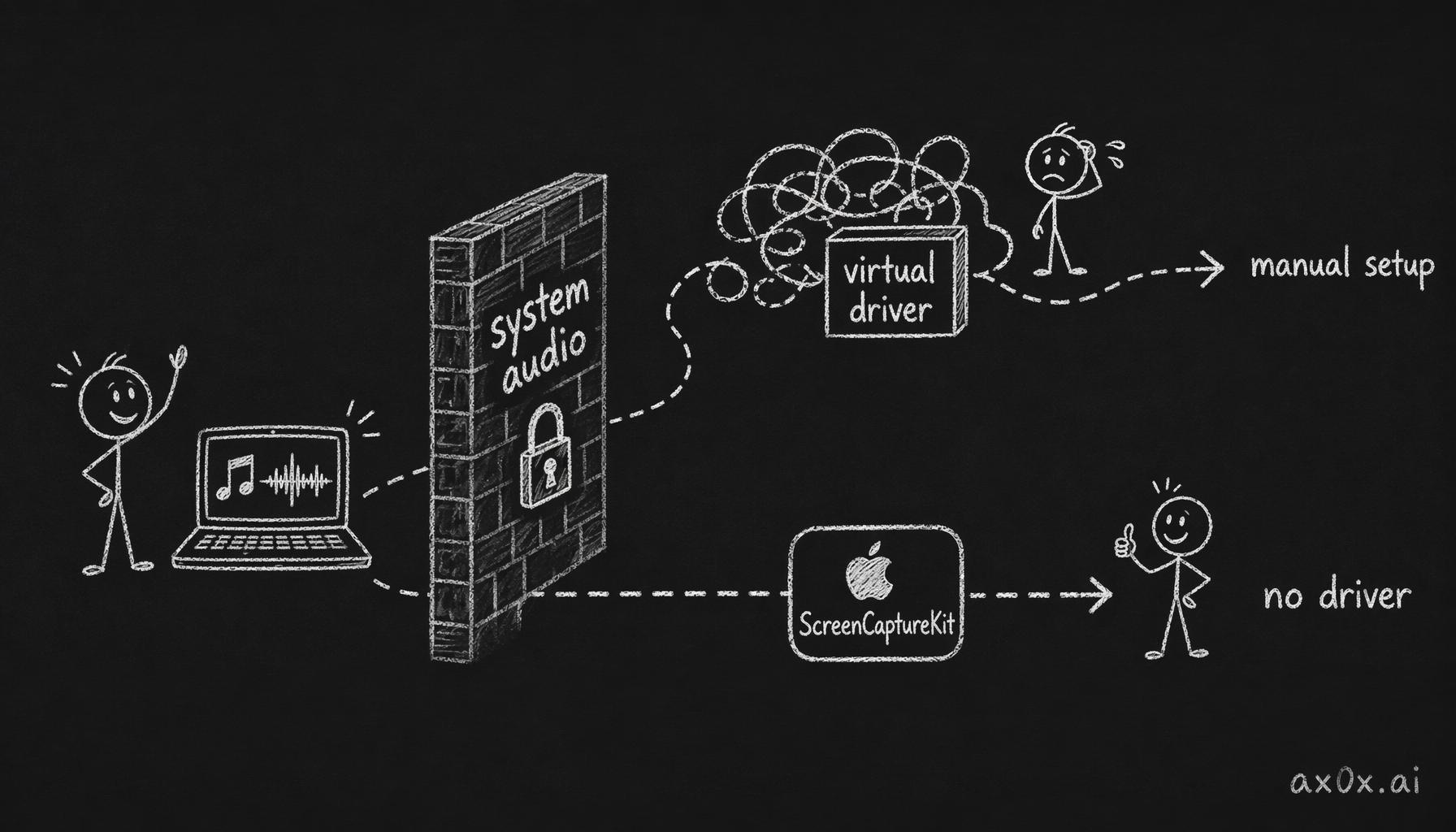 macOS blocks apps from grabbing system audio directly; two routes around it — install a virtual driver and configure it by hand, or use the driver-free system API ScreenCaptureKit (but needs a recent OS)
Speech-to-text. Three open-source lineages dominate. OpenAI's Whisper (whisper.cpp / WhisperKit on Mac), NVIDIA's Parakeet (faster, narrower language coverage), and Alibaba's Qwen3-ASR. All three run on Apple Neural Engine at near-real-time speed with near-commercial accuracy on clean audio.
Summarization. Local Ollama + llama works. Want better quality? BYOK against Claude / GPT / Gemini.
The optional fourth piece is speaker diarization — figuring out who said what. The open-source library FluidAudio handles this well, and even matches voices across meetings.
Three pieces. Each one a commodity. Each one with multiple open-source implementations. Of course GitHub has eight projects racing to assemble them — the math is sitting right there.
Eight Projects, From Hand-Rolled Toy to Near-Product
Sorted by completeness, not stars. More informative that way.
Notes4Me (8 stars, Electron).
The textbook reference. Electron shell + mandatory BlackHole 2ch install + whisper.cpp running base.en + Ollama running llama3.2 for summarization. Every layer of the stack is exposed; nothing is abstracted.
The README is admirably honest: "macOS doesn't allow apps to directly capture system audio for privacy reasons. You must install BlackHole, then create a Multi-Output Device in Audio MIDI Setup." For anyone not already comfortable with macOS audio routing, this is a wall.
The upside is exactly the same property. If you want to learn how this pipeline gets built, Notes4Me's code is the cleanest template. Install BlackHole once and you'll understand why every newer project pushes ScreenCaptureKit instead.
Doesn't capture mic (system audio only), no diarization, no real-time transcription. It's a working minimum loop — not a product.
Parrot (3 stars, SwiftUI).
Notes4Me's Mac-native upgrade. SwiftUI + WhisperKit + ScreenCaptureKit + AVAudioEngine. System audio and mic captured simultaneously, no BlackHole.
The author's own comment on the diarization implementation: "embarrassingly basic." It alternates speakers based on silence gaps. Two-person calls work. Three-person calls fall apart.
A clean personal project. Don't run it as a daily driver.
Oatmeal (3 stars, Swift).
This one is interesting. It's already on Parakeet-TDT 0.6b running on Apple Neural Engine — an order of magnitude faster than Whisper. FluidAudio for speaker clustering. OpenRouter as the summarization backend (so you pick GPT-4o / Claude / Gemini at runtime). The stack is the most Mac-native combination available right now.
The downside: macOS 14+ and Apple Silicon only. Intel Macs need not apply. Three stars but the code quality is already approaching daily-use.
For someone willing to build the Xcode project themselves and live on the bleeding edge.
Recap (703 stars, Swift).
Recap was once the most-watched project in the category. MIT, pure Swift, auto-detects Teams/Zoom/Meet launches, captures system audio via native Core Audio taps (no BlackHole), runs WhisperKit locally.
But the README contains a warning: "broken in current state, do not use in production." Last release was v0.0.3, August 2025.
The idea is right, the architecture is right, the implementation isn't stable. The author still uses it personally but won't recommend it. This pattern is common in open source — the idea has been validated, but the author hasn't had time to polish it into a product.
Whether you try it depends on your tolerance for crashes.
pasrom/meeting-transcriber (19 stars, Swift).
The "actually works" pick I'd put my own money on.
The differentiator is choice. Three STT engines selectable at runtime — WhisperKit (99 languages, ~1 GB model), Parakeet TDT v3 (25 European languages, ~50 MB, very fast), Qwen3-ASR (30 languages including Chinese, ~1.75 GB, requires macOS 15+).
Audio capture uses CATapDescription (macOS 14.2+), no BlackHole. Diarization runs on FluidAudio + Apple Neural Engine, with cross-meeting voice matching that doesn't require a HuggingFace token.
For summarization it pipes through Claude Code CLI or any OpenAI-compatible endpoint (Ollama, LM Studio). So you can BYO any model. Output is structured Markdown protocol.
19 stars, but 760 commits on main and an actively maintained release cadence.
If your situation matches mine — Mac user, Apple Silicon, want native performance, need both English and Chinese transcription — this is the one.
OpenWhispr (3,000+ stars, Electron + React).
A different shape. It fuses global hotkey dictation with meeting transcription into one product — so it can replace macOS Dictation for daily writing and handle meetings.
Stack: Electron + Whisper + Parakeet + better-sqlite3 + sherpa-onnx. Local voice-fingerprint speaker recognition that persists across meetings (much more useful than per-meeting diarization). Ships an MCP server, so Claude Code can read your meeting history directly — meeting notes wired into your agent workflow.
Cross-platform (mac/win/linux), 76 releases, 1,365 commits. They're building a real product.
The downside is Electron. Memory and startup time are not in the same league as the Swift-native projects.
Anarlog (8.4k stars, Rust + Tauri).
Anarlog used to be called Hyprnote. The team behind it (fastrepl) is now primarily focused on a new product called char. Anarlog is still MIT-licensed and maintained, but the main effort has moved on. It's an awkward state.
That said, it's still the closest open-source shape to Granola. Rust + Tauri, cross-platform, local transcription, markdown on disk, full BYO-LLM — OpenAI / Anthropic / Gemini / OpenRouter / Ollama / LM Studio.
If your spec is "the Granola product form, but I control my data", Anarlog is currently the lead candidate.
Meetily (11.6k stars, Rust + Tauri).
The most product-shaped open-source project in the category.
Rust + TypeScript + Tauri + GPU acceleration (Metal on Mac, CUDA/Vulkan on Windows). Dual Parakeet/Whisper engine — they claim 4× faster than vanilla Whisper. LLM summarization across Ollama / Claude / Groq / OpenRouter / any OpenAI-compatible endpoint. Can re-transcribe imported audio files.
Community Edition is MIT and free forever. There's a paid Pro tier targeting accuracy improvements, custom templates, GDPR compliance, speaker ID (not yet shipped), and calendar integration.
147 open issues — high user count, real bug volume. Active community, v0.3.0 just shipped in March, the cadence is accelerating.
If you want the "install one thing and it works" experience without touching Xcode or BlackHole, Meetily is the safe bet today.
Pick Based on What You Actually Want
| Your situation | Pick |
|---|---|
| Product-grade experience, install and go | Meetily — Community is enough, upgrade to Pro on demand |
| Granola-style "notes during the meeting" form factor | Anarlog (formerly Hyprnote) — note the team has shifted focus |
| Mac purist, no Electron | pasrom/meeting-transcriber — three engines, best fit on Apple Silicon |
| Fully local, never touches the cloud | Any of these, but Notes4Me is the purest (whisper.cpp + Ollama) |
| English + Chinese mixed transcription | pasrom/meeting-transcriber with the Qwen3-ASR engine |
| Daily dictation + meetings in one tool | OpenWhispr |
| Want to learn how this pipeline is built | Notes4Me for the architecture → Parrot for ScreenCaptureKit → Oatmeal for Parakeet + FluidAudio on ANE |
| Bleeding-edge, willing to debug | Recap or Oatmeal — bring patience |
I personally landed on two: pasrom/meeting-transcriber for daily English and Chinese meetings (Apple Silicon Mac, Qwen3-ASR's Chinese accuracy is meaningfully better than Whisper), with Meetily as a "just works" backup.
The Closed-Source Window Here Is Shorter Than People Think
Back to the opening line — this pipeline is trivially simple.
Transcription and summarization have no technical moat. The models are open-source (Whisper, Parakeet). The LLMs are open-source (Ollama, llama). The system APIs are open-source (ScreenCaptureKit). The diarization libraries are open-source (FluidAudio). What Granola and Krisp are selling isn't technology — it's packaging. "We installed BlackHole for you. We configured the Multi-Output Device for you. We pre-paid the STT credits for you."
Subscription fees are friction fees.
And friction is exactly what open source is best at flattening. Meetily ships an installer that's no harder than installing Slack. pasrom/meeting-transcriber takes one Xcode build. Notes4Me takes five minutes of README reading.
This is the standard fate of any feature with two properties: trivially simple to build and strong universal demand. It gets eaten by open source and eventually demoted to an OS feature — like macOS Voice Memos, like the transcription that ships with Notes.app.
The closed-source window for meeting recorders may be much shorter than the incumbents are pricing in.
The previous post — Your Apple Watch Is Already a Voice Transcription Device — covered recording one person (myself) with a thirty-minute hand-rolled pipeline. This one covers recording a group meeting, where the open-source world has already done the work — all that's left is picking one and installing it.
Meeting recording was always supposed to look like this.