
Doubao TTS Integration Guide: Voice Cloning with Per-Sentence Emotion
About this series: Each post in this series is a complete technical runbook — not a story, but instructions you can hand directly to an agent or follow yourself. The technical details are what matter. Replace the placeholders, wire it into your stack, and ship.
Doubao TTS: Voice Cloning with Per-Sentence Emotion Control
This guide covers end-to-end integration of Volcengine Doubao Seed-ICL 2.0 for voice synthesis — console setup, voice cloning, API details, natural language emotion control, per-sentence multi-call synthesis, NDJSON response parsing, and every gotcha I hit along the way. Intended for developers building voice features in any project.
Table of Contents
- Why Doubao
- Console Setup
- Environment Variables
- API Details
- Clone 1.0 vs Clone 2.0
- Emotion Control
- Pricing
- Complete TypeScript Implementation
- Gotchas
- Integration Checklist
1. Why Doubao
I integrated Doubao TTS for a voice project that needed two things: cloned voices and per-sentence emotion control. After evaluating multiple providers, Doubao Seed-ICL 2.0 stood out for Chinese voice synthesis.
| Factor | Doubao Seed-ICL 2.0 | MiniMax Speech 2.8 HD |
|---|---|---|
| Relative cost | 1x (baseline) | ~2.3x more expensive |
| Emotion control | Natural language context_texts + COT tags | Speed/pitch/volume only |
| Voice cloning | Clone 2.0 — full emotion + prosody | Static voice profiles |
| Free tier | 20,000 characters | Limited |
The key differentiator: Doubao lets you describe emotions in natural language — "用撒娇甜蜜的语气" (speak in a sweet, coquettish tone) — and the model actually follows it. MiniMax only gives you numeric sliders for speed, pitch, and volume. The gap in expressiveness is enormous.
At roughly half the cost of MiniMax HD (check current pricing on the Volcengine console), Doubao delivers significantly higher emotional fidelity for Chinese speech. For English content, MiniMax or other providers are still better choices — Doubao is optimized for Chinese.
2. Console Setup
Step 1: Create a Volcengine Account
Go to the Volcengine console: https://console.volcengine.com/speech/app
Step 2: Create a TTS Application
- Navigate to 豆包语音 in the left sidebar.
- Select 声音复刻大模型 (Voice Clone Large Model).
- Click 创建应用 (Create Application).
- Name the application and submit.
- Note the APP ID from the application detail page (numeric, e.g.,
1234567890).
Step 3: Clone a Voice
- Within the application, navigate to the voice cloning section.
- Upload a voice sample:
- Duration: 10–30 seconds
- Single speaker only — no background music, no overlapping speech
- Clean recording, minimal noise
- MP3 or WAV format
- After processing completes, the page shows a Speaker ID in the format
S_xxxxxxxxx. - Copy this Speaker ID — it is the voice identifier used in every API call.
Step 4: Enable Synthesis Service
- In the application settings, ensure 语音合成 (Speech Synthesis) is enabled.
- Both Clone 1.0 and Clone 2.0 use the same Speaker ID — no re-cloning needed when switching versions.
Step 5: Get Access Key
- Go to 访问控制 → API 访问密钥 in the Volcengine console.
- Create or copy an Access Key.
- This key is used in the
X-Api-Access-Keyheader for every request.
3. Environment Variables
# Required
DOUBAO_TTS_APP_ID=your_app_id_here
DOUBAO_TTS_ACCESS_KEY=your_access_key_here
DOUBAO_TTS_SPEAKER=S_your_speaker_id_here
| Variable | Purpose | Example format |
|---|---|---|
DOUBAO_TTS_APP_ID | Numeric APP ID from the Volcengine console | 1234567890 |
DOUBAO_TTS_ACCESS_KEY | API Access Key from 访问控制 | AbCdEfGhIj... |
DOUBAO_TTS_SPEAKER | Cloned voice Speaker ID | S_EVeoGUVU1 |
If any of these three are missing, the provider should return unavailable, allowing your system to fall through to a backup TTS provider.
4. API Details
Endpoint
POST https://openspeech.bytedance.com/api/v3/tts/unidirectional
Required Headers
Content-Type: application/json
X-Api-App-Id: <DOUBAO_TTS_APP_ID>
X-Api-Access-Key: <DOUBAO_TTS_ACCESS_KEY>
X-Api-Resource-Id: <see routing table below>
Resource ID Routing
The X-Api-Resource-Id header must match the voice type you're using. Send the wrong one and you'll get error 55000000: resource ID is mismatched with no further explanation.
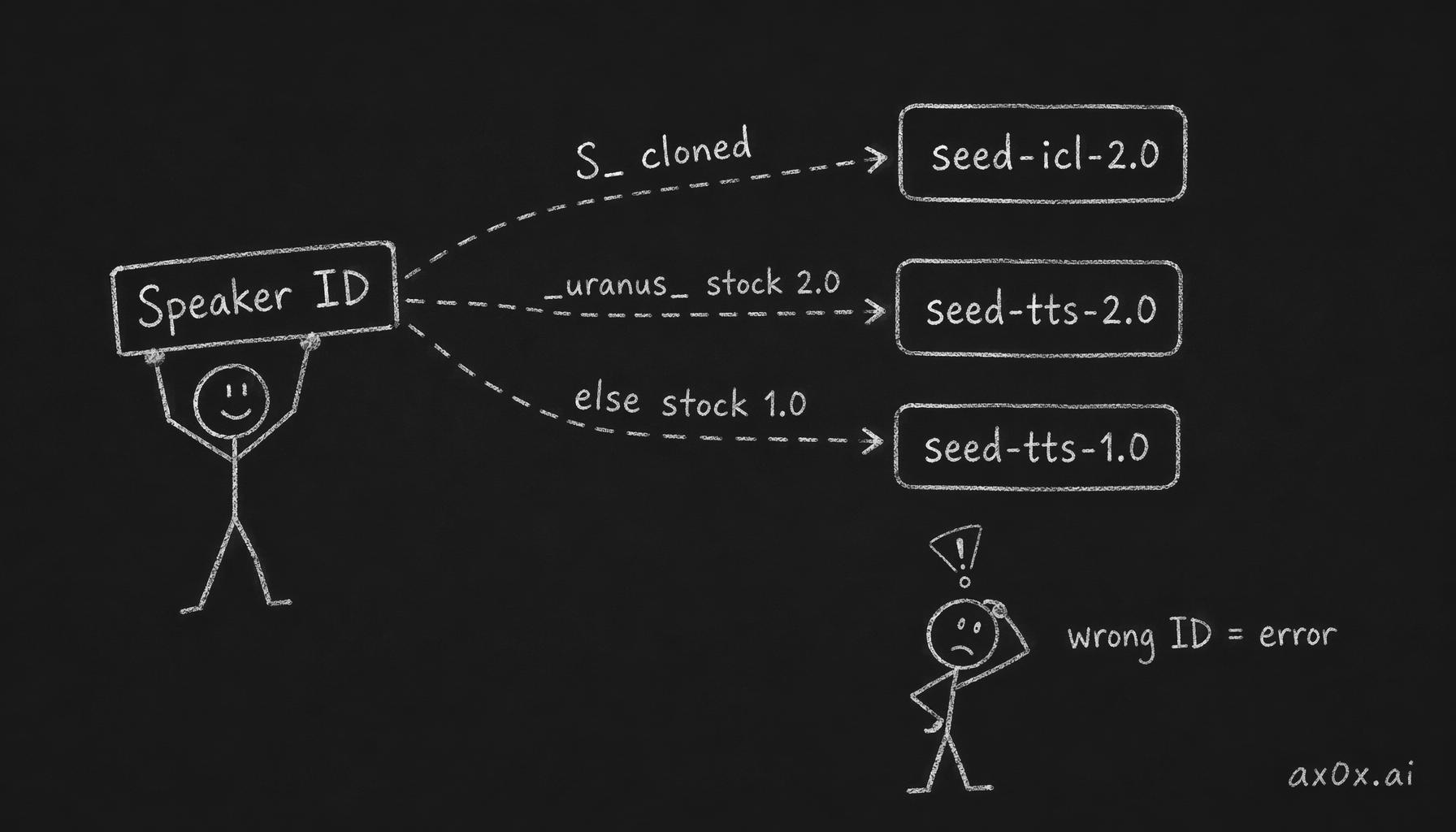 How the Speaker ID pattern routes each request to the correct Resource ID, and how a mismatch throws an error
| Voice Type | Speaker ID Pattern | Resource ID | model_type |
|---|---|---|---|
| Cloned (ICL 2.0) | S_xxxxxxxxx | seed-icl-2.0 | 4 (required) |
| Stock 2.0 | *_uranus_bigtts, saturn_* | seed-tts-2.0 | not needed |
| Stock 1.0 | *_mars_bigtts, *_moon_bigtts, ICL_* | seed-tts-1.0 | not needed |
| Stock 1.0 (concurrent) | same as above | seed-tts-1.0-concurr | not needed |
Derive the resource ID from the speaker ID at runtime:
const isCloned = speakerId.startsWith('S_')
const is2dot0 = speakerId.includes('_uranus_') || speakerId.startsWith('saturn_')
const resourceId = isCloned ? 'seed-icl-2.0' : is2dot0 ? 'seed-tts-2.0' : 'seed-tts-1.0'
For cloned voices, use seed-icl-2.0 (recommended). See section 5 for Clone 1.0 differences.
Minimal Request Body
{
  "user": {
    "uid": "your-app-name"
  },
  "req_params": {
    "text": "你好呀!",
    "speaker": "S_your_speaker_id_here",
    "audio_params": {
      "format": "mp3",
      "sample_rate": 24000
    }
  }
}
Request Body with Emotion Control
{
  "user": {
    "uid": "your-app-name"
  },
  "req_params": {
    "text": "你好呀!",
    "speaker": "S_your_speaker_id_here",
    "audio_params": {
      "format": "mp3",
      "sample_rate": 24000
    },
    "additions": "{\"context_texts\":[\"用撒娇甜蜜的语气\"],\"model_type\":4}"
  }
}
Note: additions is a string (serialized JSON), not an object. This is the single most common integration error — see Gotcha 1.
Full Field Reference
| Field | Type | Required | Notes |
|---|---|---|---|
user.uid | string | yes | Caller identifier; used for logging/billing attribution |
req_params.text | string | yes | Text to synthesize |
req_params.speaker | string | yes | Speaker ID from console (S_xxxxx) |
req_params.audio_params.format | string | yes | mp3 or wav |
req_params.audio_params.sample_rate | number | yes | 24000 recommended |
req_params.additions | string | no | JSON-stringified object; carries context_texts and model_type |
Response Format (NDJSON)
The response is NDJSON (newline-delimited JSON), not standard JSON. Each line is an independent JSON object:
{"code":0,"data":"<base64-encoded audio chunk 1>"}
{"code":0,"data":"<base64-encoded audio chunk 2>"}
{"code":0,"data":"<base64-encoded audio chunk 3>"}
{"code":20000000}
Parsing rules:
- Split the response body by
\n. - Parse each non-empty line as JSON independently.
- If
code === 0anddatais present: decodedatafrom base64 and append to chunk array. - If
code === 20000000: end of stream — stop parsing. - If
codeis anything else: treat as an error. - Concatenate all chunks:
Buffer.concat(chunks).
If you call response.json() on this, it will throw. See Gotcha 4.
curl Smoke Tests
No emotion:
curl -X POST 'https://openspeech.bytedance.com/api/v3/tts/unidirectional' \
  -H 'Content-Type: application/json' \
  -H 'X-Api-App-Id: YOUR_APP_ID' \
  -H 'X-Api-Access-Key: YOUR_ACCESS_KEY' \
  -H 'X-Api-Resource-Id: seed-icl-2.0' \
  --data-raw '{
    "user": { "uid": "test" },
    "req_params": {
      "text": "你好呀!",
      "speaker": "YOUR_SPEAKER_ID",
      "audio_params": { "format": "mp3", "sample_rate": 24000 },
      "additions": "{\"model_type\":4}"
    }
  }'
With emotion:
curl -X POST 'https://openspeech.bytedance.com/api/v3/tts/unidirectional' \
  -H 'Content-Type: application/json' \
  -H 'X-Api-App-Id: YOUR_APP_ID' \
  -H 'X-Api-Access-Key: YOUR_ACCESS_KEY' \
  -H 'X-Api-Resource-Id: seed-icl-2.0' \
  --data-raw '{
    "user": { "uid": "test" },
    "req_params": {
      "text": "你好呀!",
      "speaker": "YOUR_SPEAKER_ID",
      "audio_params": { "format": "mp3", "sample_rate": 24000 },
      "additions": "{\"context_texts\":[\"用开心撒娇的语气\"],\"model_type\":4}"
    }
  }'
5. Clone 1.0 vs Clone 2.0
Both versions use the same Speaker ID — no re-cloning is required.
| Feature | Clone 1.0 | Clone 2.0 |
|---|---|---|
X-Api-Resource-Id header | volc.seedicl.default | seed-icl-2.0 |
model_type in additions | Not needed | 4 (required for 2.0 behavior) |
context_texts support | Limited | Full natural language support |
| COT inline tags | Not supported | Supported |
| Emotion fidelity | Basic | Significantly better |
For new integrations, always use Clone 2.0 (seed-icl-2.0). Clone 1.0 is documented here only for reference.
Clone 2.0 COT Tags
Clone 2.0 supports inline per-sentence emotion via COT (chain-of-thought) tags embedded directly in the text:
<cot text=开心>你好呀!</cot><cot text=温柔>今天辛苦了。</cot>
This is an alternative to the per-segment multi-call approach. COT tags allow a single API call to carry multiple emotions, but the per-sentence multi-call approach (described in section 6) gives more reliable results and finer-grained control.
6. Emotion Control
This is what makes Doubao special. Most TTS providers give you numeric parameters — speed, pitch, volume. Doubao lets you describe the emotion in natural Chinese, and the model interprets it.
Emotion Method by Voice Type
Not all voices respond to emotion the same way. The method and effectiveness depend on the voice type and resource ID:
| Voice Type | Method | Effectiveness |
|---|---|---|
Cloned (S_xxx) on seed-icl-2.0 | context_texts in additions | Strong — clear emotion difference confirmed |
Stock 2.0 (_uranus_) on seed-tts-2.0 | context_texts in additions | Voice-dependent — vivi/liufei respond well; cancan does not |
Stock 1.0 multi-emotion (_emo_) on seed-tts-1.0 | audio_params.emotion param | Keyword-based (angry, happy, sad, etc.) |
Stock 1.0 regular on seed-tts-1.0 | None | No emotion control available |
Key findings from testing:
context_textsworks on cloned voices too. The official docs say it's "仅适用于豆包语音合成模型2.0的音色" (only for 2.0 stock voices), but testing confirms it works on cloned voices withseed-icl-2.0— producing +25-65% audio difference versus no emotion hint.- Stock 2.0 is voice-dependent. Tested voices:
zh_female_vv_uranus_bigtts(Vivi) responds well,zh_male_liufei_uranus_bigtts(刘飞) responds well,zh_male_m191_uranus_bigtts(云舟) responds well, butzh_female_cancan_uranus_bigtts(灿灿) shows minimal difference. - The
seed-tts-2.0-expressivemodel param can strengthen emotion for some 2.0 voices. Passmodel: 'seed-tts-2.0-expressive'in the additions JSON — in testing this produced +26% audio difference versus baseline for responsive voices.
How context_texts Works
context_texts is an array inside the stringified additions field. It accepts natural language Chinese text describing the desired emotion or speaking style. Only the first element is used — additional elements are ignored.
The text in context_texts is not billed — only the text field counts toward character usage.
"additions": "{\"context_texts\":[\"用撒娇甜蜜的语气\"],\"model_type\":4}"
Emotion Hint Examples
Short keywords like "开心" or "伤心" produce minimal effect. The key insight: you need to paint a scene. The more vivid and specific the description, the stronger the emotion in the output.
Bad (too generic — barely affects output):
开心
用温柔的语气说
撒娇
Good (vivid, descriptive — strong emotion shift):
用甜蜜撒娇的声音,像在跟男朋友撒娇,语调上扬很开心
用哭泣的声音,边哭边说,很伤心,声音颤抖带着哽咽
用非常激动兴奋的语气,开心到快要尖叫了
用ASMR悄悄话的声音,非常小声非常轻柔,像在耳边低语
用愤怒嫌弃的语气,非常不满在骂人,声音拔高
用疲惫慵懒的声音,边打哈欠边撒娇,声音软绵绵的
用低沉磁性的声音,表面平淡但充满关心,像大叔在叮嘱
用压抑悲伤的声音,故意克制但声音微微颤抖,不想让人看出来
Think of it like prompting an image model: "a dog" gives you a generic dog, but "a golden retriever puppy sleeping on a red couch in afternoon sunlight" gives you exactly what you want. Same principle applies here — describe the physical quality of the voice, the scenario, and the intensity.
The Per-Sentence Approach
Doubao's context_texts applies to the entire synthesis call. When a response contains multiple sentences with different emotions, synthesize each sentence separately with its own context_texts.
Input with emotion markers:
[开心]你好呀![温柔]今天辛苦了。[害羞]你别这么说嘛。
Processing pipeline:
- Parse the
[emotion]textmarker format into segments. - For each segment, call the API once with that segment's text and its emotion as
context_texts. - Concatenate the resulting audio buffers into a single MP3.
- Strip markers to produce
displayTextfor the user.
Why not one call with the full text?
Sending a paragraph in a single call applies context_texts only to the start. Emotional consistency degrades after the first sentence. Per-sentence calls ensure every sentence gets its target emotion applied correctly.
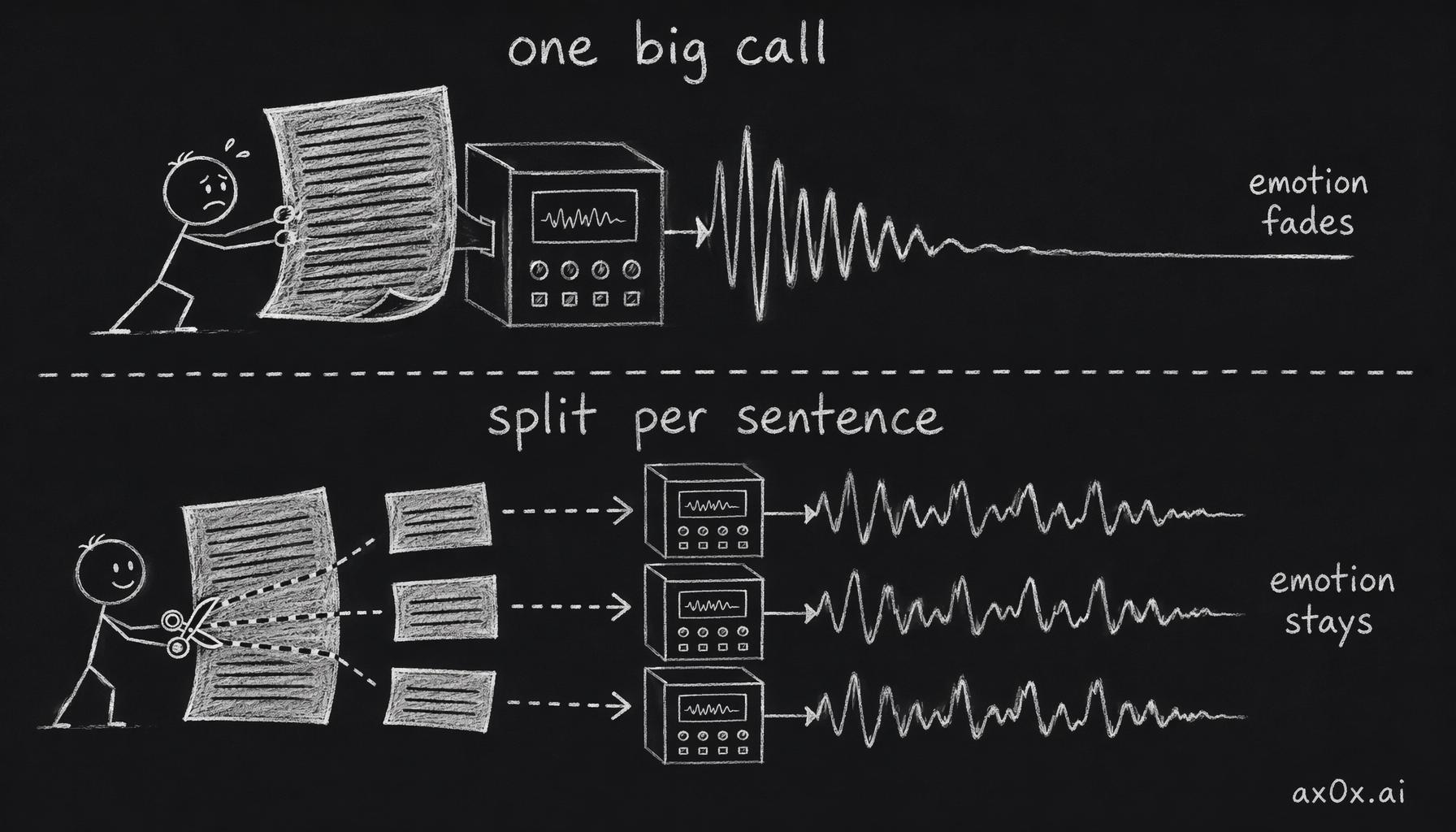 How sending a whole paragraph in one call lets emotion fade, versus splitting per sentence so each keeps its target emotion
LLM System Prompt for Emotion Markers
If you're using an LLM to generate text that feeds into Doubao TTS, add this to the system prompt:
当你生成语音内容时:
- 每一句前都加一个方括号情感指令
- 例如:[开心]、[伤心]、[温柔]、[害羞]、[愤怒]
- 也可以写具体语气描述,例如:[用温柔甜蜜的声音]、[她正在生气地质问对方]
- 这些标记仅用于 TTS 处理,不展示给用户
- 如果多句话情绪不同,每句都需要自己的方括号标记
7. Pricing
| Tier | Notes |
|---|---|
| Pay-as-you-go (Clone 2.0) | Default; check current rates on Volcengine console |
| Volume discount (available) | Negotiated — roughly 30% off pay-as-you-go |
| MiniMax HD (for comparison) | ~2.3x more expensive than Doubao |
| Free tier | 20,000 characters per application |
Cost tracking notes:
- Billing is based on characters in the
textfield only. context_textscontent is not charged — you get emotion control for free.- Check the Volcengine console for current per-character rates to plug into your cost tracking.
8. Complete TypeScript Implementation
This is a standalone module. Adapt the imports and types to your project structure.
Emotion Segment Parser
// emotion parsing module

export interface EmotionSegment {
  contextText?: string
  text: string
}

export function parseEmotionSegments(input: string): EmotionSegment[] {
  const segments: EmotionSegment[] = []
  const parts = input.split(/\[([^\]]+)\]/)
  let pendingContext: string | undefined

  for (let i = 0; i < parts.length; i++) {
    if (i % 2 === 0) {
      const chunk = parts[i].trim()
      if (chunk) {
        segments.push({ contextText: pendingContext, text: chunk })
        pendingContext = undefined
      }
    } else {
      pendingContext = parts[i]?.trim() || undefined
    }
  }

  return segments
}

export function stripEmotionMarkers(text: string): string {
  return text.replace(/\[([^\]]+)\]/g, '').replace(/\s{2,}/g, ' ').trim()
}
Core TTS Call
// doubao TTS module

const DOUBAO_TTS_URL = 'https://openspeech.bytedance.com/api/v3/tts/unidirectional'

function getResourceId(speakerId: string): string {
  const isCloned = speakerId.startsWith('S_')
  const is2dot0 = speakerId.includes('_uranus_') || speakerId.startsWith('saturn_')
  return isCloned ? 'seed-icl-2.0' : is2dot0 ? 'seed-tts-2.0' : 'seed-tts-1.0'
}

export interface DoubaoSpeechParams {
  text: string
  speakerId: string
  userId?: string
  contextText?: string
  format?: 'mp3' | 'wav'
}

async function callDoubaoTTS(params: DoubaoSpeechParams): Promise<Buffer> {
  const appId = process.env.DOUBAO_TTS_APP_ID!
  const accessKey = process.env.DOUBAO_TTS_ACCESS_KEY!

  const { text, speakerId, contextText, format = 'mp3' } = params

  const isCloned = speakerId.startsWith('S_')
  const additions = JSON.stringify({
    ...(contextText ? { context_texts: [contextText] } : {}),
    ...(isCloned ? { model_type: 4 } : {}),
  })

  const body = {
    user: { uid: params.userId ?? 'default' },
    req_params: {
      text,
      speaker: speakerId,
      audio_params: { format, sample_rate: 24000 },
      additions,
    },
  }

  const controller = new AbortController()
  const timer = setTimeout(() => controller.abort(), 30_000)

  try {
    const response = await fetch(DOUBAO_TTS_URL, {
      method: 'POST',
      headers: {
        'Content-Type': 'application/json',
        'X-Api-App-Id': appId,
        'X-Api-Access-Key': accessKey,
        'X-Api-Resource-Id': getResourceId(speakerId),
      },
      body: JSON.stringify(body),
      signal: controller.signal,
    })

    if (!response.ok) {
      const errText = await response.text().catch(() => '')
      throw new Error(`Doubao TTS HTTP ${response.status}: ${errText}`)
    }

    // NDJSON response — parse line by line
    const raw = await response.text()
    const chunks: Buffer[] = []

    for (const line of raw.split('\n')) {
      const trimmed = line.trim()
      if (!trimmed) continue

      let parsed: { code?: number; data?: string; message?: string }
      try {
        parsed = JSON.parse(trimmed)
      } catch {
        continue
      }

      if (parsed.code === 0 && parsed.data) {
        chunks.push(Buffer.from(parsed.data, 'base64'))
        continue
      }
      if (parsed.code === 20000000) break
      if (parsed.code !== undefined && parsed.code !== 0) {
        throw new Error(
          `Doubao TTS stream error: code=${parsed.code} message=${parsed.message ?? ''}`
        )
      }
    }

    if (chunks.length === 0) throw new Error('Doubao TTS returned no audio data')
    return Buffer.concat(chunks)
  } finally {
    clearTimeout(timer)
  }
}
Multi-Segment Synthesis with Emotion
// multi-segment synthesis module

import { parseEmotionSegments, stripEmotionMarkers } from './emotion-parser'
import { callDoubaoTTS, type DoubaoSpeechParams } from './doubao-tts'

export async function synthesizeWithEmotion(
  input: string,
  speakerId: string,
  userId?: string,
): Promise<{ audio: Buffer; displayText: string }> {
  const segments = parseEmotionSegments(input)
  const buffers: Buffer[] = []

  for (const segment of segments) {
    const audioBuffer = await callDoubaoTTS({
      text: segment.text,
      speakerId,
      userId,
      contextText: segment.contextText,
    })
    buffers.push(audioBuffer)
  }

  return {
    audio: Buffer.concat(buffers),
    displayText: stripEmotionMarkers(input),
  }
}
Availability Check
export function isDoubaoTTSAvailable(): boolean {
  return !!(
    process.env.DOUBAO_TTS_APP_ID &&
    process.env.DOUBAO_TTS_ACCESS_KEY &&
    process.env.DOUBAO_TTS_SPEAKER
  )
}
9. Gotchas
These are the most valuable part of this guide. Every one of these cost me real debugging time.
Gotcha 1: additions is a String, Not an Object
The most common integration error. The additions field expects a JSON-serialized string, not a plain object.
Wrong:
"additions": {
  "context_texts": ["开心"],
  "model_type": 4
}
Correct:
"additions": "{\"context_texts\":[\"开心\"],\"model_type\":4}"
In TypeScript:
const additions = JSON.stringify({ context_texts: [contextText], model_type: 4 })
// additions is now a string: '{"context_texts":["开心"],"model_type":4}'
The API will not return an error if you pass an object — it will silently ignore your emotion settings and produce flat, emotionless audio. You'll wonder why context_texts isn't working and spend an hour before realizing the data type is wrong.
Gotcha 2: model_type Goes Inside additions, Not at req_params Level
model_type: 4 (which enables Clone 2.0 behavior) lives inside the additions string alongside context_texts. Placing it at the req_params root level has no effect — you'll get Clone 1.0 behavior without any error message.
Correct placement:
req_params: {
  text: '...',
  speaker: '...',
  audio_params: { format: 'mp3', sample_rate: 24000 },
  additions: JSON.stringify({ context_texts: ['开心'], model_type: 4 }),
}
Gotcha 3: Don't Send Whole Paragraphs in One Call
Sending multiple sentences in a single text field with one context_texts entry produces inconsistent emotion: the first sentence typically sounds correct, subsequent sentences drift toward neutral.
Solution: one API call per emotionally-distinct sentence, each with its own context_texts. Yes, this means more API calls. The emotion quality improvement is worth it.
Gotcha 4: Response is NDJSON, Not Standard JSON
Calling response.json() on the raw response will throw a parse error because the body contains multiple JSON objects, one per line.
Solution: read the body as text, split by \n, and parse each line individually.
// WRONG — will throw SyntaxError
const data = await response.json()

// CORRECT — parse NDJSON line by line
const raw = await response.text()
for (const line of raw.split('\n')) {
  const trimmed = line.trim()
  if (!trimmed) continue
  const parsed = JSON.parse(trimmed)
  // ... handle each chunk
}
Gotcha 5: Strip Markers After Parsing, Not Before
The [emotion] markers must be present when calling parseEmotionSegments() to correctly associate each emotion with its sentence. Stripping markers before parsing loses all emotion context.
Order of operations:
- Receive raw text:
[开心]你好呀![温柔]今天辛苦了。 - Call
parseEmotionSegments()to get segments with theircontextText. - Synthesize each segment separately.
- Concatenate audio.
- Call
stripEmotionMarkers()to producedisplayTextfor the user.
Getting this order wrong means every sentence gets synthesized with no emotion — and you'll blame the API when the bug is in your pipeline.
Gotcha 6: Latency Characteristics
Doubao takes approximately 14 seconds for long multi-sentence text versus MiniMax at ~5 seconds. This sounds bad, but in practice:
- The per-segment approach means each individual API call handles a short sentence (~5–15 characters), completing in 2–4 seconds.
- The first segment returns quickly, so playback can start streaming before all segments are ready.
- Emotion quality improvement justifies the latency overhead.
If you need real-time low-latency voice (< 1 second first-byte), Doubao is not the right choice. Use MiniMax or another streaming-first provider.
Gotcha 7: MP3 Chunk Concatenation Compatibility
Concatenating multiple MP3 buffers from separate API calls produces a valid MP3 stream for most players, but some players may exhibit issues at segment boundaries — a gap, click, or playback interruption.
If this causes problems in production, remux the concatenated output through ffmpeg:
ffmpeg -i input.mp3 -c copy output.mp3
Or in Node.js via a spawned process before returning the final buffer.
10. Integration Checklist
Before shipping Doubao TTS to production:
- Three env vars set:
DOUBAO_TTS_APP_ID,DOUBAO_TTS_ACCESS_KEY,DOUBAO_TTS_SPEAKER - Smoke test with curl (no emotion) — confirms credentials and network access
- Smoke test with curl (with
context_texts) — confirms Clone 2.0 emotion pipeline -
additionsis serialized as a string in all code paths -
model_type: 4included in the stringifiedadditions - Response parsed as NDJSON (line-by-line), not
response.json() - Per-segment synthesis for multi-emotion text
-
stripEmotionMarkers()applied to producedisplayText(after synthesis, not before) - Availability check returns
falsewhen env vars are absent — falls through to backup provider - Cost tracking wired: character count x current per-char rate from Volcengine console
- 30-second timeout on each API call
- LLM system prompt updated to output
[emotion]textmarker format (if applicable)
This post is also available in Chinese (中文版).