
Doubao STT Integration Guide: Async Chinese Speech Recognition
About this series: Each post in this series is a complete technical runbook — not a story, but instructions you can follow step-by-step to integrate a service. Replace the placeholders, adapt to your stack, and go.
Doubao STT: Integrating Volcengine Seed ASR for Chinese Speech-to-Text
I needed Chinese speech-to-text for a project. Whisper was the obvious first choice — but after testing it on Mandarin recordings with casual speech, colloquial expressions, and dialect inflections, the results were rough. Sentences got mangled. Homophones were wrong. Entire clauses disappeared.
Then I found Volcengine's Seed ASR bigmodel — the same STT engine behind Doubao (豆包), ByteDance's AI assistant. The accuracy difference on Chinese audio was night and day.
This guide covers everything I learned integrating it: console setup, the two-step async API, a fallback chain pattern for production resilience, cost tracking, and the 8 gotchas that would have saved me a full day of debugging if I'd known them upfront.
Table of Contents
- Why Doubao Over Whisper for Chinese
- Console Setup
- Environment Variables
- API Details: The Submit-Then-Poll Flow
- Complete TypeScript Implementation
- Fallback Chain Pattern
- Supported Audio Formats
- Cost Tracking
- Gotchas and Lessons Learned
1. Why Doubao Over Whisper for Chinese
| Criterion | Doubao (Seed ASR) | OpenAI Whisper |
|---|---|---|
| Mandarin accuracy | Excellent — handles colloquial speech, filler words, dialect inflections | Good for formal speech, struggles with casual Mandarin |
| Dialect support | Strong coverage of regional accents | Limited |
| Utterance timestamps | Yes — per-utterance start/end in response | Yes — per-segment |
| Pricing | Roughly 2.5x cheaper (check Volcengine console) | Standard Whisper rates |
| Latency | 2–4s for short clips (async poll) | Real-time streaming or batch |
| API style | Async submit-then-poll (REST) | Sync or streaming |
The pricing alone makes Doubao compelling — roughly 2.5x cheaper than Whisper (check the Volcengine console for current rates). But the real win is accuracy on Chinese. If your audio is primarily Mandarin with any amount of casual speech, Doubao is the better choice.
When Doubao is unavailable or fails, you can fall through to OpenAI, then Gemini — a pattern I'll cover in Section 6.
2. Console Setup
2.1 Register and log in
Go to console.volcengine.com and log in or register with a Chinese phone number or email.
2.2 Navigate to the correct service
This is the most error-prone step. There are multiple ASR products in the console that look similar.
- In the top navigation, find 豆包语音 (Doubao Voice) or search for it
- Under it, find API服务中心 (API Service Center)
- Select 录音文件识别大模型 (Audio File Recognition - Bigmodel)
Critical: Do NOT select:
- 录音文件识别 2.0 — the old version with a completely different auth system
- 流式语音识别 — the streaming service; it uses a different resource ID and WebSocket protocol
- Any "旧版" (old version) variant
2.3 Enable the service
Click 开通服务 (Enable Service) if it is not already enabled.
2.4 Purchase a duration package
The bigmodel service is billed by audio duration. Go to 时长包 (Duration Package) and buy a package appropriate for your expected usage. There is no free tier for this API.
2.5 Find your credentials
Navigate to 服务接口认证信息 (Service Interface Authentication Info) within the Doubao Voice product page. You need:
- APP ID — map to
DOUBAO_STT_APP_ID - Access Token — map to
DOUBAO_STT_ACCESS_KEY
Note: The console also shows a "Secret Key". You do NOT need it for this API. The bigmodel v3 API authenticates with APP ID + Access Token only. (More on this in Gotcha #6.)
3. Environment Variables
# Required for Doubao STT
DOUBAO_STT_APP_ID=<APP ID from console>
DOUBAO_STT_ACCESS_KEY=<Access Token from console>

# NOT needed for the file-recognition API
# Only relevant if you implement streaming WebSocket transcription
# DOUBAO_STT_CLUSTER=volcengine_streaming_common
A simple availability check before attempting transcription:
function isDoubaoAvailable(): boolean {
  return !!(process.env.DOUBAO_STT_APP_ID && process.env.DOUBAO_STT_ACCESS_KEY)
}
If either variable is missing at runtime, skip this provider and fall through to the next one in your chain.
4. API Details: The Submit-Then-Poll Flow
The bigmodel file-recognition API is a two-step async flow: submit the audio, then poll until the result is ready.
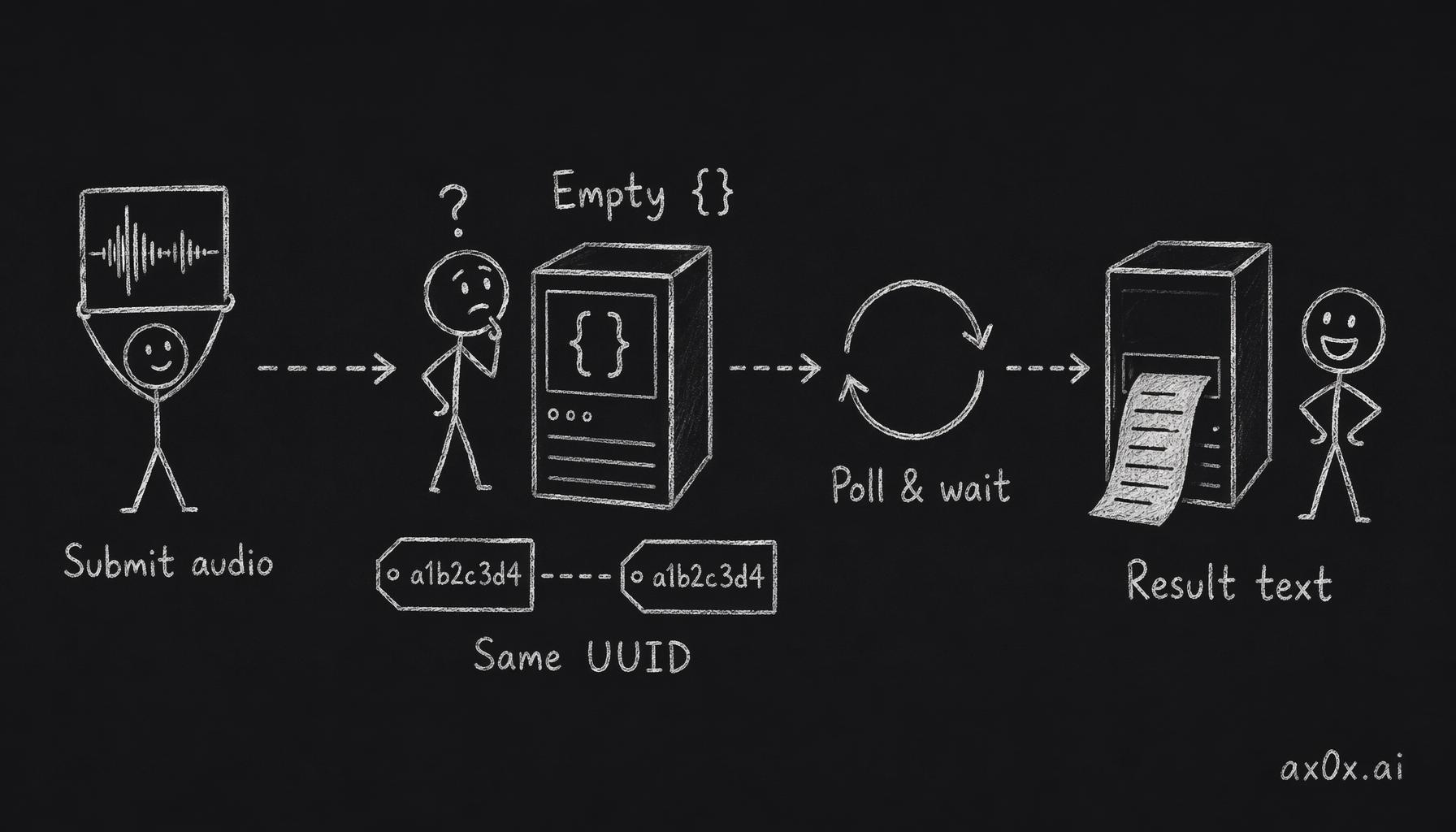 The submit-then-poll async flow: submit returns an empty {}, the UUID you generated is both the request ID and the task ID, and you poll with it until the transcript comes back
Endpoints
| Step | Method | URL |
|---|---|---|
| Submit | POST | https://openspeech.bytedance.com/api/v3/auc/bigmodel/submit |
| Query | POST | https://openspeech.bytedance.com/api/v3/auc/bigmodel/query |
Authentication headers
All requests (both submit and query) must include:
X-Api-App-Key:      <DOUBAO_STT_APP_ID>
X-Api-Access-Key:   <DOUBAO_STT_ACCESS_KEY>
X-Api-Resource-Id:  volc.seedasr.auc
X-Api-Request-Id:   <UUID you generate>
The X-Api-Request-Id is a UUID you generate per request. It doubles as the task ID — the same value is used when polling.
Submit request body
{
  "user": { "uid": "your-app-name" },
  "audio": {
    "data": "<base64-encoded audio bytes>",
    "format": "ogg"
  }
}
Submit response
A successful submit returns HTTP 200 with an empty body {}. There is no task ID in the response body — the X-Api-Request-Id you sent IS the task ID. (This tripped me up — see Gotcha #4.)
Query request body
{}
The query endpoint identifies the task via the X-Api-Request-Id header (same UUID used in submit).
Query response
While the job is still processing, the response is an empty {}. Once complete:
{
  "audio_info": {
    "duration": 4300
  },
  "result": {
    "text": "你好,今天天气怎么样",
    "utterances": [
      { "text": "你好,今天天气怎么样", "start_time": 0, "end_time": 4300 }
    ]
  }
}
audio_info.duration is in milliseconds.
5. Complete TypeScript Implementation
Here's a standalone, production-ready implementation. No framework dependencies — just node:crypto for UUID generation and the global fetch.
import { randomUUID } from 'node:crypto'

// ── Constants ──────────────────────────────────────────────
const SUBMIT_URL = 'https://openspeech.bytedance.com/api/v3/auc/bigmodel/submit'
const QUERY_URL  = 'https://openspeech.bytedance.com/api/v3/auc/bigmodel/query'
const RESOURCE_ID = 'volc.seedasr.auc'

const MAX_POLLS = 30       // 30 polls × 2s = 60s max wait
const POLL_INTERVAL = 2000 // 2 seconds between polls

// ── MIME → Doubao format mapping ───────────────────────────
const MIME_TO_FORMAT: Record<string, string> = {
  'audio/ogg':   'ogg',
  'audio/mpeg':  'mp3',
  'audio/mp3':   'mp3',
  'audio/wav':   'wav',
  'audio/x-wav': 'wav',
  'audio/mp4':   'm4a',
  'audio/m4a':   'm4a',
  'audio/x-m4a': 'm4a',
}

function mimeToFormat(mimeType: string): string {
  return MIME_TO_FORMAT[mimeType] ?? 'mp3'
}

function sleep(ms: number): Promise<void> {
  return new Promise(resolve => setTimeout(resolve, ms))
}

// ── Main transcription function ────────────────────────────
export async function transcribeWithDoubao(
  audio: Buffer,
  mimeType: string,
  userId?: string,
): Promise<string> {
  const appId     = process.env.DOUBAO_STT_APP_ID
  const accessKey = process.env.DOUBAO_STT_ACCESS_KEY

  if (!appId || !accessKey) {
    throw new Error('Doubao STT credentials not configured')
  }

  const reqId = randomUUID()
  const headers: Record<string, string> = {
    'Content-Type':      'application/json',
    'X-Api-App-Key':     appId,
    'X-Api-Access-Key':  accessKey,
    'X-Api-Resource-Id': RESOURCE_ID,
    'X-Api-Request-Id':  reqId,
  }

  // ── Step 1: Submit ──
  const submitRes = await fetch(SUBMIT_URL, {
    method: 'POST',
    headers,
    body: JSON.stringify({
      user:  { uid: userId ?? 'app' },
      audio: {
        data:   audio.toString('base64'),
        format: mimeToFormat(mimeType),
      },
    }),
  })

  if (!submitRes.ok) {
    const errText = await submitRes.text()
    throw new Error(`Doubao STT submit failed (${submitRes.status}): ${errText}`)
  }
  // submitRes body is {} — do not parse for a task ID

  // ── Step 2: Poll ──
  for (let i = 0; i < MAX_POLLS; i++) {
    await sleep(POLL_INTERVAL)

    const queryRes = await fetch(QUERY_URL, {
      method: 'POST',
      headers, // same headers, same reqId
      body: '{}',
    })

    const body = await queryRes.text()
    if (!body || body === '{}') continue // still processing

    const result = JSON.parse(body)
    if (result.result?.text) {
      const audioDurationMs = result.audio_info?.duration ?? 0
      const audioDurationSec = audioDurationMs / 1000
      console.log(`Doubao STT: ${audioDurationSec}s audio transcribed`)
      return result.result.text
    }
  }

  throw new Error(`Doubao STT: no result after ${MAX_POLLS * POLL_INTERVAL / 1000}s`)
}
Typical turnaround: 2–4 seconds for short voice messages (first or second poll).
6. Fallback Chain Pattern
In production, never rely on a single STT provider. Network issues, API outages, rate limits — they all happen. The chain-of-responsibility pattern gives you automatic failover.
The idea
Register providers in priority order per language. Iterate through the chain. Skip unavailable providers (missing credentials). If a provider throws, log the error and try the next one.
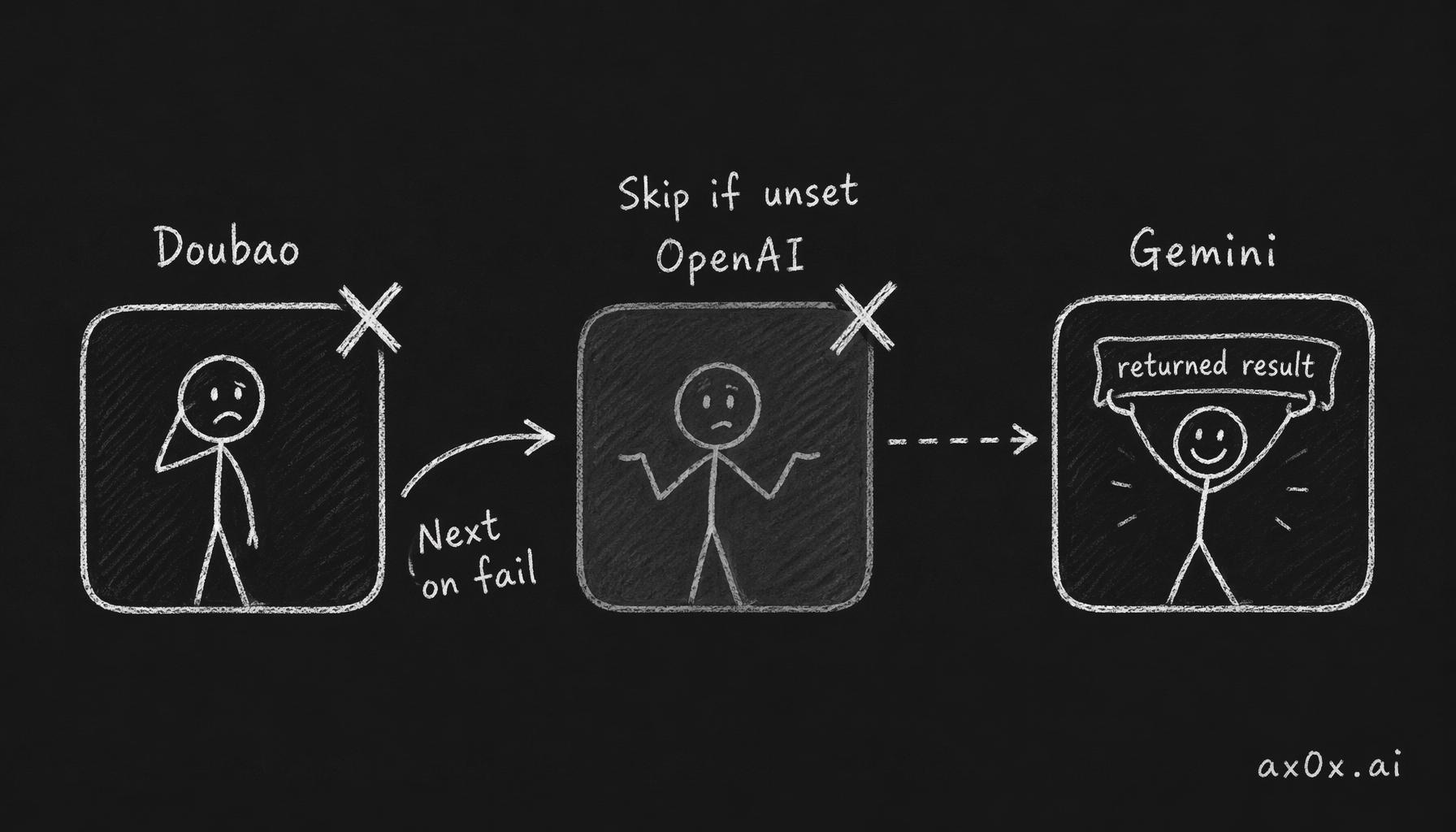 The fallback chain: multiple speech-to-text providers wired in priority order, skipping ones with no credentials and moving to the next on failure until one succeeds
// ── Provider interface ─────────────────────────────────────
interface STTProvider {
  name: string
  isAvailable(): boolean
  transcribe(audio: Buffer, mimeType: string, userId?: string): Promise<string>
}

// ── Chain registry ─────────────────────────────────────────
const chains = new Map<string, STTProvider[]>()
let defaultChain: STTProvider[] = []

function registerSTTChain(language: string, providers: STTProvider[]): void {
  chains.set(language, providers)
}

function setDefaultSTTChain(providers: STTProvider[]): void {
  defaultChain = providers
}

// ── Chain execution ────────────────────────────────────────
async function transcribeWithChain(
  language: string,
  audio: Buffer,
  mimeType: string,
  userId?: string,
): Promise<string> {
  const chain = chains.get(language) ?? defaultChain

  for (const provider of chain) {
    if (!provider.isAvailable()) continue
    try {
      const text = await provider.transcribe(audio, mimeType, userId)
      if (text) return text
    } catch (err) {
      console.warn(`STT provider ${provider.name} failed, trying next:`, err)
    }
  }

  return '[Voice message could not be transcribed]'
}
Example chain registration
// Chinese: Doubao primary → OpenAI fallback → Gemini last resort
registerSTTChain('zh', [doubaoProvider, openaiProvider, geminiProvider])

// English: OpenAI only
registerSTTChain('en', [openaiProvider])

// Default (unknown language): OpenAI → Doubao → Gemini
setDefaultSTTChain([openaiProvider, doubaoProvider, geminiProvider])
This pattern works for any STT integration — swap in your own providers. The key insight is that isAvailable() gates on environment variables, so you can deploy the same code across environments with different credentials and the chain automatically adapts.
7. Supported Audio Formats
The MIME type must be mapped to a Doubao format string before submission:
| MIME type | Doubao format | Common source |
|---|---|---|
audio/ogg | ogg | Telegram voice messages, WebM audio |
audio/mpeg, audio/mp3 | mp3 | Standard audio files |
audio/wav, audio/x-wav | wav | Raw recordings, browser MediaRecorder |
audio/mp4, audio/m4a, audio/x-m4a | m4a | WhatsApp audio, iOS recordings |
| anything else | mp3 (default fallback) | — |
Telegram voice messages arrive as audio/ogg and work without conversion. WhatsApp audio is typically audio/ogg or audio/mp4 — both handled correctly.
8. Cost Tracking
Model ID and pricing
Model ID:  doubao-seedasr
Pricing:   Check Volcengine console for current rates — roughly 2.5x cheaper than Whisper
For current pricing, check the Volcengine console. As of this writing, Doubao is roughly 2.5x cheaper than OpenAI Whisper.
Token estimation
The API returns audio duration in milliseconds. You can convert this to a token-equivalent for unified cost tracking:
// Estimate tokens from audio duration (for cost tracking)
const estimatedTokens = Math.ceil(audioDurationSec * 200)
  || Math.ceil((audio.length / 32000) * 200) // fallback: estimate from buffer size
- Primary:
audioDurationSec * 200— uses the actual duration returned by the API - Fallback:
(audio.length / 32000) * 200— if duration is missing, estimate from byte length assuming ~32kbps bitrate
Recording cost
// Record cost — fire-and-forget, don't block transcription
recordCost({
  userId,
  operationType: 'transcription',
  modelId: 'doubao-seedasr',
  inputTokens: estimatedTokens,
}).catch(err => console.warn('Cost tracking failed:', err))
Cost recording should be fire-and-forget. Errors are caught and logged but never interrupt the transcription flow.
9. Gotchas and Lessons Learned
These are hard-won discoveries from debugging the integration. Read all 8 before writing your first line of code. Each one cost me at least an hour.
1. The old v2 API is a completely different system
Volcengine has an older ASR API (v2) that uses WebSocket connections and a cluster identifier. It authenticates with a different scheme involving a Bearer token derived from a secret key. Everything about it is different:
- Different auth headers
- Different endpoints
- Different cluster IDs (
volcengine_streaming_common,volcengine_input_common, etc.)
If you see cluster or Bearer tokens in documentation or forum posts, you're looking at the old v2 API. Walk away. The bigmodel v3 REST API is what you want.
2. v3 WebSocket endpoints return 400 for all auth combos
The v3 API has WebSocket variants as well. I tested these exhaustively — they returned 400 for every combination of credentials and headers I tried. The working path is the REST file-recognition endpoint only. Don't waste time on the WebSocket endpoints unless Volcengine publishes new documentation for them.
3. The resource ID must be volc.seedasr.auc
Common wrong values seen in Volcengine docs and forum posts:
volc.bigasr.auc— wrong, returns auth errorvolcengine_streaming_common— this is a streaming cluster ID, not a resource IDvolc.bigasr.sauc— streaming variant, wrong endpoint
The correct value for the bigmodel file-recognition API is exactly volc.seedasr.auc.
4. Submit returns {} — do not look for a task ID in the body
Unlike most async APIs that return a task/job ID in the submit response, this API returns an empty JSON object. The task is identified by the X-Api-Request-Id header you sent. Reuse that same UUID for all subsequent query polls.
This is unusual enough that I initially thought the submit was failing.
5. Query also returns {} until processing completes
The query response is either:
{}— job queued or still processing (keep polling)- Full result object — job complete
There is no intermediate "processing" or "in-progress" status. The transition from {} to the full result is binary. Don't look for status fields in the empty response — they don't exist.
6. You do not need the "Secret Key"
The Volcengine console shows three credential fields: APP ID, Access Token, and Secret Key. The bigmodel v3 REST API uses APP ID + Access Token only. The Secret Key is used for signing requests in some other Volcengine services. Ignore it for this API.
7. "新版" vs "旧版" console services use different auth schemes
Volcengine is gradually migrating services to a new console UI ("新版"). The new version uses X-Api-* headers as described in this guide. The old version ("旧版") uses Authorization: Bearer <token> with a different credential structure.
If you are browsing Volcengine forum posts or old documentation and see Authorization: Bearer, that is the old scheme — it will not work with the bigmodel endpoint.
8. The streaming service and file recognition are separate products
Even if your Volcengine account has the streaming ASR service enabled, file recognition is a separate service with its own enablement and billing. You must separately enable 录音文件识别大模型 and purchase a duration package for it. Having the streaming service active does not grant access to file recognition.
Quick Reference
Headers template
X-Api-App-Key:      YOUR_APP_ID
X-Api-Access-Key:   YOUR_ACCESS_TOKEN
X-Api-Resource-Id:  volc.seedasr.auc
X-Api-Request-Id:   <generated UUID>
Content-Type:       application/json
Endpoints
Submit: POST https://openspeech.bytedance.com/api/v3/auc/bigmodel/submit
Query:  POST https://openspeech.bytedance.com/api/v3/auc/bigmodel/query
Credentials checklist
| Credential | Where to find | Env var |
|---|---|---|
| APP ID | 豆包语音 → API服务中心 → 服务接口认证信息 | DOUBAO_STT_APP_ID |
| Access Token | Same page | DOUBAO_STT_ACCESS_KEY |
| Secret Key | Same page — not needed | — |
Decision tree
Need Chinese STT?
├── Yes → Doubao (Seed ASR bigmodel)
│   ├── Available? → Use it
│   └── Unavailable/failed? → Fall through to OpenAI → Gemini
└── No → OpenAI Whisper (better multilingual coverage)
This post is also available in Chinese (中文版).