
From Web to Mobile: One Codebase, Two Platforms
The moment I published Part 1 of this series, a friend asked: "Can I try it on my phone?"
She didn't mean "open the website on mobile Safari." She meant tap an icon on her home screen, pick a photo from her camera roll, and share the result to WeChat Moments without leaving the app. The full native loop.
I told her to use the web app. She said she'd try it later. She never did.
That interaction crystallized something I already knew but had been postponing: ÉLAN's target user — 18-35 year old women who want effortless social photos — lives on her phone. Photos are taken on the phone. Edited on the phone. Posted from the phone. A web app, no matter how polished, is a detour. The core use case is mobile-native.
So I built a mobile app.
Why Not Just a PWA?
Progressive Web Apps are fine for content consumption. They're terrible for anything that touches the camera roll, the share sheet, or file storage. On iOS, PWA photo access is sandboxed and clunky. There's no reliable way to save images to the user's album. Share sheet integration doesn't exist. Push notifications are barely functional.
For a product whose entire loop is "pick photo from album, generate result, save to album, share to WeChat" — every single step is worse as a PWA. The web app works great on desktop for browsing the Muse Card gallery and quick generation. But the phone is where the product needs to live.
The Stack Decision
I had an existing Next.js web app with Tailwind, Zustand state management, and a streaming SSE generation pipeline. The question was: how do I get to mobile fastest while reusing the most code?
Option 1: Flutter. Cross-platform, great performance, mature ecosystem. But zero code reuse from the existing TypeScript codebase. I'd be rewriting everything from scratch in Dart. That's a different project, not an extension of this one.
Option 2: Native (Swift + Kotlin). Best performance, best platform integration. But now I'm maintaining three codebases — web, iOS, Android — for a solo project. Not viable.
Option 3: React Native via Expo. Same language (TypeScript). Same state management library (Zustand). Same mental model for components. Expo SDK 55 has matured dramatically — file system APIs, image picker, media library, sharing, all built in. The bet: I can reuse the business logic and only rewrite the UI layer.
I went with Option 3.
The Actual Setup
The project isn't a monorepo in the packages/ sense. I evaluated a proper workspace split — packages/logic/, packages/presets/, packages/types/ — and deferred it. With only one consumer (the mobile app hitting the web app's API), the overhead of maintaining cross-package imports, tsconfig aliases, and workspace tooling wasn't justified.
Instead, the structure is simpler:
ai-daipai/
  src/              ← Next.js web app
    stores/         ← Zustand stores (web)
    types/          ← TypeScript types (web)
    lib/            ← Business logic, muse cards, presets
  mobile/           ← Expo app (standalone)
    src/
      app/          ← Expo Router screens
      stores/       ← Zustand stores (mobile, adapted)
      lib/          ← API client, types, theme, image cache
      components/   ← React Native components
      hooks/        ← Custom hooks
The mobile app talks to the web app's API (ai-daipai.vercel.app). It doesn't import from src/ directly. The types and store patterns are duplicated — not ideal, but pragmatic. When there's a second mobile platform or a shared SDK situation, that's when the monorepo split pays for itself.
The Code Reuse Scorecard
Here's what actually transferred and what didn't. I'm being honest because I've seen too many "we got 90% code reuse!" claims that count copy-pasted type definitions as "reuse."
Almost Everything Transferred (~90-100%)
Prompt construction and Muse Card data: 100%. These live on the server. The mobile app doesn't construct prompts — it sends a museCardId and outputStyle to the API, which does everything. The entire prompt pipeline, VANITY_DESIGN_INSTRUCTIONS, card definitions — all server-side. Mobile gets this for free.
API request/response contracts: ~95%. The mobile lib/types.ts mirrors the web's types/generation.ts, types/upload.ts, etc. Same interfaces, same field names, same enum values. I copied them and adjusted readonly annotations (mobile is stricter about immutability). The effort was maybe 30 minutes of careful copying.
Zustand store patterns: ~85%. The web has creation-store.ts with step tracking, reference images, generation state. The mobile has generation-store.ts with the same concepts — but the implementation differs because the mobile store also handles the upload-then-generate flow internally (the web delegates upload to a separate component). The state shape is similar. The actions are similar. The exact code isn't copy-pasteable, but the architecture transfers completely.
Partial Transfer (~40-50%)
UI components: ~40%. This is where the "one codebase" dream meets reality. Web components use <div>, <button>, className, CSS grid, Tailwind utilities. Mobile components use <View>, <Pressable>, StyleSheet.create(), flexbox only. You cannot share a single line of JSX between them.
What transfers is the structure — the component decomposition, the prop interfaces, the state flow. Mobile has CardPicker, RefImagePicker, StyleToggle, PhotoCountSlider — same names, same responsibilities, completely different rendering code.
Navigation: ~30%. Web uses Next.js page routing (/create, /results). Mobile uses Expo Router with file-based routing (app/(tabs)/create.tsx, app/results.tsx) plus a tab layout. The concepts map — create screen, results screen, profile screen — but the mechanics are different. Expo Router's useLocalSearchParams, router.push(), and the (tabs) group layout are mobile-specific patterns.
Didn't Transfer At All
Styling. Web: Tailwind. Mobile: StyleSheet.create() with a custom theme system (BrandColors, Colors.light, Colors.dark, spacing tokens). I initially considered NativeWind (Tailwind for React Native) but decided against it. The mobile app needed precise control over touch targets (44px minimums), safe area insets, and platform-specific shadows — all easier with explicit StyleSheet than with utility class abstractions.
Authentication flow. Web uses httpOnly cookies set by the server. React Native can't use httpOnly cookies the same way. The mobile app sends the invite code via both a Cookie header and an x-invite-code header, and the backend checks both. A small but non-obvious adaptation.
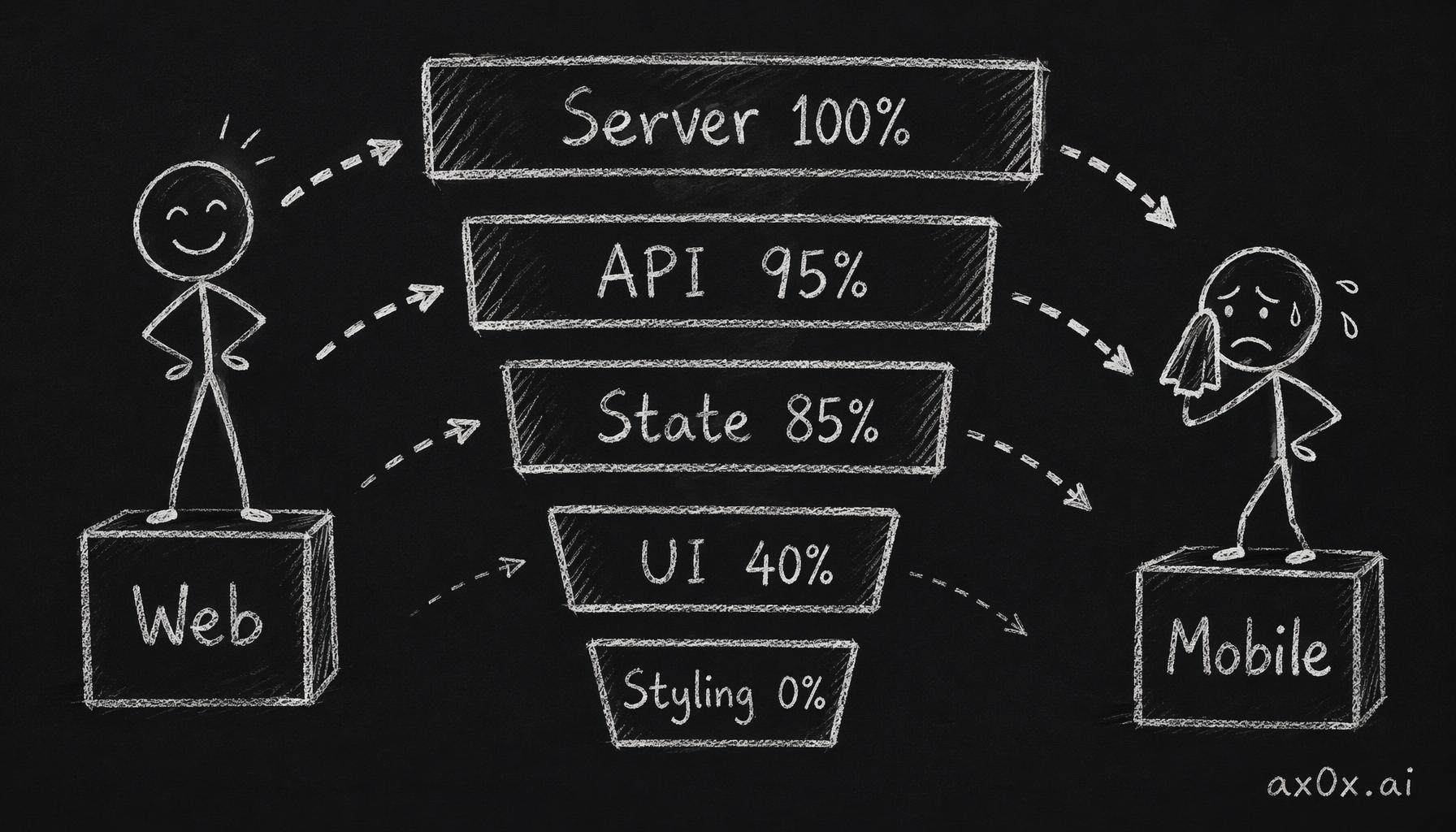 Moving web to mobile, code reuse drops layer by layer: server logic transfers almost entirely, while UI and styling approach a full rewrite
SSE on Mobile: The Unexpected Challenge
This was the single hardest technical problem in the mobile build.
ÉLAN's generation pipeline is SSE-based. The server sends data: {...}\n\n events as each photo completes — started, photo_completed, photo_failed, completed. On the web, this uses the native fetch API with ReadableStream response body parsing. Clean, standard, works everywhere.
On React Native, fetch returns a Response whose body (ReadableStream) is null on iOS. Not broken, not missing — the runtime literally doesn't support streaming response bodies. This is a known React Native limitation that's been open for years.
I evaluated three alternatives:
react-native-sse — A polyfill library that wraps EventSource. But our API uses POST with a JSON body (not GET), and EventSource is GET-only by spec. Would require a protocol change on the backend.
react-native-fetch-api — A fetch polyfill with streaming support. But it relies on native module patches and had compatibility issues with Expo SDK 55's new architecture.
XMLHttpRequest — The oldest API in the book. But here's the thing: XHR's onprogress event fires incrementally as response data arrives, and xhr.responseText accumulates the full response. You get streaming behavior through progressive text accumulation.
I went with XHR and built a custom SSE parser:
// React Native on iOS doesn't support ReadableStream.
// XHR's onprogress gives us incremental streaming data.
export function startGeneration(
  config: GenerationConfig,
  code: string,
  onEvent: (event: SSEEvent) => void,
): Promise<void> {
  return new Promise((resolve, reject) => {
    const xhr = new XMLHttpRequest();
    xhr.open('POST', `${API_BASE}/api/generate`);
    // ...headers...

    const parser = createSSEParser();
    let lastIndex = 0;

    xhr.onprogress = () => {
      const newData = xhr.responseText.substring(lastIndex);
      lastIndex = xhr.responseText.length;
      const events = parser.feed(newData);
      for (const event of events) {
        onEvent(event);
      }
    };

    xhr.onload = () => {
      const remaining = parser.flush();
      for (const event of remaining) {
        onEvent(event);
      }
      resolve();
    };

    xhr.timeout = 600000; // 10 minutes
    xhr.send(JSON.stringify(config));
  });
}
The createSSEParser() function buffers chunks, splits on double-newline boundaries (the SSE protocol delimiter), and parses complete data: {...} lines as JSON. Incomplete chunks are held in the buffer until the next onprogress fires.
This approach is old school, but it's reliable. No native module dependencies. No polyfill patches. Works on both iOS and Android. The 10-minute timeout handles the worst case of generating 8-9 high-resolution photos.
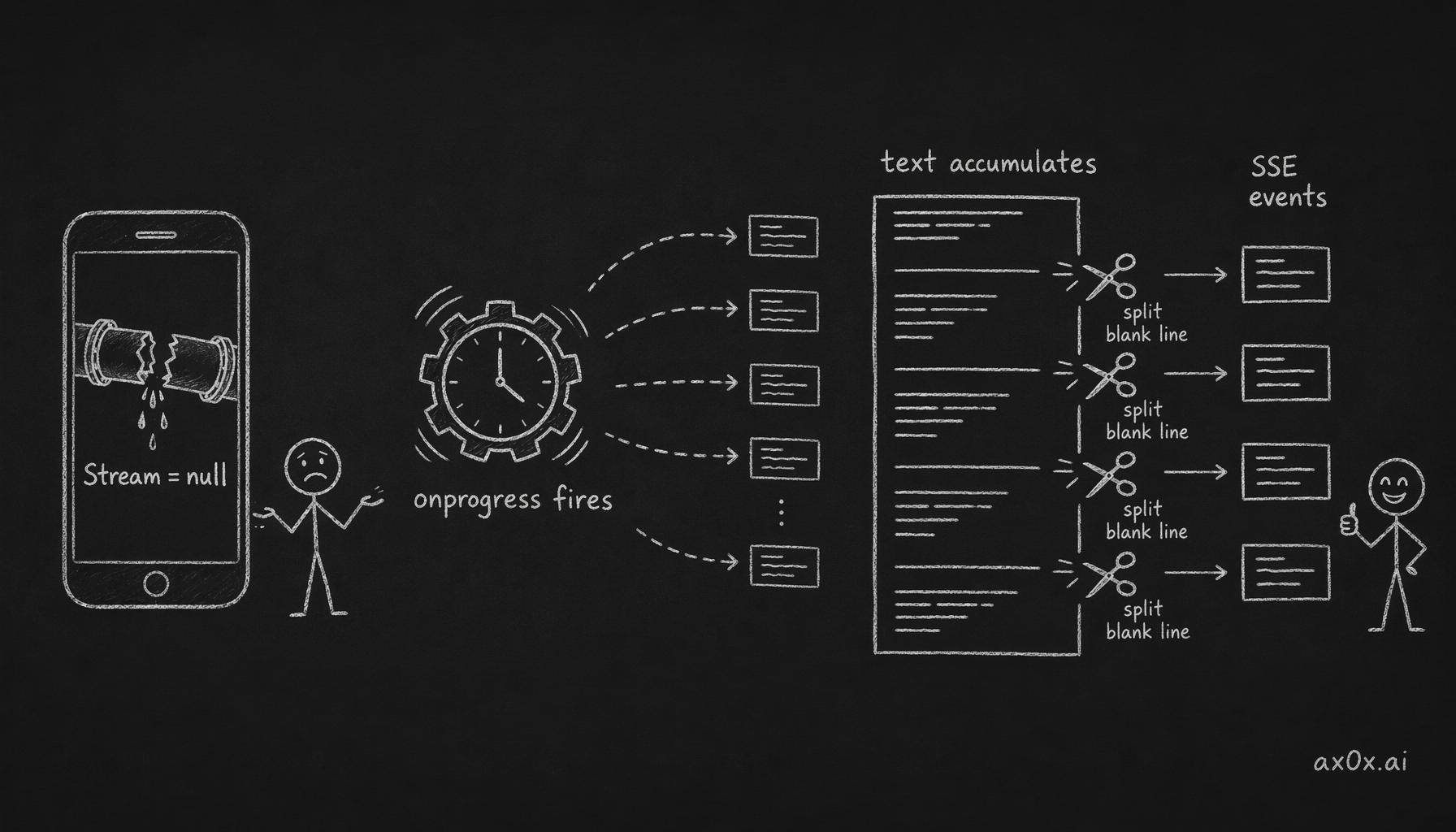 React Native has no streaming response body, so XHR's onprogress event lets responseText pile up, then splits on blank lines into SSE events
UI Adaptation: Same Flow, Different Interaction
The web app's three-step flow (选张美照 → 选个灵感 → 光影创作) maps directly to the mobile create screen — but the interaction patterns change completely.
Photo selection. Web: drag-and-drop zone. Mobile: expo-image-picker with camera roll access and a compact preview row showing headshot and optional body shot slots.
Muse Card browsing. Web: responsive grid with hover previews. Mobile: scrollable card grid with tap-to-select and long-press-to-preview modal. The card preview modal slides up with full card details — scene description, outfit, mood, sample images — things you'd see on hover on desktop.
Inspiration matching. Both platforms: upload a photo, AI analyzes the style and auto-matches to the best Muse Card with a match percentage. On mobile, the matched card auto-selects and the card picker collapses to a compact summary row. One fewer tap.
Results screen. Web: grid of generated photos with download buttons. Mobile: 2-column grid with skeleton shimmer animation during generation (using react-native-reanimated), rotating waiting copy ("好照片值得等一等", "光正在寻找最好的角度"), and a progress bar. When complete: save-to-album, share via native share sheet, or "change style" to go back and re-generate with same reference photos.
Image persistence. This doesn't exist on web — you download and you're done. On mobile, generated images auto-cache to the device filesystem (Paths.cache/elan-images/{sessionId}/) immediately after generation completes. The server deletes blob URLs after 2 hours, but the local copies survive. A cache management screen shows total size with a "clear all" button.
The Dark Mode Surprise
I didn't plan for dark mode. But Expo SDK 55's userInterfaceStyle: "automatic" in app.json and React Navigation's ThemeProvider made it almost trivial. The theme system is a lookup table:
export const Colors = {
  light: {
    background: '#FAF7F2',  // warm cream
    text: '#3D3530',        // warm charcoal
    accent: '#C9A96E',      // champagne gold
    // ...
  },
  dark: {
    background: '#2A2420',  // dark warm brown
    text: '#F5F0EA',        // light cream
    accent: '#C9A96E',      // same gold — brand anchor
    // ...
  },
};
Every component reads from useTheme() hook and applies colors.background, colors.text, etc. No conditional className logic, no CSS variables — just direct style object application. The champagne gold accent stays the same in both modes, which keeps the brand feel consistent.
The whole dark mode implementation was maybe 2 hours of work. On web, with Tailwind's dark: prefix and CSS variables, it took longer.
What Surprised Me
Easier than expected:
Expo's native APIs. expo-image-picker, expo-media-library, expo-sharing, expo-file-system — all just work. No native module linking, no pod install debugging, no Xcode project file surgery. I went from zero to "save AI-generated photo to camera roll and share via WeChat" in an afternoon.
Zustand on React Native. Identical API. No adapter needed. The store shape differs because mobile has different concerns (local URIs vs. blob URLs, upload phase tracking), but the Zustand create() pattern works exactly the same.
EAS Build. Expo Application Services builds both iOS and Android in the cloud. I pushed code, ran eas build, and got an .ipa and .apk without touching Xcode or Android Studio. The first build took 15 minutes. Subsequent builds were faster.
Harder than expected:
SSE streaming. Covered above. The ReadableStream gap in React Native cost me a full day of research and experimentation before I landed on the XHR approach.
Touch targets. Apple's HIG says 44px minimum. My web components had py-1.5 (~28px) tap targets. Every interactive element needed adjustment — caption style pills, platform switcher tabs, category filters. This was tedious, not hard, but it touched every component.
Safe area insets. The iPhone home indicator, the status bar, the notch — all eat into your layout. Every screen needs SafeAreaView or manual useSafeAreaInsets() padding. The results screen's bottom action bar needed paddingBottom: insets.bottom to not hide behind the home indicator. Small thing, but you forget it once and the bug report comes immediately.
Image display performance. React Native's <Image> component with remote URLs can be slow on first load. I switched to expo-image for the card grid (better caching, blurhash placeholders) but kept react-native-reanimated for the shimmer loading animation. Two separate image display strategies in the same app.
What I'd change if starting over:
Start mobile-first. The web app was built first because it was faster to iterate on. But the mobile app is the better product — the camera roll integration, the native share sheet, the album save, the caching. If I started today, I'd build Expo first and add a web dashboard later.
Shared types package from day one. The manual type duplication between src/types/ and mobile/src/lib/types.ts is maintainable at this scale (6 type files) but annoying. Every API change means updating two places. A packages/types/ workspace would have paid for itself by week two.
Skip StyleSheet, use Tamagui. Not NativeWind — I still think utility-class CSS in React Native is a leaky abstraction. But Tamagui gives you a component library with built-in theme tokens, responsive styles, and web+native parity. For a new project, that's the right bet. For ÉLAN, the custom StyleSheet approach works but was more manual labor than necessary.
The Numbers
Since this is a builder's log, here are the actual numbers:
- Web codebase: ~12,000 lines (Next.js + Tailwind + API routes)
- Mobile codebase: ~4,200 lines (Expo + React Native)
- Ratio: Mobile is ~35% the size of web
- Time to mobile MVP: 2 weeks (including the SSE streaming detour)
- Shared by reference: All server-side logic (prompts, card data, generation pipeline, caption generation)
- Shared by pattern: Zustand stores, API contracts, type definitions
- Rewritten from scratch: UI components, navigation, styling, auth flow
The 35% size ratio tells the real story: mobile is significantly simpler because all the complexity lives on the server. The mobile app is a thin client — upload photos, pick a card, show results. The prompt construction, Gemini API calls, face-drift quality checks, cost tracking — all server-side, all free.
What's Next
The mobile app is live in internal testing. Both .ipa (iOS) and .apk (Android) builds are going through EAS. The next feature — inspiration image matching where you upload a Xiaohongshu screenshot and AI matches it to the best Muse Card — is already working on both platforms because it's an API feature, not a client feature.
That's the payoff of the architecture: new capabilities ship simultaneously to web and mobile because the intelligence lives on the server. The clients are just windows.
This post is also available in Chinese (中文版).