
Under the Hood: How ÉLAN Talks to Gemini
In Part 1, I described what ÉLAN is trying to do: deliver complete social media moments — photos plus captions — that project effortless luxury. The core concept is "不经意的优越感" (inadvertent superiority), and the UX vehicle is the Muse Card.
This post opens the hood. How does a Muse Card actually become four photos and a caption? What does the prompt look like? How does the system stream results in real-time? And what does it actually cost?
The 10-Section Prompt
Every Muse Card generation ultimately calls buildMuseCardPrompt() — a function that takes a card's data and a shot index and constructs a single prompt string. The prompt has 10 distinct sections, each with a specific job:
1. Reference Image Annotation. A short instruction telling the model it's looking at reference photos of a specific person. The actual images are sent separately (more on that below), but this section anchors the identity:
Generate a photo of the EXACT person shown in the 2 reference image(s) above.
Their face must be IMMEDIATELY recognizable — same eyes, nose, lips, face shape, skin tone.
Match their body type and proportions realistically.
Short on purpose. I learned early that verbose identity descriptions actually compete with the images for attention. The photos carry identity; the text just says "use those photos."
2. Scene. Pulled directly from the Muse Card's scene.description:
SCENE: 豪华度假村无边泳池,俯瞰无际大海,金色黄昏将水面染成碎金。
       泳池边缘与天际线融为一体,天水相连。
LIGHTING: 黄金时刻侧逆光,暖橙色光晕,水面反光形成自然柔光
ENVIRONMENT STYLE: 无边泳池边缘,远景为开阔海面,天边云霞渐变
Note: the scene descriptions are in Chinese. This was a deliberate choice. Since the target users are Chinese and the aesthetic references are Chinese social media, writing scene prompts in Chinese produces more culturally appropriate compositions than English equivalents. Gemini handles Chinese prompts well.
3. Outfit with Luxury Hints. The outfit description plus "luxury hints" — but notice the hints are generic, not branded:
OUTFIT: 精致泳衣搭配真丝纱笼,设计师太阳镜随意架于发顶
OUTFIT DETAILS: 真丝纱笼; 设计师墨镜; 精致泳装
COLOR PALETTE: 沙金色, 象牙白, 玫瑰裸粉
I don't say "Hermès scarf" in the prompt. I say "真丝纱笼" (silk sarong). The brand names exist only in the card's brandHints array for scene-level aesthetic calibration — they're listed as "SCENE AESTHETIC" so the model understands the tier of luxury without generating actual brand logos. This matters for brand safety (more on that later).
4. Narrative Shot Role. Each of the 4 photos has a specific narrative role:
SHOT ROLE: establishing — 宽幅全景:泳池延伸至海天交界,人物处于远景左三分之一
COMPOSITION: 超宽画幅,泳池线条引导视线,强调空间的辽阔
The four standard roles are: establishing (wide shot, sets the scene), portrait (medium shot, focuses on the person), detail (close-up of a specific element — feet in water, hand on a book), and mood/closing (atmospheric shot, often silhouette or back-to-camera). When posted as a set on Xiaohongshu, these four shots tell a visual story rather than being four random photos.
5. Pose and Composition. Shot-specific pose overrides or card defaults:
POSE: 侧坐泳池边缘,双腿自然垂入水中,回望镜头,神情慵懒
COMPOSITION RULES: 以泳池边缘线条引导视线延伸至地平线, 人物置于画面黄金分割点
6. Color Grading. A natural-language color grade instruction:
COLOR GRADING: golden hour warmth with amber tones, slightly lifted shadows,
               creamy highlights, film-like grain
I experimented with both structured parameters (temperature: warm, saturation: medium) and prose descriptions. Prose produces more consistent results because the model interprets it holistically rather than trying to satisfy multiple independent constraints.
7. Mood. A short vibe line:
MOOD: serene luxury, effortless elegance
8. VANITY_DESIGN_INSTRUCTIONS (the differentiator). This is the section I'll break down in detail next.
9. Identity Lock Footer. A final reminder to preserve face identity:
Generate ONE photorealistic image. No watermarks, no text overlays.
FACE IDENTITY: must match the reference photos exactly. Same person, immediately recognizable.
If style conflicts with identity, choose identity.
That last line — "if style conflicts with identity, choose identity" — was added after I noticed the model would sometimes sacrifice facial accuracy to better match a stylistic direction. Telling it explicitly to prioritize identity over style made a measurable difference.
VANITY_DESIGN_INSTRUCTIONS in Practice
Here's the actual instruction block:
LUXURY PLACEMENT RULES (CRITICAL):
- Any luxury brand items (bags, jewelry, scarves) must appear INCIDENTALLY,
  never centered or prominently displayed
- Brand logos should be partially visible or at natural angles,
  as if the camera happened to catch them
- The photo should look like a candid life moment, NOT an advertisement
- Focus should be on the person and the scene atmosphere,
  not on the luxury items
- The overall feeling should be "this is just my normal Tuesday"
  rather than "look what I have"
Five rules. Each one matters:
"Incidentally, never centered." Without this, the model defaults to product-photography composition — it puts the luxury item in the center of the frame because that's what most of its training data does with branded items. This instruction overrides that default.
"Partially visible or at natural angles." A fully visible, face-on logo screams "advertisement." A logo partially obscured by a folded scarf or caught at a 45-degree angle reads as "real life." This is the visual language of actual Xiaohongshu posts.
"Candid life moment, NOT an advertisement." The model needs to understand the intent of the photo. Without this framing, Gemini tends toward editorial/commercial compositions — perfect lighting, centered subjects, clean backgrounds. Those look impressive but also look produced, which is exactly what the target user is trying to avoid.
"Focus on the person and scene atmosphere." This tells the model what should be centered: the person's face, their posture, the overall environment. The luxury items are supporting cast, not the protagonist.
"This is just my normal Tuesday." I tested several phrasings for the overall feeling. Academic descriptions ("project nonchalant affluence") didn't work well. This colloquial framing — a direct emotional target — produced the most consistent results.
Without VANITY_DESIGN_INSTRUCTIONS: The model generates what looks like a luxury brand ad. Person holding a bag front-and-center, logo clearly visible, professional lighting on the product. Beautiful photo — but if you posted this on Xiaohongshu, everyone would immediately see it as an ad or an AI generation.
With VANITY_DESIGN_INSTRUCTIONS: The luxury items drift to the edges. The bag is on a chair next to the person, partially out of frame. The hotel branding is on a glass in the background, slightly soft-focus. The person is the subject, and the luxury is the context. This is what real "凡尔赛" posts look like.
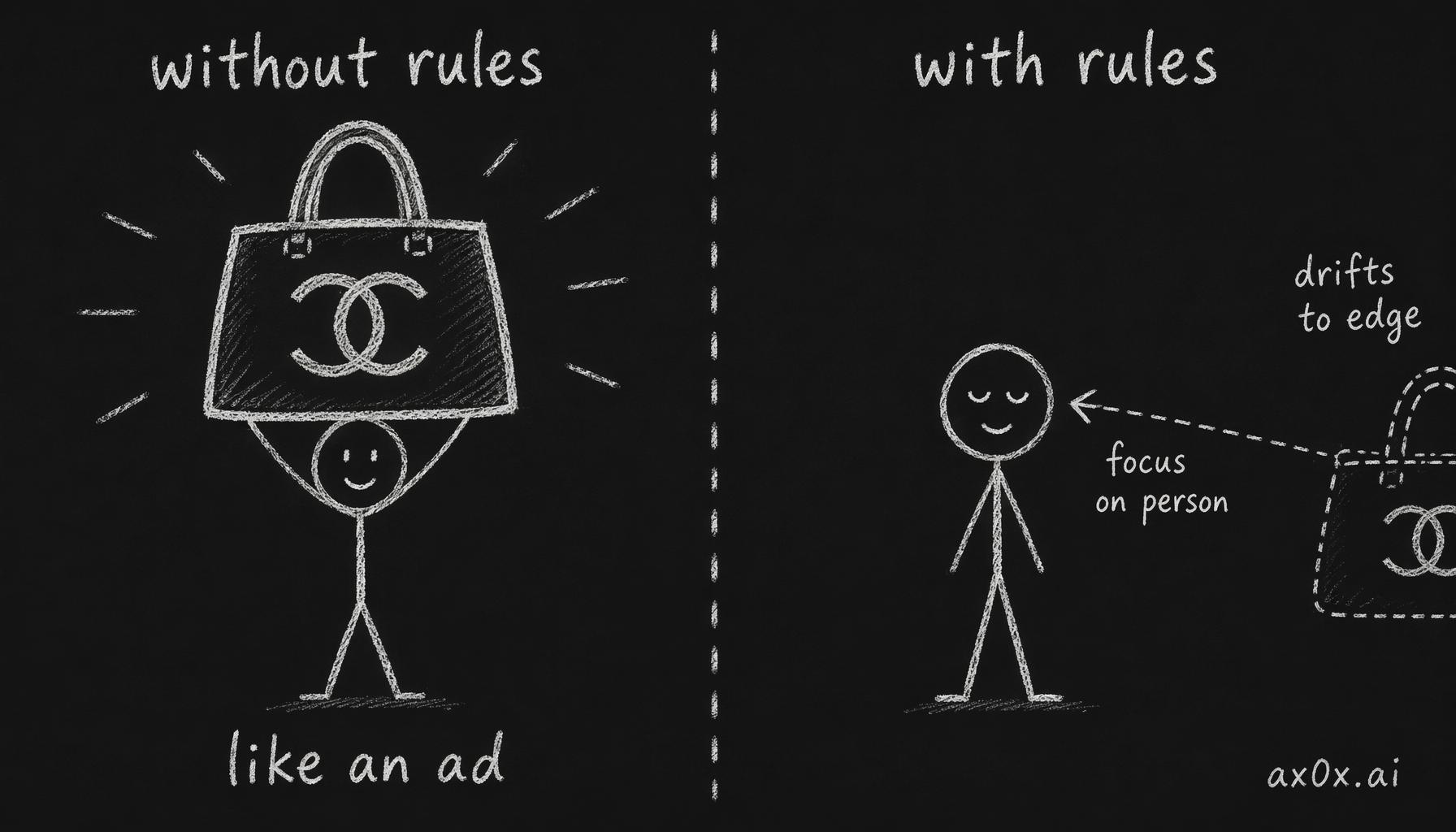 With the vanity rules, luxury items drift from the centered ad position to the frame's edge, putting the person back as the subject.
The Image-First Architecture
Before the prompt even matters, there's a critical architectural decision: how you send the reference images to Gemini determines how well it preserves the person's face.
I discovered through extensive testing that Gemini pays significantly more attention to images that appear early in the parts array, before any text. So the buildParts() function in generate-photo.ts follows a strict order:
- Reference images first — no text before them. Each image is actually sent twice for extra weight.
- Identity relationship instruction — "Use the uploaded image(s) strictly as the FIXED IDENTITY REFERENCE. Preserve exact facial structure..."
- The scene/style prompt — the output of
buildMuseCardPrompt() - Scene reference images last — if the user provided custom scene photos
The image duplication was counterintuitive — I initially thought it would confuse the model. But in practice, sending each reference photo twice improved face consistency measurably. It's essentially giving the identity signal more "weight" in the model's attention.
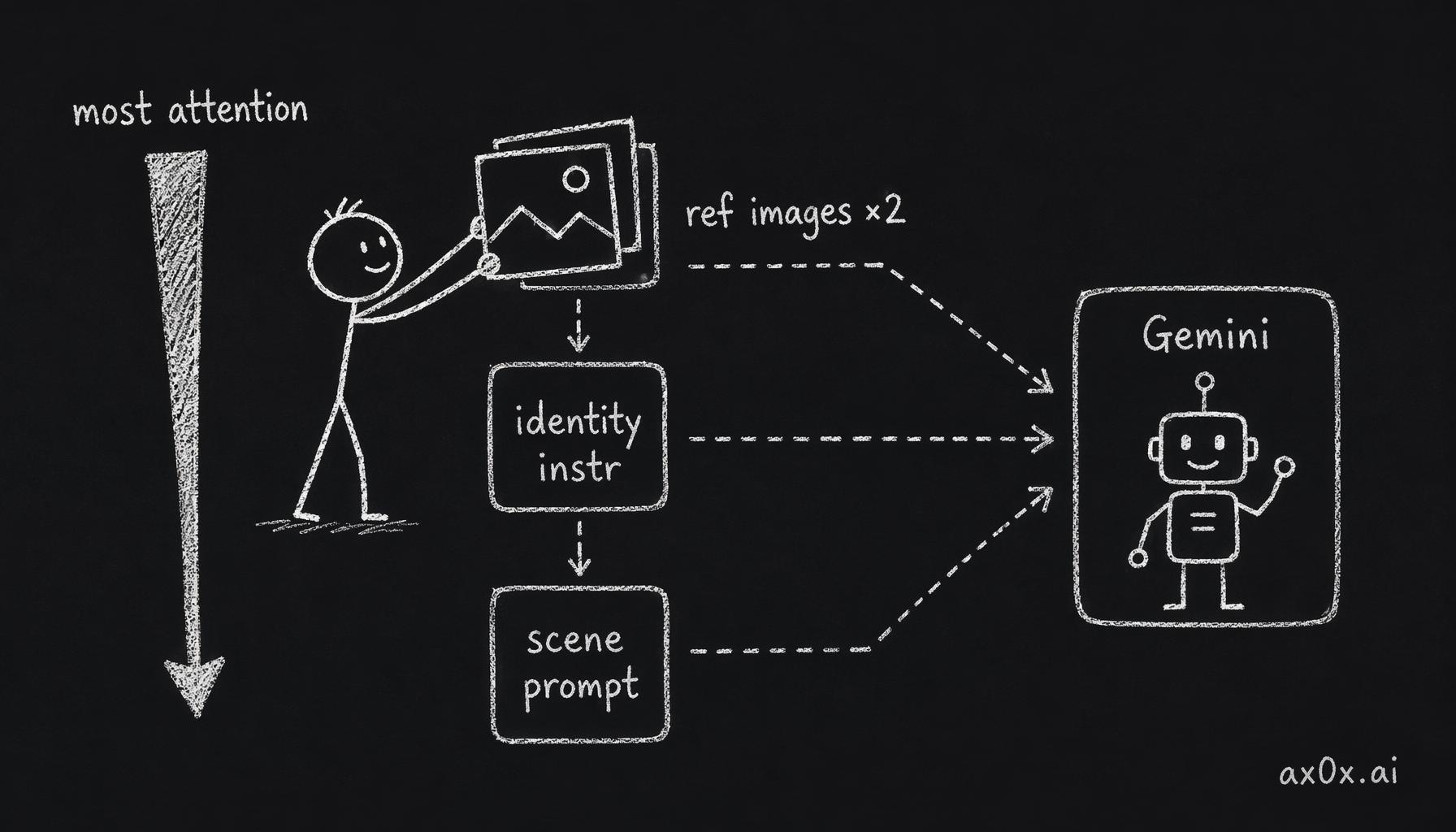 Putting reference images first in the parts array (sent twice) gives them the most model attention, which stabilizes face consistency.
SSE Streaming: Why Not WebSocket
When a user taps "Create," they're waiting for 4 photos to generate. Each one takes 15-60 seconds depending on resolution. That's potentially a 4-minute wait.
I chose Server-Sent Events (SSE) over WebSocket for several reasons:
Unidirectional. The client only needs to receive events, never send data back after the initial request. SSE is designed for exactly this pattern. WebSocket's bidirectional capability would be unused overhead.
Simpler infrastructure. SSE works over standard HTTP. No separate WebSocket server, no connection upgrade handling, no persistent connection pool management. On Vercel's serverless infrastructure, this matters — WebSocket support requires edge functions with specific configurations.
Natural reconnection. If the connection drops (common on mobile networks in China), SSE's built-in reconnection protocol handles it automatically. WebSocket reconnection requires custom logic.
The implementation is straightforward. The API route creates a ReadableStream and fires all 4 photo generations in parallel:
const stream = new ReadableStream({
  async start(controller) {
    const send = (event: string, data: unknown) => {
      controller.enqueue(encoder.encode(`data: ${JSON.stringify({ event, data })}\n\n`));
    };
    send("started", { sessionId, totalPhotos });

    // Fire all generation requests in parallel
    const promises = poses.map((_, i) => generateWithQc({ prompt, index: i }));

    // Stream results as they complete
    const pending = promises.map(p => p.then(async (res) => {
      if ("error" in res.result) {
        send("photo_failed", { index: i, error: res.result.error });
      } else {
        send("photo_completed", { index: i, imageId, previewUrl });
      }
    }));

    await Promise.allSettled(pending);
    send("completed", { successful, failed, total });
    controller.close();
  },
});
The SSE event types are: started (session ID + total count), photo_completed (with preview URL), photo_failed (with error message), and completed (final tally). The client can render each photo as it arrives instead of waiting for all four.
The UX of waiting. Even with streaming, 15-60 seconds per photo is a long time. The loading screen doesn't show a progress bar (that implies predictable duration, which we don't have). Instead, it shows the Muse Card's preview images as a slideshow with the message "你的光,刚刚好" (your light, just right). Each completed photo replaces a loading placeholder with a satisfying entrance animation. The experience feels like photos "arriving" rather than "processing."
Face Drift QC
One of the most frustrating problems in AI photo generation is "face drift" — the generated person looks vaguely similar to the reference photos but is clearly a different person. This is especially noticeable to the user, who knows their own face intimately.
ÉLAN runs a post-generation quality check using Gemini Flash (text-only, cheap and fast). After each photo is generated, the system sends the generated image plus the original reference photos to a separate Flash model call with a simple question: "Is this the same person?"
const QC_PROMPT = `
You are a face consistency quality checker.
I will show you REFERENCE photos and one GENERATED photo.
Determine if the person in the GENERATED photo is recognizably
the SAME individual as in the REFERENCE photos.
Focus on: facial bone structure, eye shape, nose shape, jawline.
Respond with: {"same_person": true/false, "confidence": 0.0-1.0, "reason": "..."}
`;
If the QC check returns same_person: false, the system retries up to 2 times. If all retries fail, it uses the last result anyway (better to show an imperfect photo than nothing). The retry count and QC check count are tracked in the cost model.
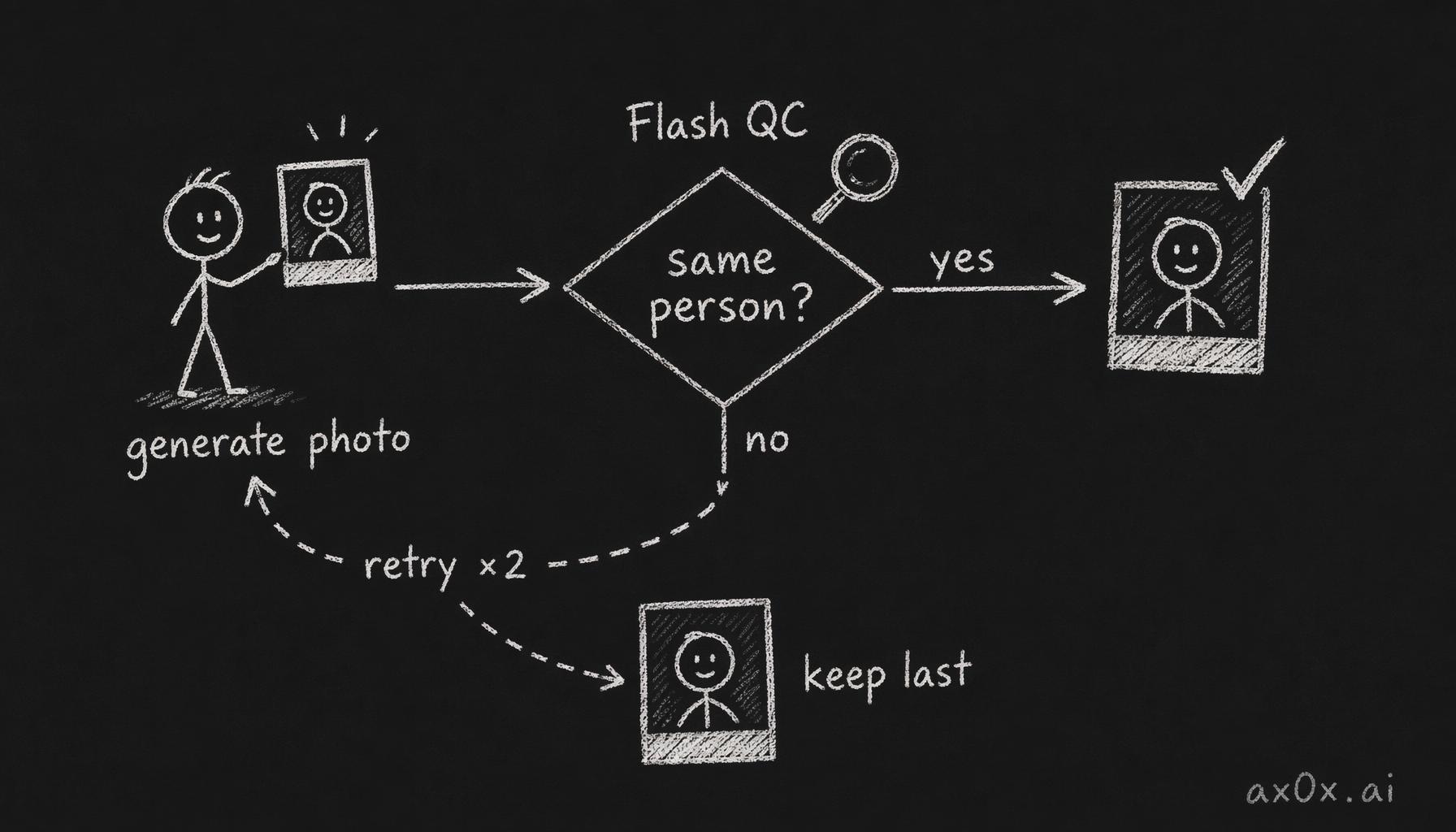 Each generated photo is checked by Flash asking "same person?"; if not it retries up to twice, then falls back to the last result.
This adds a fraction of a cent per check and 2-5 seconds of latency, but it catches the worst face drift cases. In practice, about 15-20% of initial generations fail the QC check, and ~80% of those produce acceptable results on retry.
Caption Generation
The caption system runs on a separate model — Gemini 3 Flash (text-only) — much cheaper than the image generation model.
There are three caption styles, each with a distinct personality:
Versailles (凡尔赛). The humble-brag. The caption describes a mundane thing; the photo reveals luxury. The style instruction (in Chinese, since captions are in Chinese):
"文案描述一件普通小事或日常瞬间,绝对不能直接提及场景名称、品牌名或价格。照片本身已经在炫耀,文案要显得漫不经心、理所当然。"
Examples from the prompt's reference pool: "难得什么都不想,泡了一整天的水" (rare to think about nothing, soaked in water all day), "说好九点起,结果又赖了两小时的床" (said I'd wake at nine, slept two more hours).
Poetic (文艺). Short, imagistic, like a tiny poem. "用感受和意象写,不叙事、不解释。" (Write with feelings and imagery, no narration, no explanation.) Example: "水天一色,心也跟着透明了" (water and sky became one color, my heart went transparent too).
Minimal (简约). Ultra-short, one phrase. "一个极短的中文句子或词组,极致留白。" (One extremely short sentence or phrase, maximum whitespace.) Example: "泡着不想动" (soaking, don't want to move).
Platform adaptation. Each style has different max lengths and formatting rules for Xiaohongshu vs. WeChat Moments:
| Xiaohongshu | WeChat Moments | |
|---|---|---|
| Versailles | 200 chars, 3-5 hashtags, up to 2 emoji | 80 chars, no hashtags, up to 1 emoji |
| Poetic | 150 chars, 3-5 hashtags, up to 1 emoji | 60 chars, no hashtags, up to 1 emoji |
| Minimal | 50 chars, 3-5 hashtags, no emoji | 30 chars, no hashtags, no emoji |
The prompt instructs the model to generate 3 candidates as a JSON array. The user sees the first one by default and can tap "换一换" (swap) to cycle through alternatives. Hashtags are extracted from the caption text and displayed separately (Xiaohongshu only). The entire caption call takes 2-4 seconds.
One hard rule in the caption prompt: "禁止提及任何品牌名、酒店名、餐厅名、景点名" (never mention any brand name, hotel name, restaurant name, or landmark name). This reinforces the vanity formula — if the caption says "checked into the Four Seasons," the illusion of effortlessness is destroyed. The caption must be generic enough that the luxury is only visible in the photo.
Cost Breakdown
Here's the cost structure of a standard 4-photo session in Gemini API fees. The dominant cost is output image tokens — generating images is roughly 120x more expensive per token than generating text.
The cost breaks down into five components: input text tokens, input reference image tokens, output image tokens, face drift QC checks, and caption generation. Of these, output image tokens are ~96% of the total cost. Everything else — the prompt, the reference images, the QC checks, the captions — is rounding error. A single session costs a fraction of a dollar.
Higher resolutions cost proportionally more — roughly 1.5x at 2K and 2.3x at 4K compared to 1K. The credit system's resolution multipliers (1x, 2x, 4x) are set to roughly track the API cost ratio.
Drift retries are the wildcard. If a photo fails QC and retries twice, that's 3x the image generation cost for that shot. In the worst case (all 4 photos retry twice each), a session could cost nearly 3x the base rate. In practice, retries add modest overhead.
What Went Wrong
An honest account of issues I've run into:
Brand safety with luxury items. Early Muse Card prompts included actual brand names — "Hermès Birkin bag," "Aman resort signage." Gemini would sometimes generate recognizable brand logos or products, which is a legal minefield. I rewrote all prompts to use generic luxury descriptions ("silk scarf," "designer sunglasses") and moved brand names to the brandHints array, which is used only for scene-level aesthetic calibration (under "SCENE AESTHETIC"), not direct product generation. The model understands the tier of luxury without reproducing specific intellectual property.
Face consistency across a 4-photo set. Each of the 4 photos is generated independently — there's no way to "lock" an identity across multiple Gemini calls. The face drift QC catches the worst cases, but subtle inconsistencies remain: slightly different skin tone, jawline that's a bit sharper in one shot, eyes that are slightly further apart. For a single Instagram post this is fine. For close scrutiny, it's noticeable. This is a fundamental limitation of the current API — true identity locking across generations would require fine-tuning or a different architecture entirely.
The 2-hour TTL. Generated images are stored in Vercel Blob with a 2-hour expiration. This was a cost decision — storing every generated image permanently would get expensive fast. But users sometimes generate a set, leave, and come back hours later to find their photos gone. The session metadata (stored in Redis) also expires at 2 hours. I've had to explain this limitation to every beta tester, and it's the number one complaint. A longer TTL or a "save to permanent" feature is on the roadmap.
The "output image tokens are 96% of cost" problem. I initially planned to offer unlimited generations during beta. When I calculated the actual per-session cost, that plan died. Even at 1K resolution, a hundred sessions per day would add up to a substantial daily API bill. The credit system was born from this constraint — not from a monetization strategy, but from the need to not go bankrupt during testing.
Prompt length vs. face accuracy tradeoff. There's a direct tension between rich scene descriptions and face preservation. The more text you add about the scene, outfit, mood, and composition, the more the model's attention is pulled away from the reference images. The current prompt is already at the edge — I've cut it from an early version that was 3x longer. The image-first architecture (sending reference photos before any text) was the biggest improvement, but the tradeoff remains. Sometimes a beautifully composed shot has a face that's 80% right instead of 95% right.
Caption quality inconsistency. The 3-candidate system helps, but Gemini Flash occasionally generates captions that are too on-the-nose ("今天的泳池好美" — today's pool is so pretty) or too abstract to make sense. The "禁止提及品牌名" rule sometimes makes the model overcorrect into vagueness. I'm considering adding a post-generation filter that rejects captions containing banned keywords and regenerates, but that adds latency and cost.
This is how ÉLAN talks to Gemini. Not with a single clever prompt, but with a carefully layered system of interlocking instructions, architectural decisions about image placement, parallel generation with streaming delivery, and a QC loop that catches the worst failures.
Part 1 covered the product vision. Part 3 will go deeper into Muse Card design — how I arrived at the current 18-card catalog, the data structure behind each card, and the editorial process for creating new ones.
This post is also available in Chinese (中文版).