
18 Muse Cards: Designing the Catalog
In Part 1, I described the core insight behind ÉLAN: users don't want AI photos — they want complete social media moments. Photo plus caption plus the right emotional register. In Part 2, I covered the architecture that makes it work: multimodal prompting, SSE streaming, the VANITY_DESIGN_INSTRUCTIONS system.
This post is about the content layer — the Muse Card catalog itself. How I researched it, how each card is structured, why the categories exist, and what I'd change if I started over.
It's also, as a meta-example, a story about using AI agents to do product research at a scale that would have taken a human team weeks.
Five Agents, One Evening
I needed to understand how people actually create and share "effortless luxury" photos on Chinese social media. Not opinions — data. Patterns. The specific visual grammar that makes a Xiaohongshu post feel "right."
So I ran five parallel research agents using Claude Code, each tasked with a different dimension:
- Photo style trends — CBNData Xiaohongshu P-figure analysis, Hong Kong film color grading tutorials, Japanese-style AI prompt templates, 2026 fashion trend reports from FantailFlo and JingDaily
- Pose libraries — Sina Fashion's Xiaohongshu blogger pose collection, Zhihu's "8 full-body poses," GirlStyle's slimming composition methods, new-style photography techniques
- Caption methodology — Xiaohongshu caption formula breakdowns, WeChat Moments high-end caption collections, the Versailles/poetic/minimal taxonomy
- Luxury aesthetics — 36Kr's "old money" aesthetic analysis, JingDaily's Safaricore 2025 report, quiet luxury vs. logo maximalism
- Competitor UX — Miaoya Camera product teardown, Xingtu parameter overload analysis, Wuta Camera App Store review mining
Each agent returned a structured report. I cross-validated findings where dimensions overlapped — if the pose research said "incidental brand placement works best" and the caption research independently said "never mention the brand name directly," that's a high-confidence signal.
The merged output was a single 18-page research document with 42 supporting data points, 3 contradictions (which I flagged and resolved), and 5 orphan claims I couldn't cross-verify.
The whole process took one evening. A traditional research team would have needed 2-3 weeks.
This is what agent orchestration looks like in practice: not a single brilliant AI, but multiple focused agents running in parallel, each owning a narrow scope, with a human doing the synthesis. The same pattern I write about in the Agentic AI series. ÉLAN's research phase was itself a working example.
 Five parallel research agents each own one dimension; where their findings overlap they cross-validate into high-confidence signal, and a human does the final synthesis.
Why These Four Categories
From the research, I identified four distinct user intents when posting luxury-adjacent photos. Not demographics. Not aesthetics. Posting occasions — the social context that triggers the desire to share.
| Category | Chinese | English | Core Intent |
|---|---|---|---|
| 远方的光 | Wanderlust | Luxury Travel | "I'm on vacation somewhere beautiful" |
| 城市漫游 | City Drift | Urban | "My everyday life is this refined" |
| 日常诗意 | Poetic Daily | Artistic Life | "I have taste and inner life" |
| 时令之美 | Seasonal | Seasonal | "I'm in sync with the beautiful now" |
The mapping is intentional:
远方的光 (Wanderlust) covers destination moments — the infinity pool, the boutique hotel morning, the island stroll. These are aspiration-heavy: the user wants to project "I travel like this." Currently 8 cards: Infinity Pool, Hotel Morning, Island Stroll, Vineyard Sunset, Mountain Retreat, Luxury Yacht, Alpine Ski Resort, First Class Lounge.
城市漫游 (City Drift) covers the urban lifestyle — rooftop golden hour, afternoon tea, gallery visits, fine dining. The intent is different: "this is just my Tuesday." It's about normalizing luxury as routine. 10 cards covering everything from wellness studios to equestrian clubs.
日常诗意 (Poetic Daily) is the intellectual and creative lane — cafe corners, bookstore afternoons, flower ateliers, home studios. This category exists because not every user wants to project wealth. Some want to project taste, creativity, depth. 7 cards including New Chinese Elegance and Tea Ceremony.
时令之美 (Seasonal) creates time-limited urgency — cherry blossoms in spring, golden autumn leaves, first snow, summer gardens. These cards have seasonalRange fields and auto-activate/deactivate based on date. 4 cards currently, with the intent to expand to monthly drops.
The category names are deliberately poetic in Chinese. "远方的光" (light from afar) sounds better than "luxury travel" to someone browsing a catalog of aspirational moments. The English names are functional — "Wanderlust," "City Drift" — because the English-speaking user base has different expectations.
Anatomy of a Muse Card: Infinity Pool
Let me walk through one card in full detail. The "无边泳池" (Infinity Pool) card is the flagship — the most-used card in testing, the one I use to explain the system to new people.
The Type System
Every Muse Card implements the MuseCard TypeScript interface:
interface MuseCard {
  id: string;
  name: string;           // "无边泳池"
  nameEn: string;         // "Infinity Pool"
  category: MuseCategory; // "travel"
  tags: string[];         // ["度假", "奢华", "海景", "黄金时刻"]

  scene: SceneConfig;
  outfit: OutfitConfig;
  poses: PoseConfig;
  colorGrade: ColorGradeConfig;
  mood: string;

  captions: CaptionTemplates;    // 3 styles
  narrative: NarrativeSequence;  // 4-5 shot story

  isNew: boolean;
  isSeasonal: boolean;
  sortOrder: number;
}
Each field feeds a different part of the generation pipeline. Here's what they look like for Infinity Pool:
Scene Config
description: "豪华度假村无边泳池,俯瞰无际大海,金色黄昏将水面染成碎金。
              泳池边缘与天际线融为一体,天水相连。"
brandHints: ["四季酒店", "安缦", "宝格丽度假村", "悦榕庄"]
lighting: "黄金时刻侧逆光,暖橙色光晕,水面反光形成自然柔光"
environment: "无边泳池边缘,远景为开阔海面,天边云霞渐变,棕榈叶偶入画框"
The brandHints array is critical. It tells the model which resorts to reference visually — but the VANITY_DESIGN_INSTRUCTIONS (described in Part 2) ensure these references appear incidental, never centered. The pool should look like the Four Seasons, but the photo shouldn't feel like a Four Seasons ad.
Outfit Config
description: "精致泳衣搭配真丝纱笼,设计师太阳镜随意架于发顶,
              整体透出不费力的优雅"
luxuryHints: ["真丝纱笼", "设计师墨镜", "精致泳装"]
colorPalette: ["沙金色", "象牙白", "玫瑰裸粉"]
The outfit isn't a costume — it's a direction. "真丝纱笼" (silk sarong) tells the model about material and drape. The color palette constrains generation to harmonious tones that work with the golden-hour scene lighting.
Pose Sequence: The 4-Shot Narrative
This is where Muse Cards diverge most sharply from traditional photo templates. Each card doesn't generate random photos — it generates a visual story in 4-5 shots:
| Shot | Role | Infinity Pool Description |
|---|---|---|
| 1 | Establishing | Wide shot: pool extends to sea horizon, person at far left third |
| 2 | Portrait | Mid-shot: poolside seated, golden backlight tracing silhouette, gaze toward distance |
| 3 | Detail | Close-up: ankle entering water, ripples catching golden reflections |
| 4 | Mood/Closing | Silhouette: person facing the sea as last light fades, back to camera |
When you post 4 photos on Xiaohongshu as a set, there's an implicit narrative structure. The research found that high-engagement posts follow a cinematic progression: wide → medium → close → mood. The pose sequence encodes this directly.
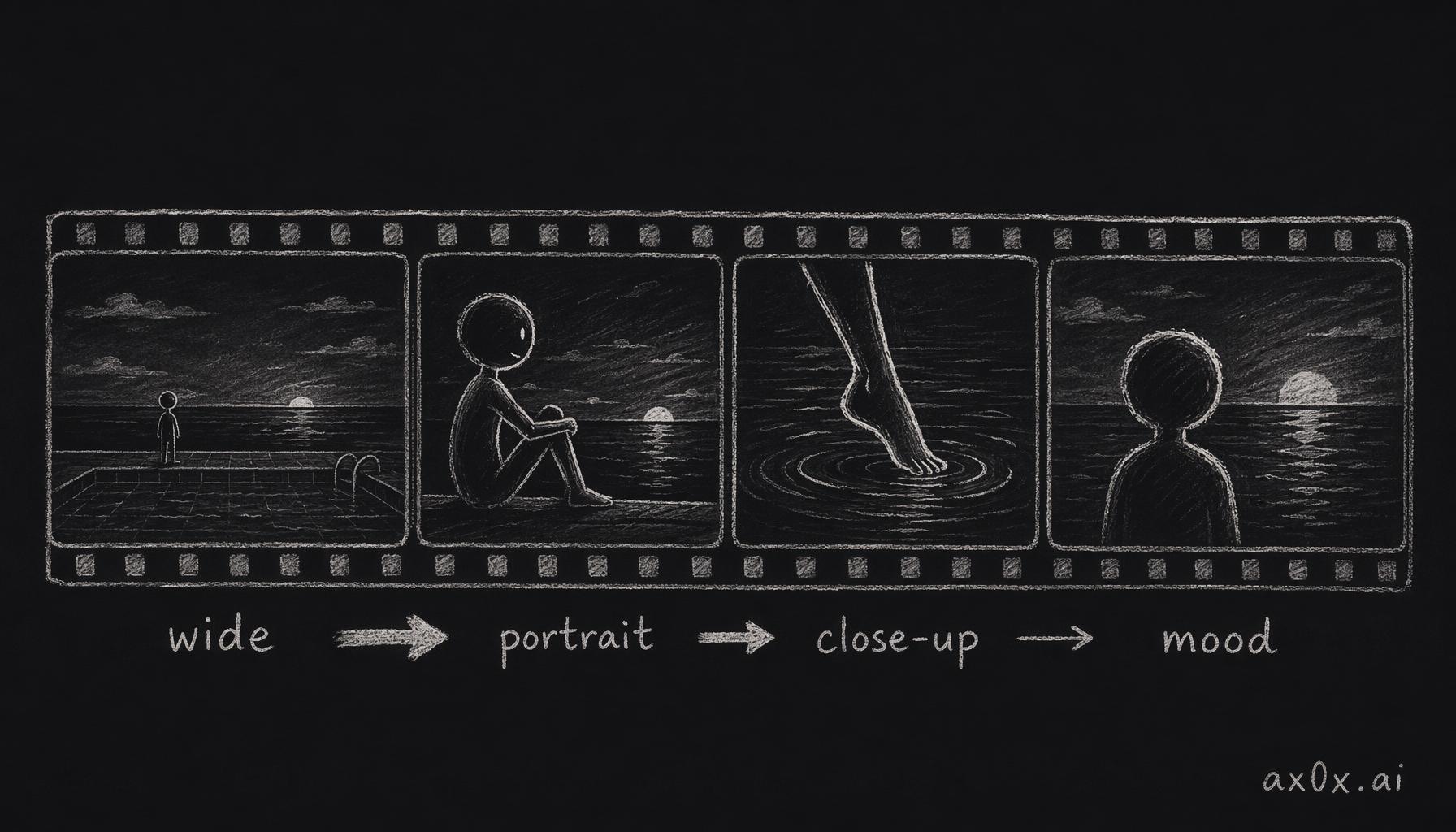 The 4-shot narrative: a photo set follows a cinematic progression — establishing wide, portrait, detail close-up, mood closer — encoding Xiaohongshu's swipe rhythm into the pose sequence.
Each shot also has a compositionHint that guides framing:
- Shot 1: "Ultra-wide aspect, pool lines guide eye to horizon, emphasize vastness"
- Shot 2: "Golden ratio composition, bokeh sea surface creates color layers"
- Shot 3: "Low angle, water surface and feet create symmetry"
- Shot 4: "Backlit silhouette, gradient sky as clean background"
Color Grading
style: "warmGold"
promptDescription: "golden hour warmth with amber tones, slightly lifted
                    shadows, creamy highlights, film-like grain"
temperature: "warm"
saturation: "medium"
contrast: "low"
The promptDescription is the most direct — it goes into the Gemini prompt as-is. The structured fields (temperature, saturation, contrast) are used for UI display and for the eventual mobile color-adjustment sliders (described in Part 4).
Caption Templates: Three Styles, One Scene
Here's where the research on caption methodology directly shaped the product. For the same Infinity Pool scene, three completely different caption tones:
Versailles (凡尔赛风) — the humble-brag:
- "随手拍的 没有调色 这个泳池的水真的是这个颜色" (Taken casually, no filter — the pool water really is this color)
- "说好游两圈就走的 结果泡到日落都没舍得起来" (Planned to swim two laps and leave, ended up soaking until sunset)
Poetic (文艺风) — the artistic:
- "水面收走了所有的光,我什么都不想要了" (The water took all the light; I don't want anything anymore)
- "泳池尽头连着天,人泡在里面会变小" (Where the pool ends, the sky begins; you feel small floating in it)
Minimal (简约高级风) — the ultra-short:
- "泡着不想动" (Soaking, don't want to move)
- "天水一色" (Sky and water, one color)
The Versailles style is the default and the most popular. It embodies the core formula: caption describes a mundane action, photo reveals the luxury. "I took this casually" — but the photo is clearly a $2,000/night resort. The mismatch is the point.
Each style also has emoji constraints. Versailles allows 2 emoji max, chosen from an approved "high-end" set (🌊, ✨, 🌅). No money bags. No champagne bottles. No crown emoji. The research was very specific: certain emoji signal "trying too hard" and break the effortless illusion.
The Miaoya Lesson: Content-as-a-Service
In Part 1, I described the "fireworks effect" — the spike-and-decay pattern that killed Miaoya Camera. The Muse Card catalog is the structural answer to that problem.
The key insight: features decay, but content compounds.
If your product ships 10 templates and never adds more, users try all 10 and leave. But if your product ships new cards weekly, users come back to see what's new. The engagement loop shifts from "try the AI" to "what looks dropped this week."
The catalog currently has 29 cards across four categories. The plan:
| Strategy | Frequency | Examples |
|---|---|---|
| New card drops | Weekly, 1-2 cards | Follow Xiaohongshu trends, holidays, seasonal shifts |
| Limited editions | Monthly | Valentine's Day, Mid-Autumn Festival, Christmas |
| User voting | Bi-weekly | "What Muse Card should we build next?" polls |
| Inspiration upload | Ongoing | Power users submit reference photos; best ones become cards |
Seasonal cards have built-in seasonalRange fields — Cherry Blossom Season auto-activates March 1 through April 30 and disappears the rest of the year. This creates natural FOMO: "cherry blossom cards are only available for 8 more weeks." You don't need push notifications or artificial scarcity. The seasons provide it.
The business model this enables is subscription, not one-time purchase. You're not buying an AI tool — you're subscribing to a living catalog of social moments. The AI is just the delivery mechanism.
The Caption Design Formula
The caption system deserves its own section because it's the single biggest differentiator from competitors. No other AI photo app generates social-ready captions. They give you a photo and leave you staring at a blank text field.
The research identified caption writing as the highest-friction point in the entire photo-to-post workflow. Users generate a beautiful photo, then spend 10 minutes trying to think of something to write. Many give up and never post.
The Three Styles
Each Muse Card ships with 3 caption styles, and each style follows strict rules encoded as AI prompt constraints:
Versailles (凡尔赛风)
- Must describe a "small thing" (daydreaming, sipping coffee, wandering)
- Never directly mention brand names, prices, or locations
- Include a "sweet complaint" or accidental humble-brag
- Tone: casual, like texting your bestie
- Emoji: 1-2 max, from the "high-end" approved set
- Length: 15-30 characters, typically one sentence
Poetic (文艺风)
- Use physical sensory metaphors (light, wind, sound, temperature)
- Short sentences, lots of white space, don't over-explain
- Can include a light philosophical observation
- Don't state emotions — let the reader feel them
- Emoji: 0-1, minimal
- Length: 10-25 characters
Minimal (简约高级风)
- English short phrases or Chinese-English mix
- Maximum 5 words
- Terse, powerful, no explanation
- Can be a noun phrase or adjective
- No emoji, or one very subtle one
- All lowercase
Platform Adaptation
The same caption also adapts to the target platform:
| Dimension | WeChat Moments | Xiaohongshu |
|---|---|---|
| Length | 1 sentence (15-30 chars) | 3-5 sentences (50-150 chars) |
| Hashtags | None | 3-5 required |
| Emoji | 0-1 | 2-4 |
| Tone | More private, more Versailles | More sharing, more "useful" |
| CTA | None | Ends with question |
One tap to switch. The user never has to think about format differences.
The Mismatch Principle
The core design principle for captions is deliberate mismatch:
Caption says small → Photo shows big → Viewer fills the gap with admiration
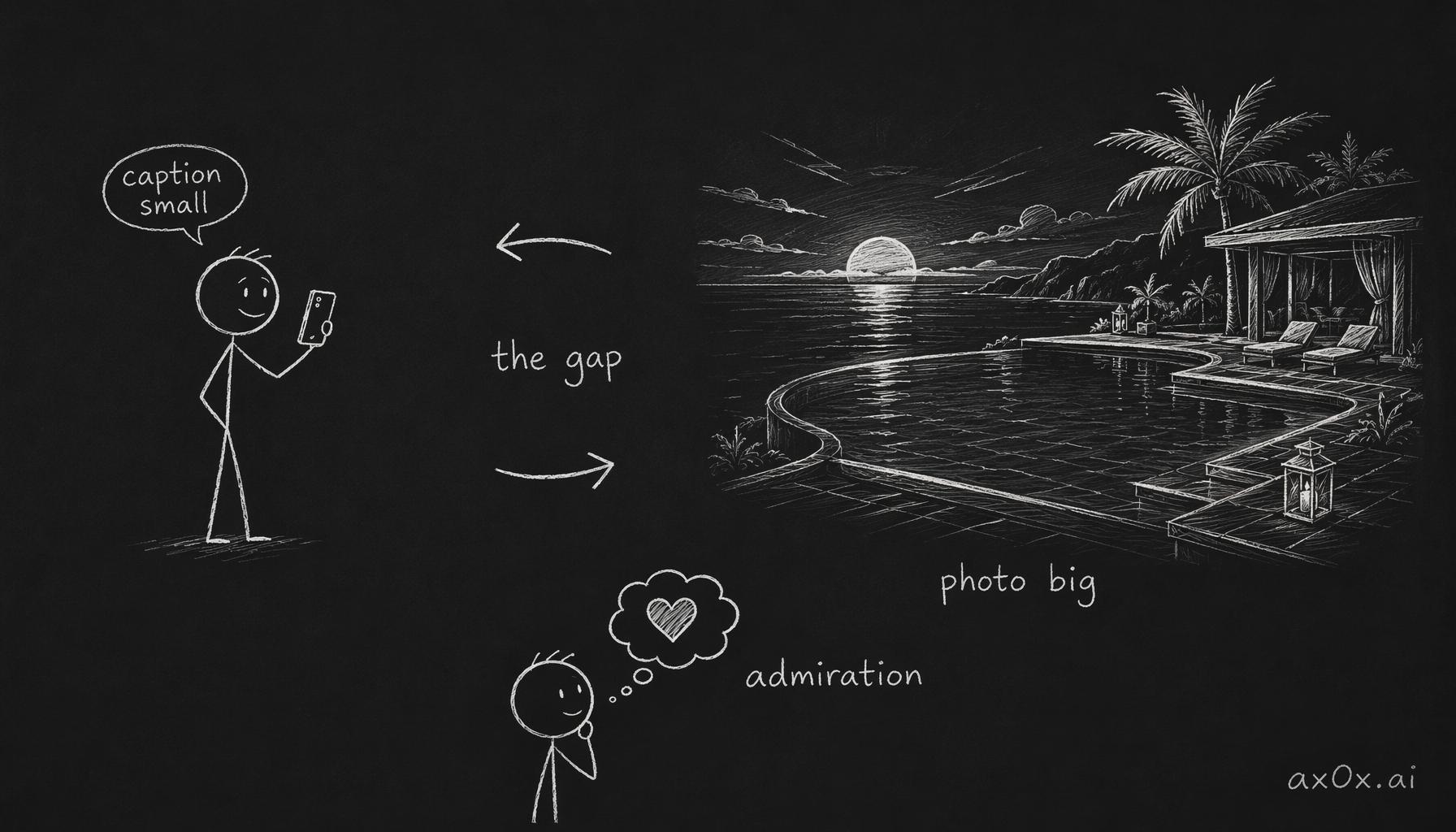 The mismatch principle: the caption deliberately says small while the photo shows big, and the reader fills the gap in between with admiration.
"说好游两圈就走的 结果泡到日落都没舍得起来" — the caption says "I planned to swim two laps and leave." The photo shows an infinity pool at what's clearly a luxury resort at golden hour. The words minimize; the image maximizes. The viewer perceives effortlessness.
This is the opposite of how most people caption luxury photos (which is why most luxury captions feel cringe). The natural instinct is to match: big photo, big caption. "Amazing sunset at the Aman!" But matching feels like bragging. Mismatching feels like... just living your life.
What I'd Do Differently
Honest reflection time.
What Works
The narrative shot sequence. This was the right call. Testing showed that users who get 4 photos in a cinematic sequence share them as a set more often than users who get 4 random photos. The establishing → portrait → detail → mood structure maps directly to how people naturally swipe through multi-image posts.
Caption generation with style switching. Users don't know they want this until they see it. The moment you show someone three different captions for the same photo set, they light up. "I can just tap and switch?" This is the "put the food in their mouth" philosophy in action.
Seasonal auto-activation. Cherry blossom cards appearing automatically in March creates a "the app knows what season it is" delight moment. Small detail, big emotional payoff.
What Doesn't (Yet)
Too many cards, not enough curation. We started with 18 cards (as described in Part 1) and grew to 29. That's already too many for a browse-and-pick interface. The current category tab UI works, but it needs a recommendation layer: "trending this week" or "popular for your location." Pure browse doesn't scale past ~20 cards without decision fatigue.
The tension between curation and freedom. Some users love the opinionated cards. Others want to tweak — "I like the Infinity Pool scene but want a different outfit." Currently, the card is take-it-or-leave-it. Adding customization per card is the right direction, but it has to be opt-in and hidden behind an "advanced" mode. The moment you expose knobs, you become Xingtu.
Brand safety. The brandHints and luxuryHints fields reference real brands — Hermes, Chanel, Four Seasons. AI-generated images containing recognizable brand elements sit in a legal gray area. For now, the hints are aesthetic directions ("silk sarong" rather than "Hermes scarf"), and the VANITY_DESIGN_INSTRUCTIONS ensure logos are never prominent. But as the product scales, this needs a formal legal review.
Caption quality variance. The Versailles style is hard to get right. Too subtle and it reads as generic. Too obvious and it reads as try-hard. The templates in the card data are hand-crafted, but the AI-generated variants sometimes miss the tone. This is a prompt engineering problem that requires ongoing iteration — there's no "solve it once" fix.
Cards that underperform. Some cards just don't resonate. "Wellness Life" (健身自律) consistently underperforms in testing — users interested in fitness photos have different aesthetics than the luxury-casual vibe ÉLAN targets. Similarly, "Equestrian Club" (马术俱乐部) is too niche. The catalog needs pruning as much as it needs expansion.
The Catalog Is the Product
Most AI photo apps treat their template library as a feature — a thing the product has. ÉLAN treats the Muse Card catalog as the product itself. The AI is infrastructure. The UX is a delivery mechanism. But the thing users actually value is the curated collection of social moments they can step into.
This reframing changes everything about how you build and maintain the product. You're not shipping features — you're shipping content. Your roadmap isn't "add face-swap" or "improve resolution." It's "what moments do our users want to project this month?"
The next post in this series will cover the transition from web to mobile — how the card-based UX translates to a native app experience, and the Expo SDK 55 migration path for sharing business logic between platforms.
Part 1: The Vanity Formula | Part 2: Architecture | Part 3: Muse Card Design | Part 4: Web to Mobile
This post is also available in Chinese (中文版).