
From Jewelry to Everything: Building a Full-Category Content Engine
Part 1 ended with a jewelry-only MVP. Six editorial templates, a Gemini analysis-then-generation pipeline, deployed in one day. It worked. Merchants upload a product photo, get back six styled images and copy for 99 RMB.
But the friend who'd originally pitched the idea looked at it and asked a question that rewired everything:
"为什么有的不做全链路呢,infra 不通用吗?" "Why don't all categories get the full pipeline? Isn't the infrastructure universal?"
I'd been thinking about it wrong. My mental model was: jewelry prompts are polished, food prompts are rough, so give food fewer features until the prompts catch up. Her mental model was: the pipeline is the same, the templates are the same, just change the words inside them.
She was right.
The Category Engine
I rebuilt the template system around 7 product domains: jewelry, beauty, fashion, food, home goods, digital products, and a general fallback. Every domain gets the same 6-template pipeline. The only thing that changes is the prompt layer.
But this forced me to think harder about what the 6 templates actually are. In the jewelry MVP, I'd named them after photography techniques — Hero, Constellation, Color DNA, Craft Detail, Lifestyle, Size Reference. Those names made sense for jewelry. They made no sense for food.
The breakthrough: the 6 slots aren't 6 photography techniques. They're 6 angles to persuade a consumer.
| Slot | Persuasion angle | Jewelry | Food | Digital product |
|---|---|---|---|---|
| 1 | First impression | Studio hero shot | Plated dish beauty shot | Course cover mockup |
| 2 | Professional breakdown | Gem constellation | Ingredient deconstruction | Curriculum structure |
| 3 | Visual identity | Color DNA swatches | Recipe step progression | Brand mood board |
| 4 | Quality proof | Craft macro detail | Texture close-up | Student results showcase |
| 5 | Lifestyle context | Wearing scene | Table setting / sharing | Workspace / study scene |
| 6 | Decision info | Size with coin | Nutrition / serving specs | Pricing comparison |
Food's "Color DNA" becomes recipe steps — same slot, same purpose (show the process behind the product), completely different visual language. Digital's "Size Reference" becomes a pricing comparison card — same slot, same purpose (give the buyer decision-critical information), no physical product in sight.
The architecture stayed clean: one TemplateRegistry mapping domain + slot to a prompt function. Adding a new domain means writing 6 prompt functions and registering them. The pipeline, streaming, storage, and UI don't change.
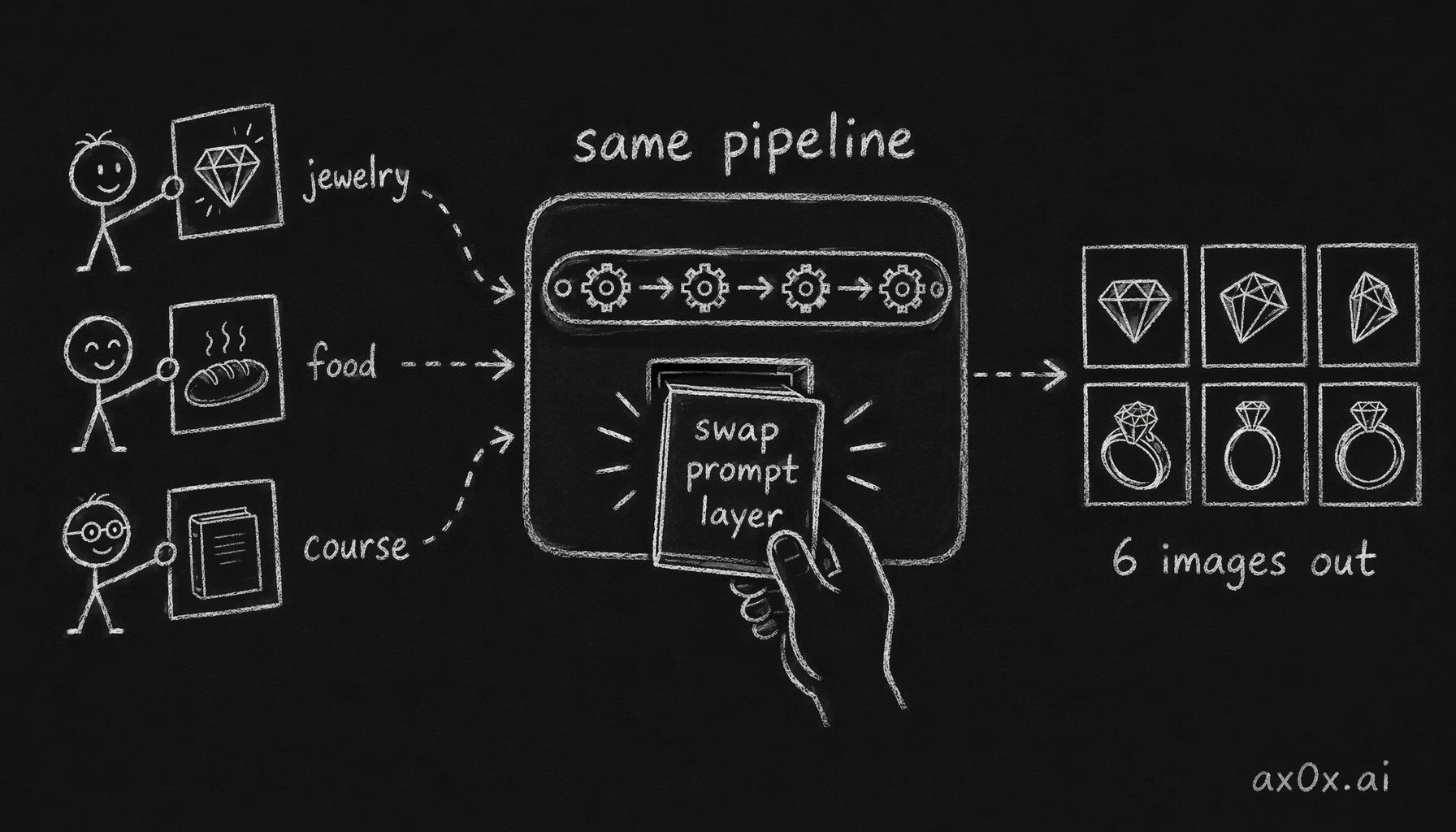 One fixed pipeline for every category — adding a new domain means only swapping the prompt layer to turn one input into 6 images
XHS Text Cards: Zero AI Cost
Here's what I noticed studying Xiaohongshu posts that sell well: the 9-image carousel isn't 9 product photos. It's typically 3-4 product photos interleaved with 5-6 text-card images — selling point summaries, ingredient guides, size specs, FAQ answers, and a cover image with a hook title.
These text cards are the single biggest gap in AI content tools. Every competitor focuses on generating product photos. Nobody generates the text cards that actually make the carousel convert.
I built a Satori-based rendering pipeline for this:
- React JSX defines the card layout (title, bullet points, icons, brand colors)
- Satori converts JSX to SVG (server-side, no browser needed)
- Sharp converts SVG to PNG at exact platform dimensions
Five card types: cover card (hook title + product image), selling points card (3-5 key benefits), guide card (how-to or ingredient list), spec card (dimensions / materials / care), FAQ card (3 common questions with answers).
The analysis step already extracts all the data these cards need — selling points, materials, care instructions, specs. The cards just render that structured data into visual layouts.
Total AI cost for text cards: zero. It's pure server-side rendering. The Gemini API call for analysis (which was already happening) provides the data. The card generation is just templating.
This means a complete Xiaohongshu 9-image set is now: 4 AI-generated product images + 5 text cards, where the text cards cost nothing — free by-products of the analysis step. Total generation cost per set is negligible.
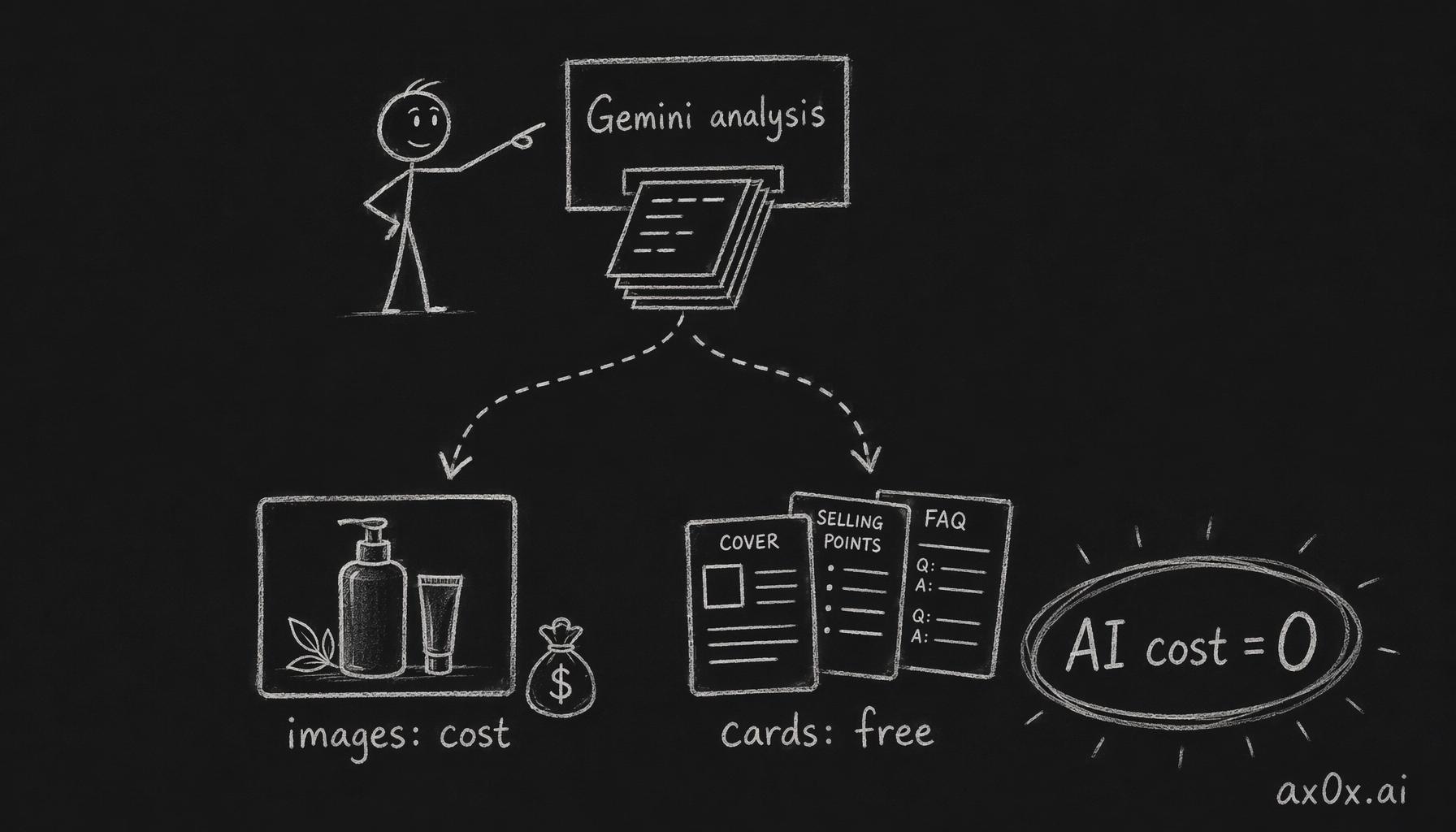 One Gemini analysis call's structured output feeds both the paid product images and the zero-cost text cards, making the cards a free by-product
Platform-Aware Output
Different platforms want different aspect ratios:
| Platform | Ratio | Dimensions |
|---|---|---|
| Xiaohongshu | 3:4 | 1080 x 1440 |
| Douyin | 9:16 | 1080 x 1920 |
| Taobao | 1:1 | 1080 x 1080 |
| General | 4:3 | 1440 x 1080 |
Before this, merchants would generate images and then manually crop them for each platform. Now it's a dropdown. Select your platform, and Sharp auto-crops every output — AI images and text cards alike — to the correct aspect ratio.
The implementation is simple (Sharp's resize + extract with gravity-center cropping), but the UX impact is large. A merchant targeting both Xiaohongshu and Taobao gets two complete image sets from one generation run.
Client-Side Video
The natural next step after generating a carousel is generating a video slideshow. Product video content is increasingly important on Douyin and Xiaohongshu, but most merchants don't know how to edit video.
I considered server-side video rendering (FFmpeg on a cloud VM, Remotion Lambda, etc.) and rejected all of them. The cost and complexity are wrong for an MVP. Instead:
Preview: Remotion Player renders the video sequence in-browser. Cover card, then AI images, then selling points card, with Ken Burns pan/zoom effects and cross-fade transitions. Zero server cost — it's just a React component playing back the already-generated images.
Export: FFmpeg.wasm compiles the sequence to MP4 directly in the browser. The user clicks "Export Video," their browser does the encoding, and they download the file. No render farm. No queue. No server cost.
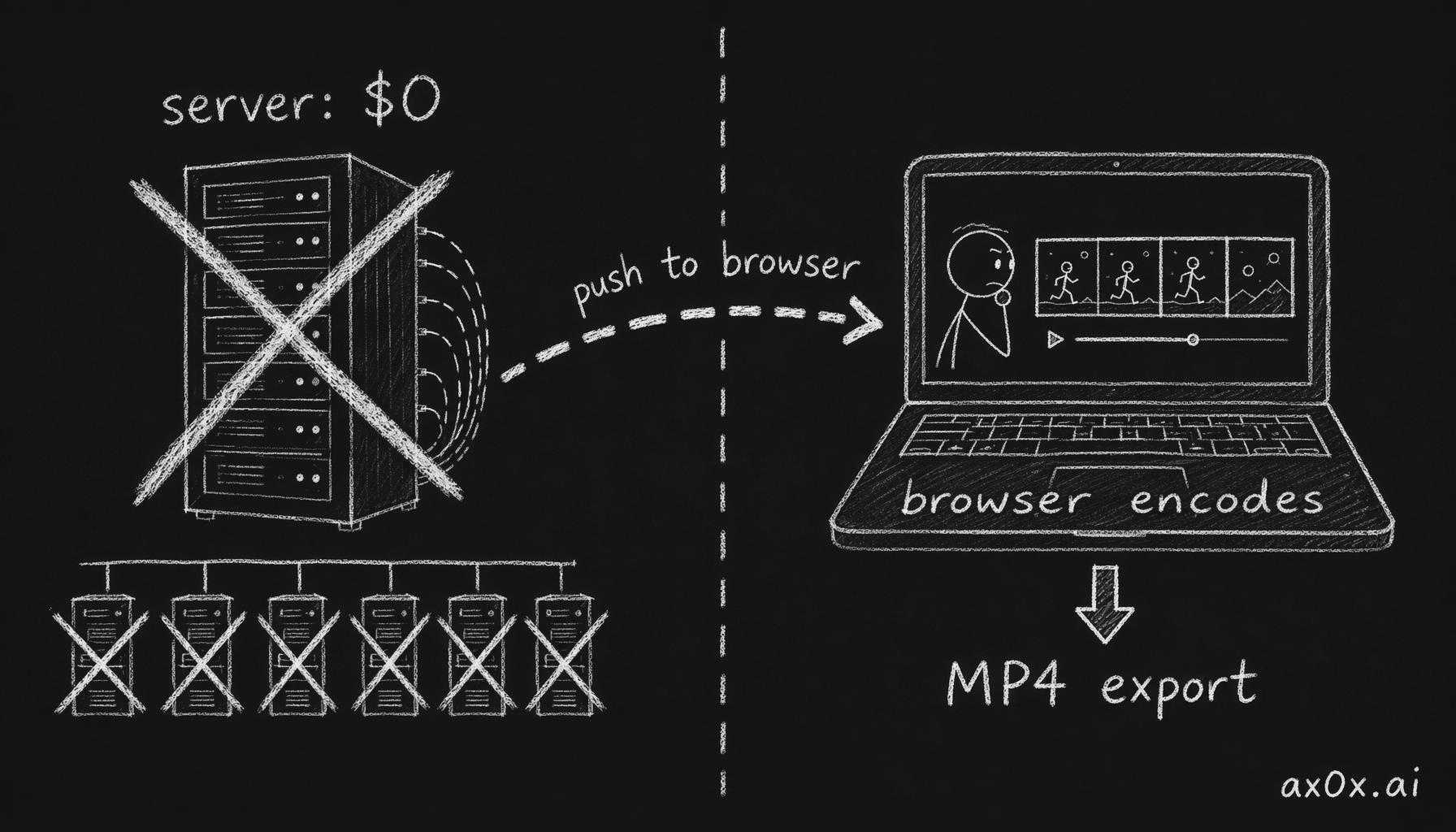 Push both video preview and encoding into the user's browser, bypassing a server render farm so the server pays nothing
The video sequence follows a proven Douyin/XHS structure:
- Cover card with hook title (1.5s)
- Hero product shot (2s)
- Material/ingredient breakdown (2s)
- Detail close-up (1.5s)
- Lifestyle scene (2s)
- Selling points card (2s)
- End card with call-to-action (1.5s)
Total: ~13 seconds. Perfect for short-form video platforms.
There's one FFmpeg.wasm gotcha I'll come back to in the codebase sweep section — a race condition that took a while to find.
The Longchamp Test
The moment of truth for the category engine was testing fashion on a real product. I picked a Longchamp Le Pliage bag — mixed materials (nylon body, leather flaps, metal hardware), strong brand identity, mid-range price point.
The Constellation template surprised me. I'd worried it would fail on non-jewelry items — the whole "gem specimens in a museum vitrine" concept doesn't obviously translate to bags. But Gemini interpreted "material constellation" for fashion as: separate the 3 materials (nylon fabric, cowhide leather, brass hardware) and generate close-up texture swatches for each, arranged as a material palette on a dark background.
It looked like a fabric swatch card from a design studio. The editorial aesthetic from jewelry — that museum-catalog feeling — transferred to fashion better than I expected. The same prompt structure that produces gem constellations produces material palettes. The AI generalizes the concept (deconstruct materials, present as specimens) even when the specific domain changes.
The Color DNA template also worked well — instead of watercolor washes inspired by gemstone hues, it produced color blocks pulled from the bag's navy nylon, cognac leather, and gold hardware. Same concept, different palette.
Fashion was validated. I moved on to the harder test.
Digital Products from Text Only
Every other domain assumes you have a product photo to upload. But what about courses, ebooks, software, templates — digital products with no physical form?
The "digital" domain works differently. Instead of analyzing a photo, it takes a text description: "Python data analysis course, 40 hours, covers pandas/numpy/matplotlib, target audience is business analysts." From that text alone, the pipeline generates:
- Hero: Abstract concept art representing the course topic (data flowing through neural pathways, etc.)
- Constellation: Curriculum structure as a visual mind map
- Color DNA: Brand mood board with suggested color palette
- Craft Detail: Feature highlights with iconography
- Lifestyle: Aspirational scene (student at a modern desk with course materials)
- Size Reference: Pricing comparison card (this course vs. bootcamp vs. degree)
No input photo required. The analysis step generates a detailed product profile from text, and the generation step produces visuals from that profile.
The aesthetic is deliberately more abstract and creative than the physical product domains. A jewelry constellation is precise — specific gems in specific arrangements. A course curriculum constellation is conceptual — topic clusters connected by flowing lines. The digital domain gives Gemini more artistic freedom, which produces more varied (and occasionally more striking) results.
Business Infrastructure
With 7 domains live and text cards generating for free, the next priority was making this a real business, not a demo.
Token Tracking
The MVP estimated Gemini costs using rough per-call averages. Wrong. Gemini's usageMetadata returns actual input/output token counts per request. I switched to real tracking — every API call logs its actual token consumption, mapped to the user and product suite that triggered it.
This matters because prompt length varies dramatically by domain. A jewelry analysis prompt with material-specific lighting instructions is ~2,000 tokens. A food analysis prompt is ~1,200 tokens. Averaging them overstates food costs and understates jewelry costs.
Credit System
Users buy credits. Each suite generation deducts credits based on actual cost (rounded up to the nearest credit unit). The credit balance is stored in Upstash Redis with atomic decrement — no double-spend race conditions.
Admin Dashboard
A cost dashboard showing:
- Daily API spend (total and per-domain)
- Per-user cumulative cost
- Average cost per suite by domain
- Margin analysis (revenue per suite minus API cost)
The numbers confirmed the pricing thesis from Part 1: 99 RMB per suite with API costs that are a small fraction of the price — extremely healthy gross margins. The text cards being zero-cost improved margins even further — the blended cost including text cards is lower than AI-only suites.
The Unit Economics
| Item | Value |
|---|---|
| Revenue per suite | 99 RMB |
| AI image generation cost | A small fraction of revenue |
| Text card generation cost | No additional AI cost (server-side rendering) |
| Platform cropping cost | No additional AI cost (server-side image processing) |
| Video generation cost | No additional AI cost (client-side encoding) |
| Gross margin | Very healthy |
| Replacement value | 1,100-3,100 RMB |
| Price ratio | 1/10th to 1/30th |
Priced at a fraction of the replacement value with API costs that are a tiny fraction of revenue, the pricing sits in a comfortable zone — cheap enough that merchants don't think twice, expensive enough that the margins fund growth.
The Codebase Sweep
Before calling the v2 milestone complete, I ran a systematic audit. 22 issues found, 8 critical.
Security fixes:
- Replaced
Math.random()withcrypto.randomInt()for invite code generation.Math.random()is not cryptographically secure — predictable invite codes mean free access. - Added auth validation on all API routes. Several generation endpoints were missing auth checks — anyone with the URL could burn credits on our Gemini key.
- Closed an SSRF vector in the image upload flow. The original code accepted arbitrary URLs for "upload from link" without validating the destination. An attacker could use Shichuan as a proxy to scan internal networks.
Reliability fixes:
- Credit refund on generation failure. If Gemini returns an error mid-generation, the user's credits were already deducted. Added automatic refund on any non-2xx response.
- FFmpeg.wasm race condition. The video export spawned FFmpeg, started writing frames, and called
ffmpeg.run()— but the frame writes were async andrun()didn't wait for them. Intermittent corrupt videos on slower machines. Fixed with explicitawaiton all frame writes before running the encode. - Stale closure bugs in Zustand stores. Several React callbacks captured stale state because they closed over the store value at render time instead of using
useStore.getState()inside the callback. Classic React pitfall, but it caused real bugs — the generation progress bar would freeze at 33% while generation continued in the background.
Code quality fixes:
- Immutability violations — several Zustand store actions mutated state directly instead of returning new objects. Refactored to spread-and-replace pattern.
- Dead code from the jewelry-only era that referenced hardcoded prompt strings instead of the domain registry.
- Missing error boundaries around the Remotion Player (a crash in video preview shouldn't take down the whole page).
22 issues. All fixed. The codebase went from "it works if you use it correctly" to "it's hard to break even if you try."
What v2 Taught Me
The single most important moment in this entire build was the question: "Why not full pipeline for all categories?" It exposed a mental trap I'd fallen into — treating each domain as a special case that needs custom features, instead of recognizing that the structure is universal and only the words change.
This is a general principle for AI product development: don't vary the pipeline per category; vary the prompts per category. The infrastructure should be category-agnostic. The intelligence lives in the prompt layer.
The text cards taught a second lesson: the most valuable feature can have zero AI cost. Everyone in the AI content space is competing on image generation quality. Meanwhile, the text cards that actually drive Xiaohongshu conversion are just server-side React rendering. No GPU. No API call. No marginal cost. Sometimes the biggest gap in the market isn't where the technology is — it's where the technology isn't needed.
And the client-side video taught a third: move computation to the client whenever possible. Server-side video rendering would require infrastructure, queuing, storage, and ongoing cost. Browser-side FFmpeg.wasm has zero marginal cost, zero infrastructure, and ships as a feature the user controls. The tradeoff is encoding speed (slower on low-end devices), but for 13-second product videos, even a phone finishes in under a minute.
v2 took Shichuan from "jewelry content tool" to "e-commerce content platform." Same Gemini pipeline underneath. Same ÉLAN DNA in the architecture. But the surface area expanded from one domain to seven, from photos only to photos + cards + video, from one platform to four.
Part 1 was about building the right thing. Part 2 was about building it for everyone.
This post is also available in Chinese (中文版).