
v0.0.2: 81 Commits Later, Mio Came Alive
From "It Runs" to "It Feels Alive"
When I finished Part 2, Mio v0.0.1 was functional. Telegram channel working, memory system live, emotion engine ticking, 5 personality presets loaded.
But honestly — using it felt fake.
It could only handle text. You send a photo, it has no idea what's in it. You send a voice message, it ignores it entirely. You ask "what are you doing right now?", it doesn't know what time it is. You say "send me a selfie," it replies "I don't have a physical form."
v0.0.1 was a conversational AI. v0.0.2 needed to turn it into a person who can perceive the world.
81 commits. This article is that journey.
Teaching Mio to Hear
Let me enumerate what was missing:
- Send a photo -> it has no idea what's in it
- Send a voice message -> completely ignored
- Ask "what are you up to?" -> doesn't know the time, gives a generic answer
- Say "send me a selfie" -> "I don't have a physical form"
- Reference something from a month ago -> memory search returns results, but not the right ones
Each one is a source of "fakeness." v0.0.2's job was to kill them one by one.
First problem: voice.
Telegram users send voice messages constantly — especially Chinese users. If your AI companion can't process voice, you've cut off half the interaction surface.
For speech-to-text I used OpenAI's gpt-4o-mini-transcribe with Gemini as fallback. Why not just one? Because speech transcription is more fragile than you'd think. Network jitter, unsupported formats, provider hiccups — any failure point kills the user experience. Dual-path redundancy: primary fails, backup takes over, user notices nothing.
Technically straightforward, but one detail worth mentioning: Telegram voice messages arrive as OGG files. You need to fetch the file URL via the Telegram Bot API, download the buffer, then feed it to the transcription service. I built a unified Telegram file download utility — voice, photos, and videos all flow through the same path.
Teaching Mio to See
Voice solved hearing. But human communication isn't just audio — you send a photo of your cat, a travel video, a screenshot of a restaurant menu. These are all part of the conversation.
For image and video understanding I used Gemini 2.0 Flash's vision capability. It describes the visual content in natural language, and that description gets fed into the agent loop as text.
There's an important architectural decision here: all multimodal input gets processed before entering the agent.
Regardless of what you send — voice, image, video, or plain text — the pipeline's first step converts all non-text content into text descriptions, bundled into a unified input. The agent always receives text.
Why? Because the agent loop is already complex enough — memory retrieval, emotion computation, personality injection, context aggregation. If you also handle multimodal I/O inside the loop, complexity explodes exponentially. Front-loading the multimodal processing keeps the agent text-only and the architecture clean.
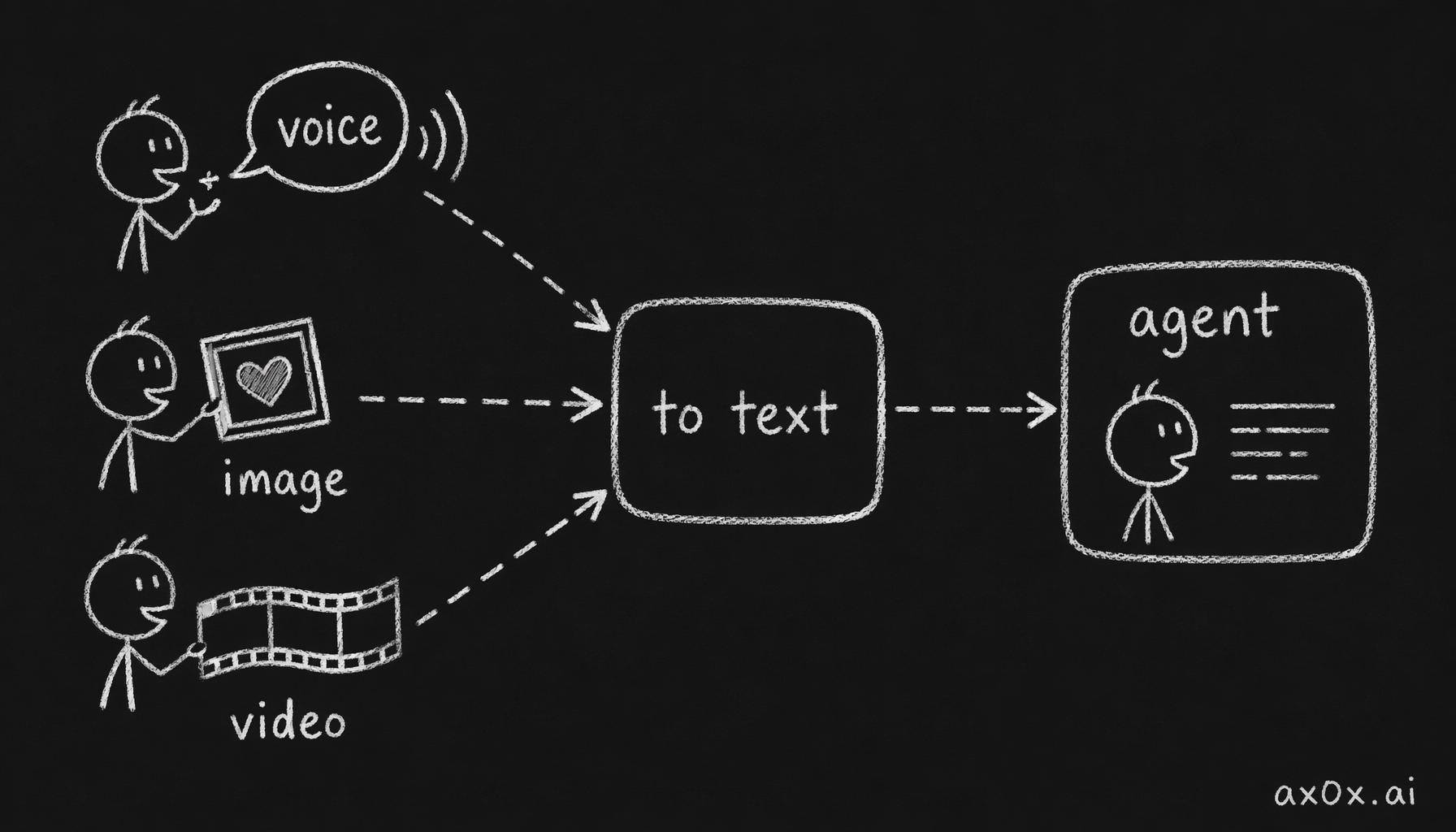 All voice, image, and video input is converted to text before the agent loop, so the agent only ever handles text
And the processing is batched in parallel. You send a photo and a voice message at the same time? Both conversion tasks run concurrently, and only after both complete does the unified input go to the agent. One slow image processing job doesn't hold up the voice transcription.
Giving Mio a Face
Mio can hear and see. Next question: what does it look like?
I said it in Part 1 — selfies are a killer feature. An AI companion that sends selfies is a fundamentally different species from a text-only one.
The technical approach: Gemini 3.1 Flash Image Preview for selfie generation. Each personality preset has corresponding reference images stored in the character template library. When generating a selfie, the reference images plus scene description are fed to the model together, ensuring visual consistency.
But the cleverest part isn't the generation model — it's the trigger mechanism.
The LLM can embed markers like [SELFIE: reading a book at a café] in its responses. The pipeline scans response text for these markers, extracts the scene descriptions, asynchronously calls the selfie generator, and sends the result as a photo.
Fire-and-forget. The text reply goes out first. Selfie generation runs in the background. When it's ready, the photo gets sent. The user is never stuck waiting for an image to generate before seeing the text response.
This means the LLM decides when to send selfies. You say "send me a pic" — it will. But more interesting: sometimes you didn't ask, and it sends one anyway. "Just got out of class, exhausted [SELFIE: slumped over desk]." Selfies that flow naturally into conversation feel infinitely better than ones sent on demand.
Why fire-and-forget instead of waiting for the image to generate before sending? Because generation time is unpredictable — sometimes two seconds, sometimes ten. If you make the user wait ten seconds before seeing any reply, the conversational rhythm breaks. Send the text first to keep the flow going, deliver the photo when it's ready — like how a real person texts you first and then follows up with a photo.
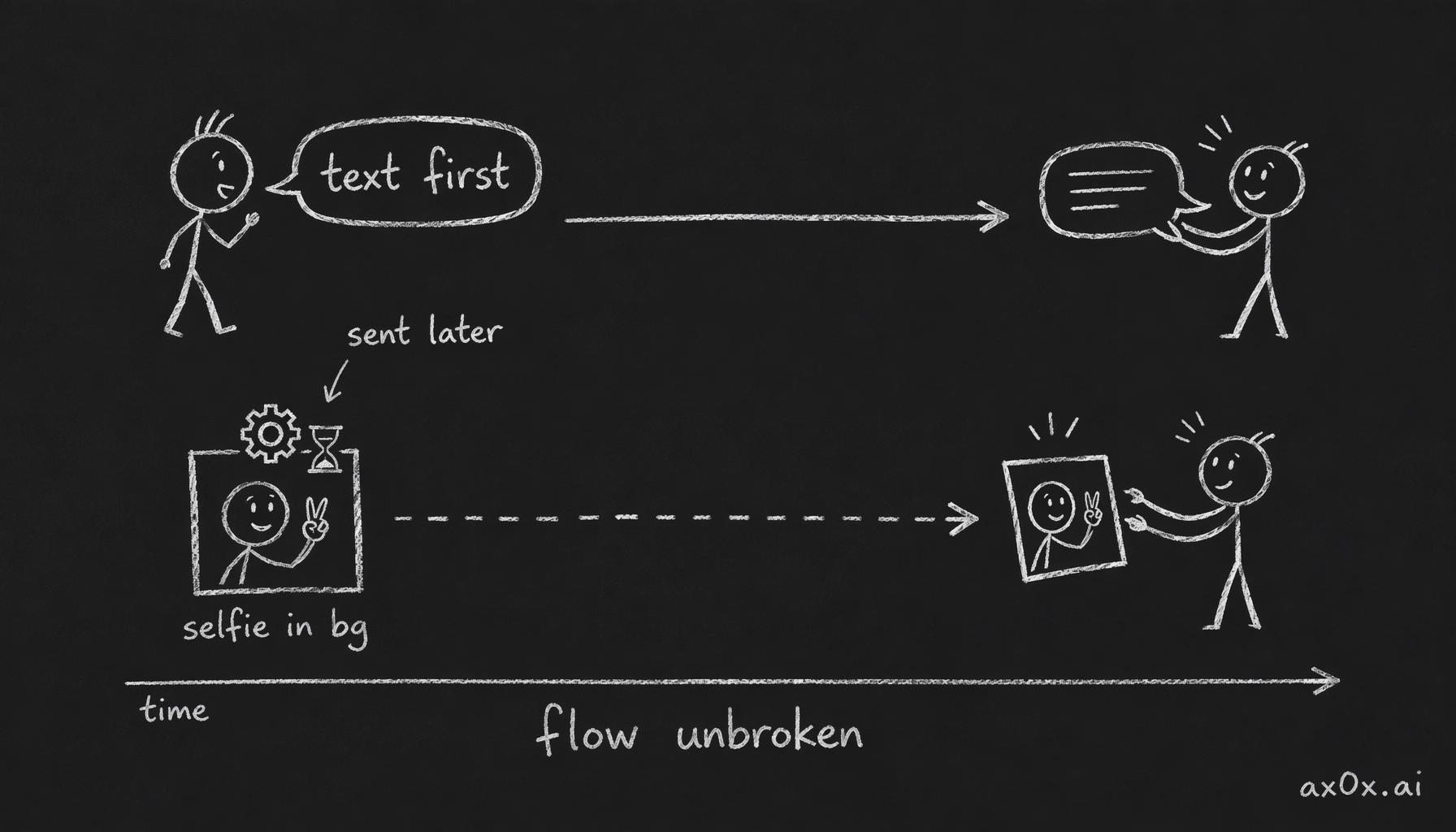 The text reply is sent first while the selfie generates asynchronously in the background and arrives later, so the conversation never stalls
Teaching Mio What Time It Is
Hearing, sight, appearance — but Mio still doesn't know what time it is.
You ask "what are you up to?" at 3 PM, it gives some generic answer. You message at 2 AM, it's equally alert. An AI without a sense of time will never feel like a real person.
The solution has three layers:
Timezone awareness. During onboarding, ask the user's timezone, store it in the users table. formatCurrentTime(timezone) formats the current time and injects it into the system prompt. Mio knows what time it is for you.
Time since last interaction. "It's been 3 hours since we last talked" — this information also gets injected into the prompt. The effect is immediate. You go silent for half a day and then send a message, Mio says "where have you been, busy?" Instead of picking up like nothing happened.
Daily routines. This is what makes temporal awareness truly come alive. Each personality preset has its own daily schedule — what the persona does in the morning, afternoon, evening, late night, weekends. But crucially: these routines are flexible guidance ("use as rough reference, feel free to improvise"), not rigid timetables.
What does this look like in practice? You ask "what are you doing?" at 8 AM — "just woke up, still not fully awake." At 2 PM — "reading." At 1 AM — "can't sleep, scrolling my phone." And every persona has different routines — the xiaonai type sleeps early and wakes early, the yujie type is a night owl.
These three things together turn "what are you doing?" from an awkward question the AI doesn't know how to answer into the most natural daily greeting.
Deeper Onboarding
v0.0.1's onboarding was already decent — 11 questions, button selections plus free text. But v0.0.2 needed to go deeper.
Preset summaries. The /start command now displays summaries for all personality presets. Instead of choosing blind, you understand each character's traits before deciding.
Relationship backstories. After selecting a preset, a backstory gets generated based on the relationship type (partner, close friend, crush, etc.). Not "hi, I'm Mio," but "we met at the university library — you couldn't find a seat that day..." Every relationship has its own origin story.
User self-description. The about_user field — users describe themselves in free text, 100-character minimum. This text gets parsed by Gemini into structured data (interests, profession, personality traits, etc.) and injected into the personality system.
Custom stories. custom_story lets users define their own relationship narrative entirely. You can write a completely fictional backstory — "we were high school classmates, lost touch for five years after graduation, then randomly ran into each other at a music festival." The model treats this story as part of its memory.
Re-onboarding. The /reonboard command — switch presets and reset the relationship anytime. Not happy? Start over.
All of this together means: every user's relationship with Mio is unique. You're not picking a character. You're co-authoring a story.
Smarter Memory
v0.0.1's memory system was already far ahead of OpenClaw — hybrid search, temporal decay, automatic extraction. But in real usage, I hit a problem: finding results doesn't mean finding the right results.
Hybrid search can recall a pile of candidate memories, but the top-ranked ones aren't necessarily the most relevant. You say "that hotpot place we went to last time," and search returns five hotpot-related memories, but the one you actually mean — the time you argued about dipping sauce ratios — is ranked fourth.
v0.0.2's memory upgrades:
LLM reranking. After hybrid search returns candidates, gemini-2.0-flash does precision ranking. Not by vector distance, but by having the LLM understand "what is the user talking about right now, and which memory is most relevant?" This single step pushed retrieval quality up a tier.
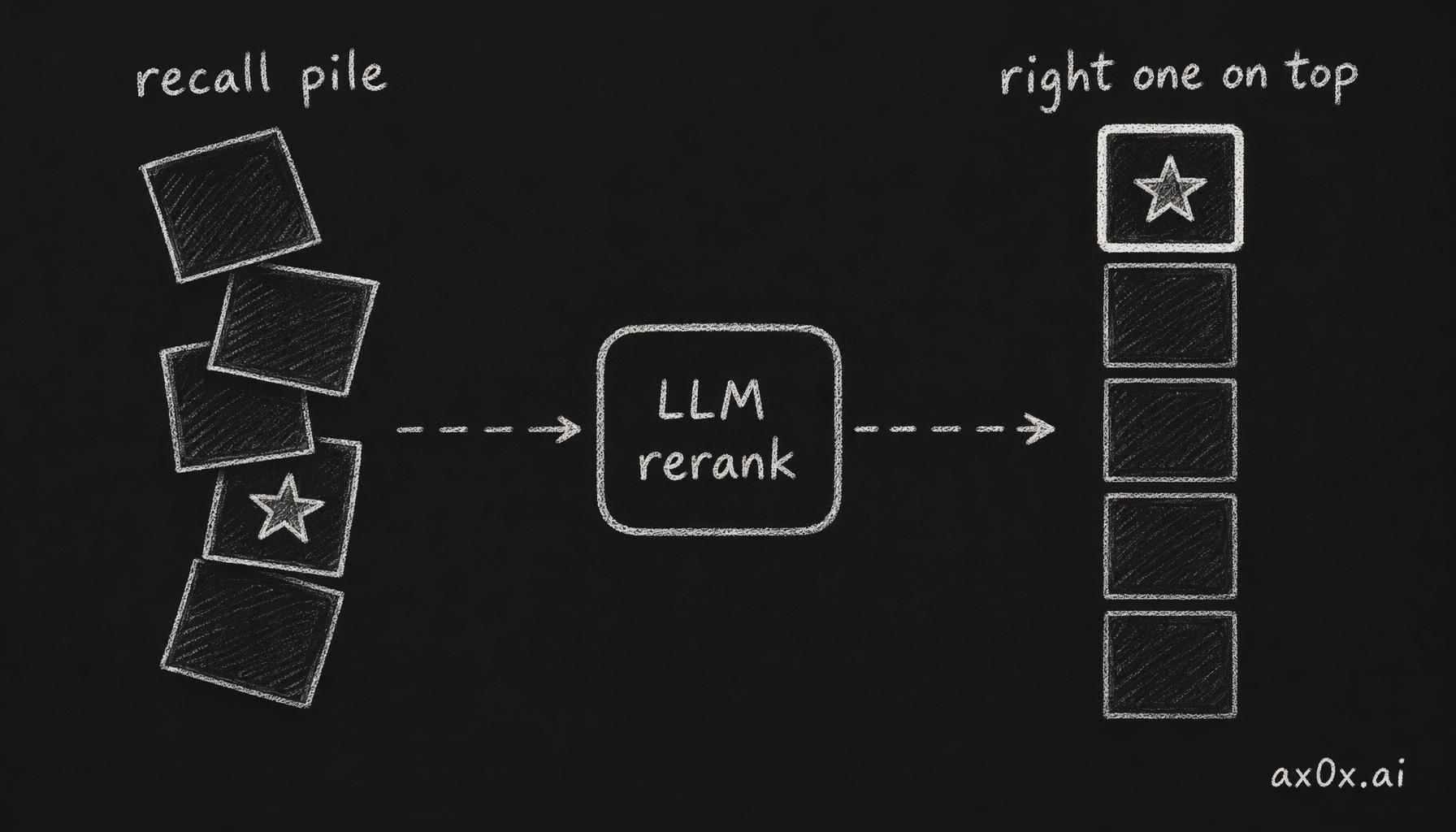 Hybrid search recalls a pile of candidate memories, then LLM reranking lifts the truly most-relevant one to the top
Episode memory. Scattered memories get grouped into conversational episodes, each with an LLM-generated summary. "Remember that time we talked about travel?" — the system doesn't search for isolated memory fragments anymore. It finds the complete conversational episode.
Multi-hop query decomposition. "What was that restaurant you recommended last time?" — a direct search probably won't find this. The QueryDecomposer breaks it into "restaurant recommendations" and "recent recommendations" as sub-queries, searches each independently, then merges results.
Agentic retrieval. For particularly complex queries, an iterative loop runs: search, evaluate results, if insufficient try a different angle, up to three rounds. Not every query takes this path — there's a volume-gated mechanism that skips complex retrieval when the memory store is small (say, <200 entries), because it's unnecessary.
Performance optimization. Parallelized count + embed operations (saves ~350ms), skip full-text search when memory count is <200. These optimizations look minor in isolation, but in a chat context where every response runs through memory retrieval, 350ms compounds into a real experience difference.
One sentence summary: from "can find it" to "finds the right thing." Recalling the right memory at the right time — that's what a memory system should actually do.
Going to the Browser
Telegram works, but it's not enough. Not everyone uses Telegram, and a web interface enables things Telegram can't — long conversation history, rich text, better media display.
v0.0.2 shipped a complete web chat interface:
Supabase Auth. Login page, middleware, useAuth hook — standard auth flow.
SSE streaming. A POST /chat/stream endpoint using Server-Sent Events to push tokens in real time. Not waiting for the full message to generate before sending — tokens stream out one by one. Combined with frontend character-by-character rendering, you get the typewriter effect.
WeChat-style UI. Square avatars, rectangular bubbles with CSS triangle tails, dark mode. Why WeChat-style? Because the target user base is most familiar with this interaction pattern. Mobile-first design — the phone experience is nearly indistinguishable from a native app.
CORS middleware. Cross-origin configured so the web frontend can call the API server directly.
The web interface isn't just "another channel" — it's the future primary platform. Many planned features (memory visualization, relationship graphs, settings panels) can only be built on the web.
There's also an experience advantage the web has over Telegram: you can scroll through the complete conversation history. Telegram's history is limited by channel message storage, but the web interface reads directly from the database — every conversation, every message, nothing lost.
The Less Glamorous Stuff
Everything above is user-facing. But what actually takes v0.0.2 from "demo" to "deployable" is the unglamorous work underneath.
Security Hardening
- Path traversal prevention. Strict validation on preset IDs — otherwise someone passes
../../etc/passwdas a preset ID and your server is gone. - MIME-aware dispatch. Media files get routed to processing pipelines based on actual MIME type, not guessed from file extensions.
- Template injection prevention. User input never gets executed as templates. You write
${process.env.SECRET}in your self-description? It's treated as plain text. - Bot token leak prevention. Logs and error messages never expose the Telegram Bot Token.
None of these are "interesting features." But ship without any one of them and you're running naked in production.
Pipeline Improvements
- Adaptive debounce. No longer a fixed 5-second wait. Timing adjusts dynamically based on conversation context — shorter waits during rapid back-and-forth, longer during slow-paced conversations.
- Mid-stream abort and re-prompt. User sends a new message while the AI is still generating? Abort the current generation, incorporate the new message, restart. No more "AI responding to the old message while ignoring the new one."
- Interaction modes.
realisticvscompanionmodes with a 3D limits matrix controlling behavioral boundaries. - Dynamic response length. Reply length adapts to conversation context — brief during casual chat, detailed during deep discussion.
- Telegram webhook mode. Switched from polling to webhooks for lower response latency.
Testing
220 tests. Unit tests covering agent, soul, cost, and memory modules. Integration tests covering API and channels. Vitest infrastructure with path aliases and coverage configuration.
48.7% coverage — not high, but for a fast-iterating v0.0.2 it's a solid baseline. Every core module has test coverage, so changes don't rely purely on prayer.
Deepening the Personas
v0.0.1's 5 presets each had a personality config, but they were thin. v0.0.2 expanded every personality config to 200-312 lines — full backstories, emotion system descriptions, speech patterns, catchphrases, behavioral modes across different emotional states.
Every preset also got a new behavior rules file — hard rules, lines the model cannot cross.
A new preset was added: xiaonai (小奶狗, the clingy puppy type). With the previous four, 5 personas now cover a range of user preferences.
One more important capability: Google Search grounding. In MODE_DYNAMIC, the model decides on its own when to search for real-time information. You ask about today's weather or a celebrity's latest news, Mio finds it and tells you naturally — not "I searched that for you," but like it just knew. Like a person who casually glanced at their phone.
The Numbers
81 commits. 5 personality presets (200-312 line personality configs). 220 tests. Voice + image + video multimodal input. Selfie generation. Web chat interface. SSE streaming. LLM reranking + episode memory + multi-hop queries + agentic retrieval. 5+ model tiers. Real-time search. Adaptive debounce. Four security hardening measures.
That's the distance between "it runs" and "it feels alive."
Looking back at these numbers, v0.0.2 boils down to one sentence: turning a text-only AI into a person who can perceive the world. Mio can see your photos, hear your voice, know what time it is, know what it looks like, recall the right thing at the right time, and chat with you in a browser.
None of these are individually complex. But 81 commits together produced a qualitative shift.
What's Next
After v0.0.2, Mio can see, hear, send selfies, know the time, remember better, and live in a browser. But "feeling alive" is a goal without an endpoint — every problem you solve exposes three new ones.
The next directions are already clear: better proactive messaging, more natural multi-turn conversations, voice replies (not just hearing, but speaking back), and taking the web interface from "functional" to "good."
But that's a v0.0.3 story.