
v0.0.7: Teaching Mio to Read the Internet
The Hallucination Problem
Users share links. It's what people do in chat — a game stats page, an article, a screenshot of something interesting. Before v0.0.7, Mio couldn't read any of them. It would see the URL in the message and then confidently make up what was on the page.
Send it https://gd.ax0x.ai/?room=0U7VS6 (a card game results page) and it would invent stats: "57.1% win rate, 8 wins." All fabricated. The URL was just decoration in the context — Mio had no mechanism to actually fetch the content.
This is worse than admitting ignorance. A companion that says "I can't see that page" is honest. A companion that invents game stats you can verify in two seconds is untrustworthy.
The 3-Tier Pipeline
Not all web pages are the same. Static articles are plain HTML. Game dashboards render with JavaScript. Some pages are mostly images. A single fetching strategy can't handle all of them.
v0.0.7 uses a waterfall — try the fast method first, escalate if the result is too thin:
Tier 1: Jina Reader — The fast path. Sends the URL to r.jina.ai/{url}, gets back clean text. Works out-of-the-box without an API key. 10-second timeout, truncation at 3,000 characters. Handles most static pages instantly.
Tier 2: Browserless Scrape — For JS-rendered pages. If Jina returns fewer than 100 characters of useful content, the pipeline escalates to Browserless, which spins up a headless browser, renders the page, and extracts text from the DOM. Catches SPAs and dynamic content that Jina's static fetch misses.
Tier 3: Screenshot + Vision — The nuclear option. If text extraction still returns less than 100 characters, the page is probably graphic-heavy — a dashboard, an infographic, a design mockup. Browserless takes a PNG screenshot, which gets piped through Mio's existing describeImage() vision module (the same one from v0.0.5). The AI describes what it sees.
Failure notice — If all three tiers fail, instead of silent skip: [用户分享了一个链接:{url},但无法读取该网页内容]. The agent knows it couldn't read the page. No more hallucination.
The threshold — 100 characters of useful content — is the key design decision. Below that, the extraction is "technically successful but useless." A page title and a cookie notice don't count as reading the page.
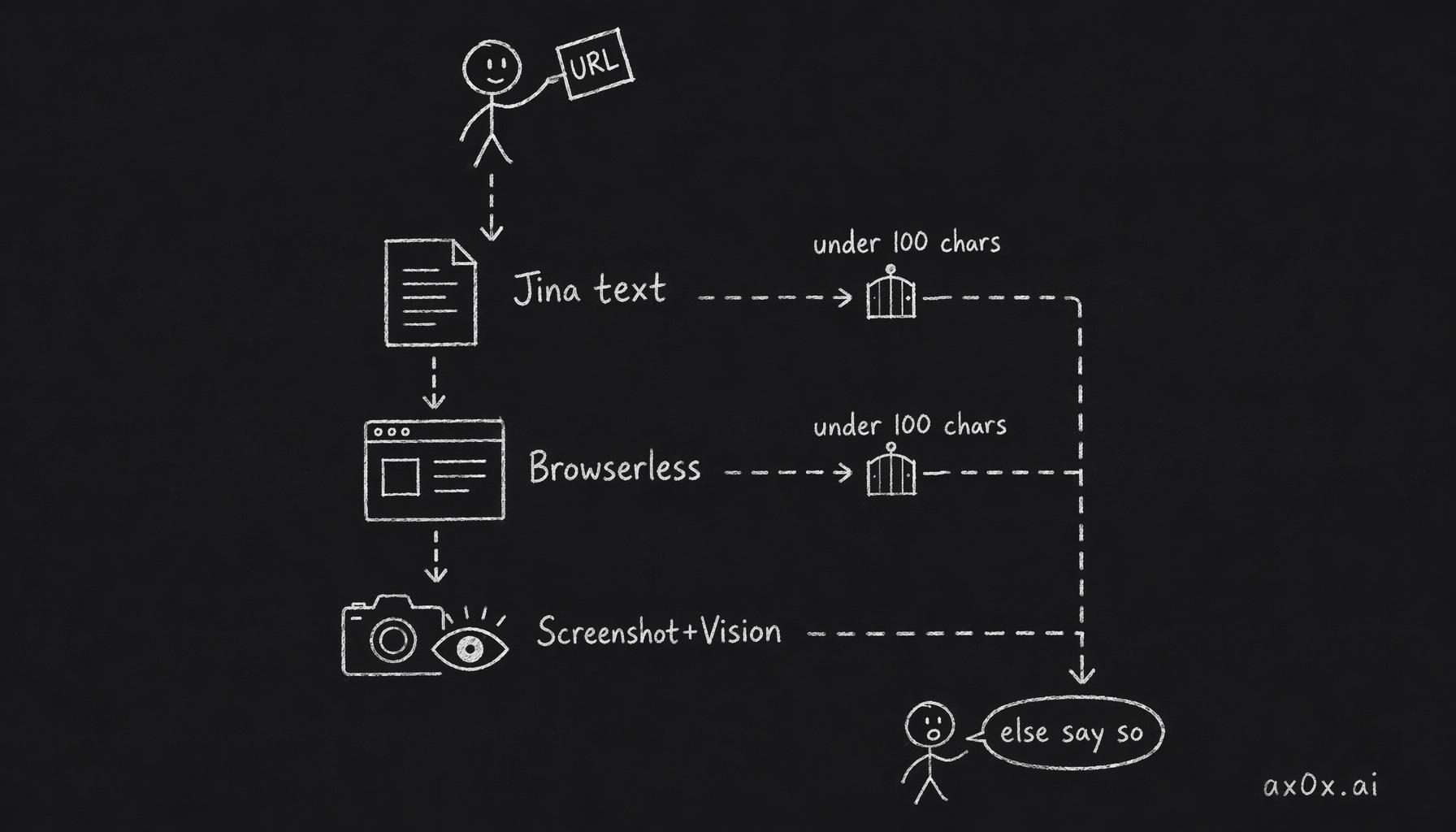 The 3-tier waterfall URL browsing pipeline: try cheap Jina text first, escalate to Browserless scrape then screenshot+vision whenever the result is under 100 chars, and honestly report failure if all tiers miss
The Integration
URL browsing plugs into two paths:
- Telegram: runs in
processBatch()after media processing, beforerouteMessage(). URLs are extracted, fetched, and the content is appended to the message context. - Web chat: runs in
prepareChatContext()afterresolveMedia(). Same logic, different entry point.
Both paths share the same browseUrls() function. Up to 5 URLs per message, deduplicated, trailing punctuation stripped. Promise.allSettled ensures one failed URL doesn't break the others.
The Proxy Bug
While deploying v0.0.7, production broke. TypeError: connection is not a function.
The database connection export in packages/shared/src/db/client.ts was a Proxy wrapping an empty object. This worked fine for property access — connection.query(...) — because the Proxy had a get trap that forwarded to the real connection.
But postgres.js uses tagged-template syntax:
connection`SELECT * FROM memories WHERE user_id = ${userId}`
This calls the Proxy as a function. An object Proxy doesn't have an apply trap. A function Proxy does. The target type determines which traps are available.
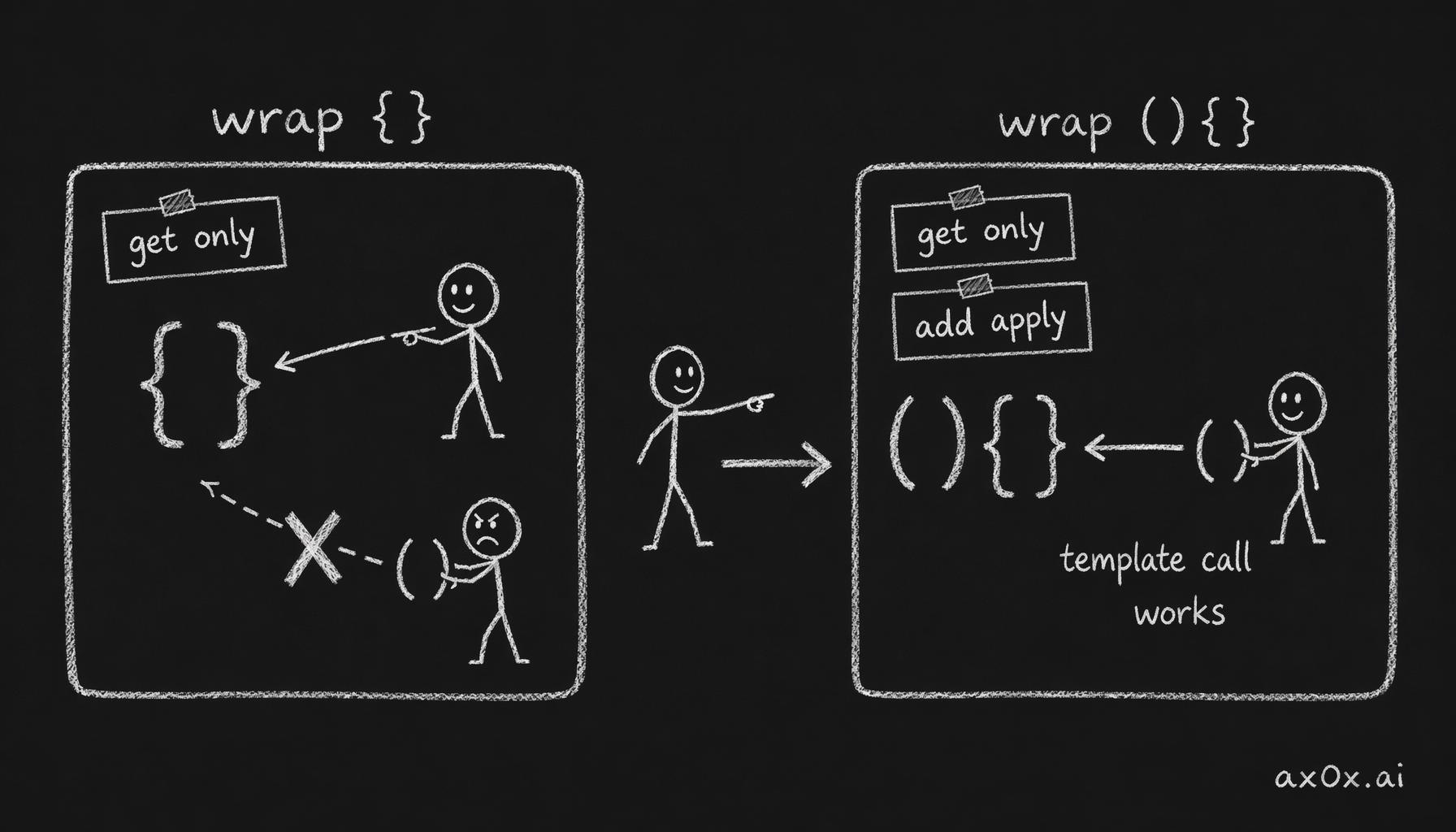 A Proxy target's type determines which traps are available: wrapping an empty object gives only a get trap (dot access), while a function target adds an apply trap so it can be called as a function via tagged templates
The fix: change the Proxy target from {} to function () {} and add an apply trap:
export const connection = new Proxy(
  function () {} as unknown as ReturnType<typeof postgres>,
  {
    get(_target, prop, receiver) {
      return Reflect.get(getConnection(), prop, receiver)
    },
    apply(_target, thisArg, args) {
      return Reflect.apply(
        getConnection() as unknown as (...a: unknown[]) => unknown,
        thisArg,
        args,
      )
    },
  }
)
This broke memory retrieval and personality extraction — every raw SQL query using the tagged-template pattern. The kind of bug that's invisible until it isn't: the Proxy worked for months for dot-notation access, then broke the moment someone used template syntax.
The Debugging Story
After deploying the URL browsing feature, I tested it immediately. Sent the card game link. The agent still hallucinated stats.
First thought: the feature didn't deploy correctly. But the logs showed it deployed fine.
The real issue was simpler and more annoying: the URL was sent at 3:03 AM, before the deployment. When the agent said "try again," the retry message contained no URL — just "try again." The browseUrls() function found nothing to fetch.
User resent the link. Jina returned all 16 lines of game state — player names, scores, bomb sequences, winner. The agent described the results accurately. Feature worked perfectly.
The lesson: when a new feature seems broken, check whether the triggering input arrived before or after the deployment. Old messages don't retroactively gain new capabilities.
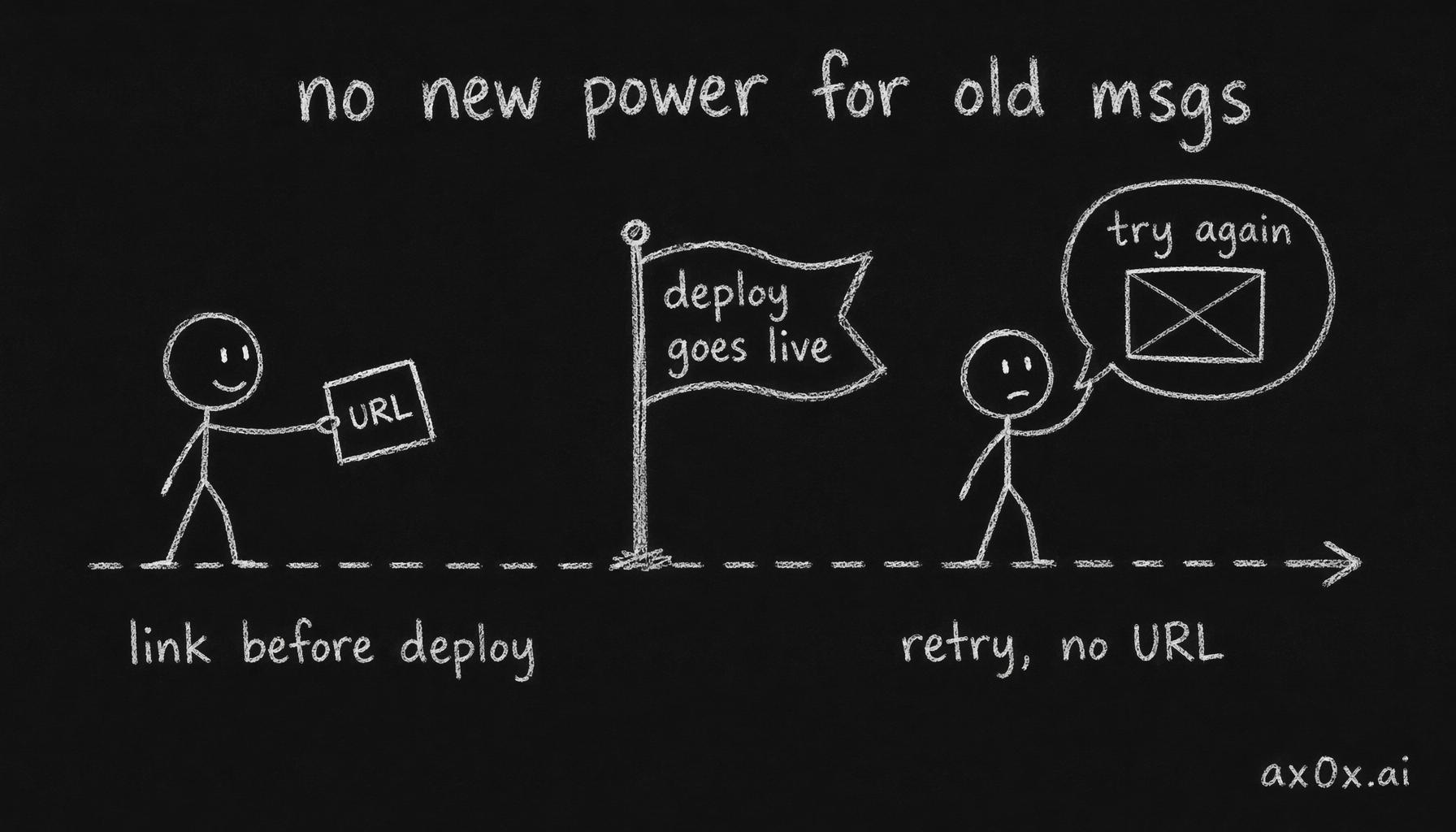 The deployment-timing gotcha: the link was sent before the deploy, and the retry message said only 'try again' with no URL to fetch — old messages don't retroactively gain new capabilities
23 Tests
The browse.test.ts file covers:
- URL extraction: no URLs, single, multiple, dedup, punctuation stripping, max 5 cap
- Jina flow: success, empty response, fetch failure, non-ok status, auth header
- Browserless fallback: Jina insufficient → scrape succeeds, Jina throws → scrape catches, no API key → skip
- Screenshot + vision: short text → screenshot triggered, vision returns unrecognized → failure notice
- End-to-end: good text bypasses screenshot, both fail → failure notice
All 23 pass. Typecheck clean.
What Changes
Before v0.0.7, every shared link was a lie waiting to happen. The agent would see the URL, not understand it, and fill the gap with plausible fiction. Users who noticed would lose trust. Users who didn't would get wrong information.
After v0.0.7, shared links become context. A game stats page becomes actual stats. An article becomes a summary. A graphic-heavy page becomes a description. And pages that can't be read are honestly reported as unreadable.
The waterfall architecture means this works across content types without the user knowing or caring which tier handled their link. They share a URL, they get a real response. That's the entire user experience.
What I'm Thinking About
A conversation with a friend surfaced ideas I've been chewing on:
AI-written backstories don't sound like people. All of Mio's persona presets are AI-generated right now. A friend read one and immediately flagged lines that "don't sound like something a person would say." The uncanny valley isn't just in faces — it's in how characters express emotion. The fix is probably human-written presets, at least for the core templates. AI can generate volume; humans generate voice.
Custom personas are a trap. My instinct was to let users write their own persona from scratch. My friend's response: "99.9% of people are too lazy to write one, and the ones who do will write badly." A badly-written persona breaks the illusion harder than a generic one. The agent can't maintain a character that's internally contradictory or underspecified.
The better approach is tiered:
- Templates for most users — fill-in-the-blank style. Not the current presets, but more granular: pick a base personality, customize key relationship events, define a few important memories. Enough structure to prevent chaos, enough flexibility to feel personal.
- Full custom for premium users — the people who care enough to write a coherent persona probably will. Gate it behind the highest tier where the user's investment (both financial and creative) correlates with quality.
Interactive storytelling. The idea that got my friend most excited: AI personas in tabletop RPG scenarios — murder mysteries, adventure campaigns, story games. Not just companion chat, but structured narrative experiences where the AI plays a character with goals, secrets, and stakes. This is where persona quality matters most. A companion can wing it in daily chat. A character in a murder mystery needs consistent motivations, hidden knowledge, and the ability to lie convincingly.
These are v0.1.0 problems. But they shape how I think about the persona system now — it needs to support not just "personality" but structured narrative state.