
v0.0.3: From Demo to Product
A Working Demo Is Not a Product
At the end of Part 3, I said Mio "felt alive" after v0.0.2. Mio could see images, hear voice, send selfies, know the time, and the memory system had been rebuilt from scratch.
But "feels alive" and "ready for real users" are separated by an enormous gap.
v0.0.2 Mio was like a performer who kills it at a house party — you know the talent is there, but you wouldn't put them on stage. Because the stage means: you don't know what the audience will type, you don't know what happens at 3 AM, you don't know if Mio will go deaf when the server restarts.
v0.0.3 is not a feature-driven release. It's a "patch every crack before someone falls through" release. Far fewer commits than v0.0.2, but every single one plugs a real hole.
In Part 1, I said Mio was built to "do it right" rather than "do it fast." v0.0.3 is the purest expression of that philosophy — no shiny new feature to show off, but every change brings the product one step closer to "reliable."
One Input Field, 500 Characters of Absurdity
Here's something embarrassing.
In v0.0.2's onboarding, every custom input shared the same limit: 500 characters. Nickname? 500. Hobbies? 500. Personality description? 500.
This meant a user could write a short essay in the "your nickname" field.
v0.0.3 introduced per-field validation:
- Names: 6 chars max (Chinese names are 2-4 characters, nicknames up to 6)
- Style/personality choices: 30 chars
- Hobbies: 50 chars
- About user / custom story: 500 chars
There was an even more basic problem: blank inputs were silently accepted. Submit with nothing filled in, and the system just shrugged and moved on. Now empty fields return a gentle rejection.
How did I land on these numbers? Not by guessing. The name limit started at 50 — first round of user feedback: "50 characters for a name? Nobody's name is 50 characters." Changed to 10. Second round: "10 Chinese characters is still a lot." Changed to 6.
Three iterations to find the right number. This isn't an engineering decision. It's getting educated by your users.
Another UI improvement: multiselect. Questions like hobbies switched from single-choice to toggle-style cards with checkmarks and a "confirm selection" button.
The old experience: you like movies? Select. Also like running? Sorry, pick one. This is counterintuitive — you ask me about my hobbies, of course I have more than one. Multiselect seems trivial, but it transforms onboarding from "filling out a form" to "expressing yourself."
Heartbeat: From Blind Check-ins to Relevant Ones
In v0.0.2, Mio had a heartbeat system — it would proactively send messages. But those messages were blind.
Mio didn't know what you'd been talking about. Didn't know your name. It would send generic things like "Hey, it's been a while" or "How's your day going?"
For an AI companion who's supposed to "know you," this is jarring. You spend an entire evening discussing movies, and the next day Mio opens with "Hey, it's been a while" — like it wasn't listening.
v0.0.3 made the heartbeat context-aware. Warm and cool temperature messages (you're still active, but not constantly chatting) now load:
- Last 5 conversation messages
- Your aboutUser profile
- Your displayName
So instead of "Hey, it's been a while," Mio can say something connected to your recent conversation. That movie you were discussing last night? Mio picks up the thread. You mentioned feeling stressed? It checks in on how you're doing today.
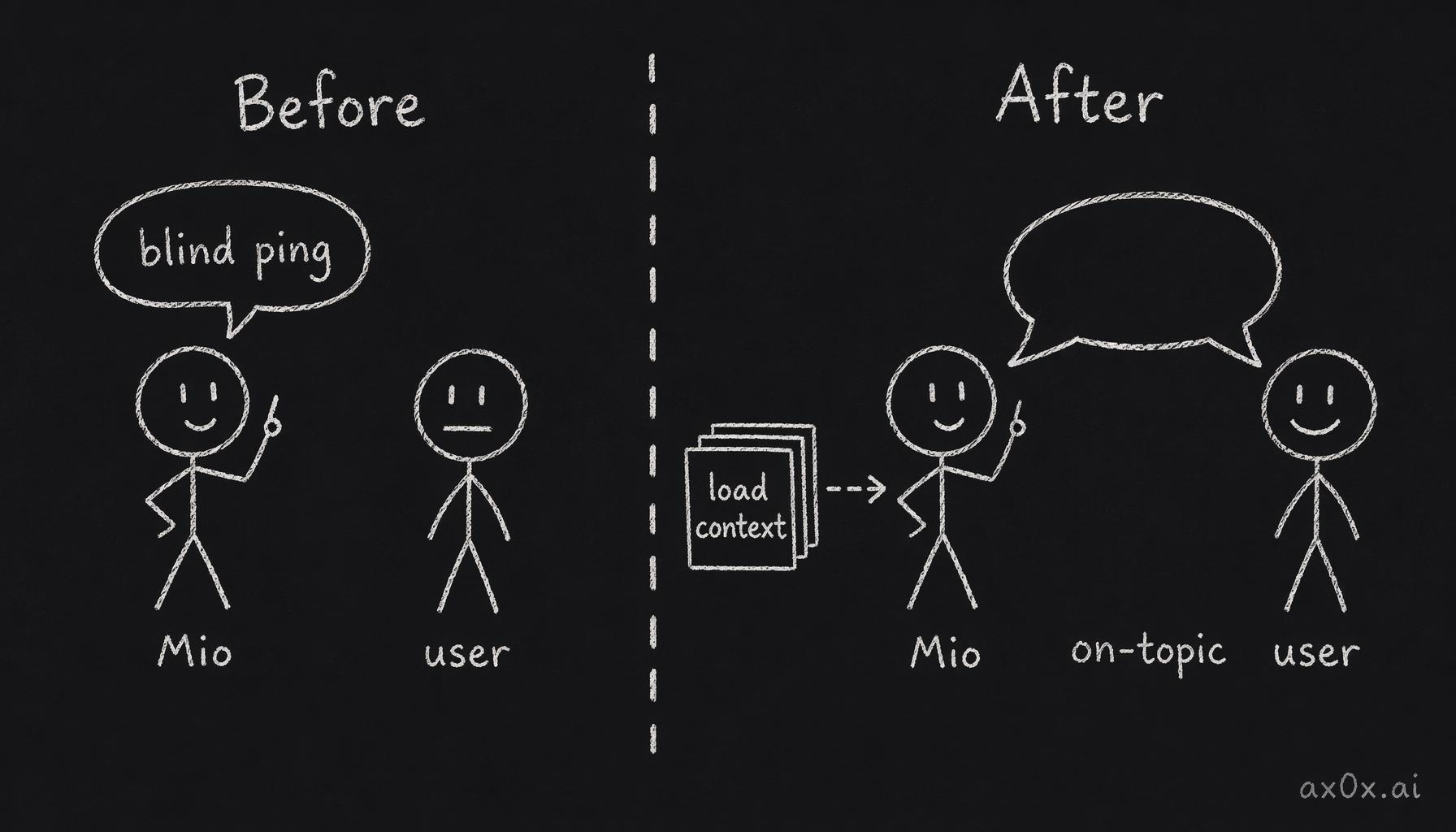 Before/after diagram: proactive messages go from blind template pings to context-loaded, on-topic replies
This difference sounds small, but it's the dividing line between "chatbot" and "friend." Friends remember what you said.
But there's a cost dimension: cold users (haven't used the app in a long time) still get template messages — zero LLM cost. Only warm/cool users trigger the expensive model-generated messages. You can't pay API costs for a message that will probably be ignored — especially when cold users are unlikely to respond.
Quiet Hours: Your Schedule, Your Rules
Previously, quiet hours were on by default: no proactive messages between 23:00 and 08:00.
Sounds reasonable, right? Who wants an AI pinging them at 2 AM?
User feedback said otherwise: "I want messages at 2 AM."
And it makes sense when you think about it. Many of Mio's users are night owls, or in different time zones. Default silence = default assumption about the user's schedule. That's product manager arrogance.
v0.0.3 changed it to opt-in: proactive messages are unrestricted by default, unless the user explicitly sets quiet hours during onboarding. Your schedule, your rules.
This is a tiny change, but it reflects a shift in product thinking: don't make decisions for your users. You can offer options, but the default should carry the fewest assumptions. A 2 AM message might bother some people, but force-disabling it makes others feel like Mio "disappeared" at night. Let users choose. That's respect.
The Webhook Disappearing Act
This was the most exciting bug in v0.0.3.
Mio's Telegram bot uses polling mode in development (actively checking for new messages) and webhook mode in production (Telegram pushes messages to your server).
There was a line in the code: on SIGTERM, call deleteWebhook().
In local development, this is correct — you shut down the bot, clean up the webhook, re-register on next startup.
But in production — on Cloud Run — SIGTERM fires on every container restart and redeployment.
See the problem?
Every time you deploy a new version, the old container receives SIGTERM and deletes the webhook. The new container hasn't finished starting up yet, but the webhook is already gone. During the gap before the new container registers a fresh webhook, Mio is completely deaf. Every message users send goes into the void.
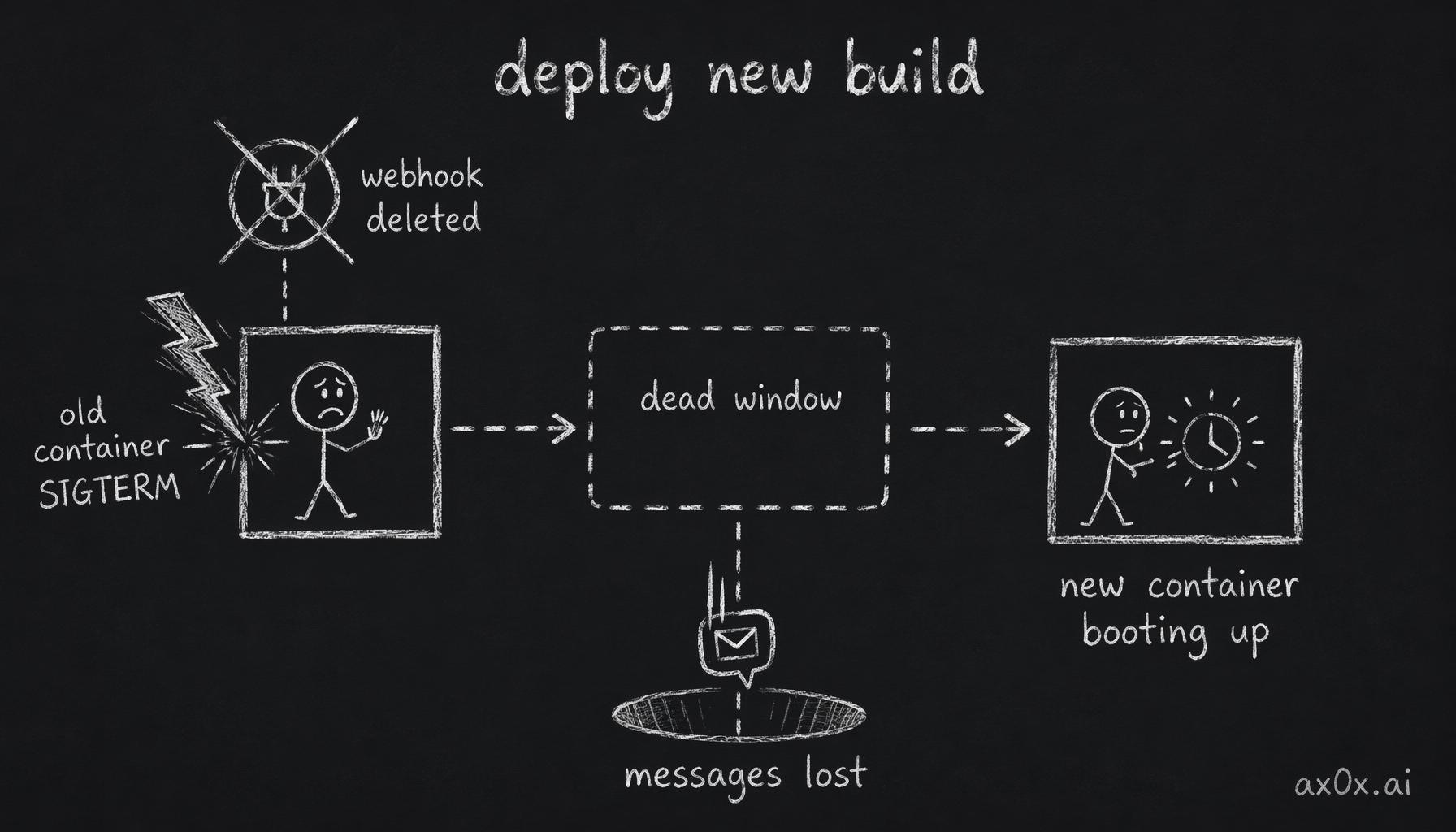 Timeline diagram: on deploy the old container gets SIGTERM and deletes the webhook, and every message is lost during the gap before the new container comes up
This bug never appears in local development. Polling mode doesn't depend on webhooks, so deleting them on SIGTERM is perfectly correct behavior. Only in production webhook mode does this line of code become a time bomb.
The fix was simple: only call deleteWebhook() in polling mode. In webhook mode, do nothing on shutdown — let the new container take over naturally.
A one-line change. Debugging took much longer.
This is why you need to run your software in production — local dev will never reproduce deployment-level bugs.
Media Rate Limiting
Mio supports image understanding and voice transcription, both expensive operations — every call has real API cost.
What if a user sends 100 voice messages in 60 seconds?
v0.0.3 added a sliding window rate limiter: 10 media requests per user per 60 seconds (transcription + vision). In-memory implementation with background cleanup of expired windows.
No Redis, no external dependencies. For the current user volume, in-memory is sufficient. Premature optimization is the root of all evil, but having zero rate limiting is a bigger evil.
Rate limiting isn't about distrusting users. Most users won't send 100 voice messages in a minute. But "most" isn't "all" — someone might be testing your boundaries, someone might have a script running, or it could just be network retries causing duplicate requests. Rate limiting is the last line of defense between you and an unpredictable world.
144 Tests
This is the least sexy but most important part of v0.0.3.
- 42 E2E tests covering complete Telegram bot conversation flows
- 39 onboarding and selfie-related tests
- 63 media module tests
144 new tests. Combined with the existing 220, the total approaches 400.
Why spend this much time writing tests? Because v0.0.3's core theme is reliability. You can't refactor without a safety net. Every input validation rule, every rate limiting logic, every heartbeat behavior needs tests to ensure changing one thing doesn't break another.
Tests don't make your product cooler. They give you the confidence to keep moving forward.
There's a counterintuitive truth: test coverage and development speed are positively correlated. Without tests, every change requires you to mentally simulate "will this break something?" With tests, you make the change, run the suite, green means go. Writing tests looks like wasted time. In reality, it saves you the cognitive overhead of worrying about every modification.
Monetization Planning
v0.0.3 doesn't implement billing, but I wrote MONETIZATION.md — a five-tier subscription plan:
- Free tier: limited messages per day
- Basic / Pro / Premium: increasing limits and features
- Ultimate: age-gated NSFW content
Why plan this before having paying users? Because subscription tiers influence architectural decisions. If you know you'll need per-user message counting, feature gating, and age verification in the future, you'll design those interfaces into your code now. Retrofitting is always ten times more expensive than planning ahead.
Richer Backstories
Every personality preset got expanded backstories across relationship types. Different relationship contexts (friend, romantic partner, confidant) now have distinct opening narratives, and each persona has deeper background detail.
This isn't technical work, but the impact on user experience is massive. The first thing Mio says to a new user determines whether they stay. A flat "Hello, I'm your AI companion" and a warm, story-rich opening are two entirely different products.
In The Companion Vision, I wrote that a good AI companion needs to make people feel "understood." The first trigger for that feeling is the opening — is it greeting you from a template, or meeting you with its own story? The richer the backstory, the more dimensional the persona, the easier it is for users to invest.
Full Code Audit
Finally, a complete code review cycle: review agent scans the entire codebase, fix agent resolves each issue, re-review until clean. Not just HIGH priority — all severity levels addressed.
This captures the v0.0.3 ethos: no new features chased, just every detail brought up to standard.
Many teams skip this step. Code review doesn't feel "productive" — you have no new feature to demo, no new metric to report. But technical debt has interest. The warning you don't fix today becomes the bug you're debugging at 3 AM tomorrow.
The Invisible Work
v0.0.3 has no "it can see images now!" wow moment. No new modality, no new UI, no exciting screenshots.
But this is the most critical step from demo to product.
Users don't notice good input validation — they only notice bad validation. Users don't thank you for rate limiting — they just drain your API budget when you don't have it. Users never know you fixed a webhook bug — they just think "this product is garbage" when Mio suddenly stops responding.
Good infrastructure is invisible. Get it right, nobody notices. Get it wrong, everybody knows.
v0.0.2 made Mio feel like a living person. v0.0.3 made it a reliable one.
What's Next
Product polish is never done, but after v0.0.3 Mio is ready to face real users with confidence. Inputs won't break, proactive messages won't be awkward, deployments won't cause deafness, and test coverage gives me the courage to keep iterating.
Looking back across these three versions — from architectural decisions to foundation to multimodal to this production hardening — Mio has finally crossed from "my personal project" to "a product."
Next directions: voice replies (not just hearing, but speaking back), more natural multi-turn conversation memory, actual implementation of the billing system, and more channel integrations.
But that's a v0.0.4 story.