Where Your Data Actually Lives — and Why RAID 5 Won't Save You
The registers, cache, and memory from the last post all share an embarrassing weakness: pull the power and everything's gone. The reason the photos on your drive survive a decade of being unplugged is a completely different set of physics. Hard drives use magnetism; solid-state drives use trapped electrons. Let's take them one at a time.
Hard drives: writing 0s and 1s into a spinning platter with magnetism
Crack open a mechanical drive and the two parts that matter are the platter and the actuator arm. The platter is coated in a magnetic film, divided into tiny regions, and the direction each region is magnetized stores a 0 or a 1. A motor spins the platter — "5,400 RPM," "7,200 RPM" is how many revolutions per minute that motor turns. At the end of the arm is the head that reads and writes, and it never actually touches the platter; it flies about 15 nanometers above it. At that scale, it's like an airliner cruising a few millimeters off the ground at full speed without ever scraping.
Writing is an electromagnet on the head magnetizing that little region; flip the current and you flip the magnetization. Early on the magnetization lay flat (LMR), which wasted space and got retired; now it stands upright (PMR), which is far denser. Reading is subtler — it relies on certain materials whose electrical resistance changes in a magnetic field. In 1988 it was discovered that stacking magnetic and non-magnetic films like a sandwich makes resistance insanely sensitive: a faint magnetic change swings the resistance enormously. This is giant magnetoresistance, and the two scientists who found it won the 2007 Nobel Prize in Physics — there's a Nobel-winning effect sitting in your hard drive.
Giant magnetoresistance let read heads get tiny and exquisitely sensitive, so tracks could be packed closer and capacity grew. But the write head stubbornly can't shrink — too small and it lacks the magnetic punch to flip the platter. So drive makers came up with what Redknot calls a galaxy-brained hack: make the tracks narrow anyway and let the wide write head just plow through, knowing it'll trample the neighboring track — then read that neighbor out first, write your track, and write the neighbor's data back afterward, each track overlapping the next like roof shingles. That's a shingled drive (SMR). Capacity goes up, write speed goes to garbage, and it's only fit for write-rarely-read-often workloads. When you buy a drive and the seller only marks "PMR," ask whether it's honest CMR or shingled SMR, so you don't get played by the wordgame. Beyond that there's heat-assisted recording (a laser pre-heats the spot to 400–700°C to demagnetize it before writing) and microwave-assisted, which has already pushed single-drive capacity past 18TB.
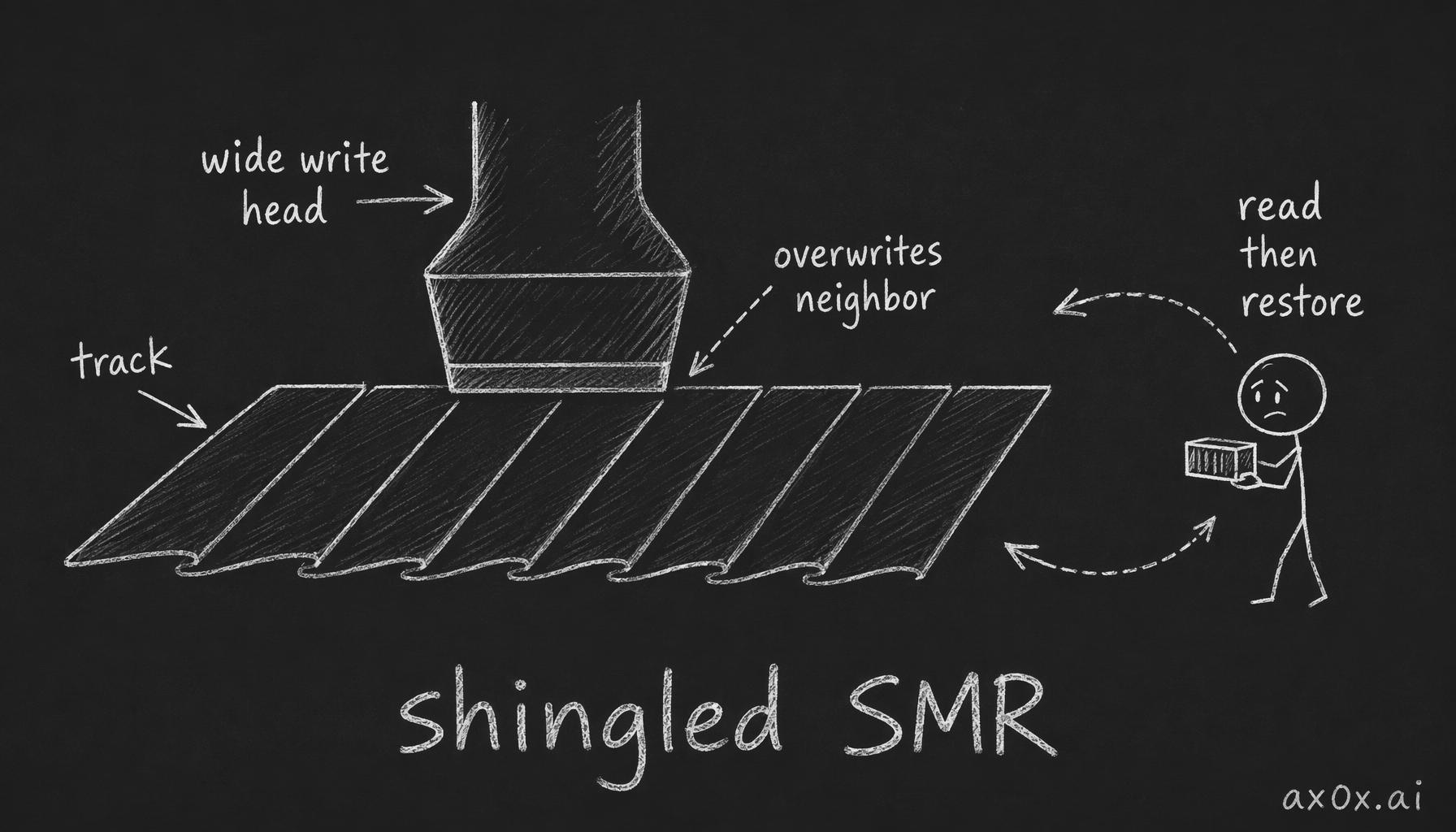 Shingled drives narrow the tracks and let a wide write head plow through, overlapping the neighbor like roof shingles — so it reads the neighbor first, then writes it back
Solid-state drives: trapping electrons inside an insulator
An SSD has no moving parts; it locks electrons up directly. An electron faces an insulating wall it normally can't cross, but under a strong enough electric field it has a probability of simply tunneling through — quantum tunneling. Use that to build a conductor wrapped in insulation (a floating gate): a strong field tunnels electrons in, and with the field gone they can't get back out, holding for around a decade even with the power off. Tuck that under the gate of a MOS transistor and you get a floating-gate transistor, where the presence or absence of trapped electrons is your 1 or 0.
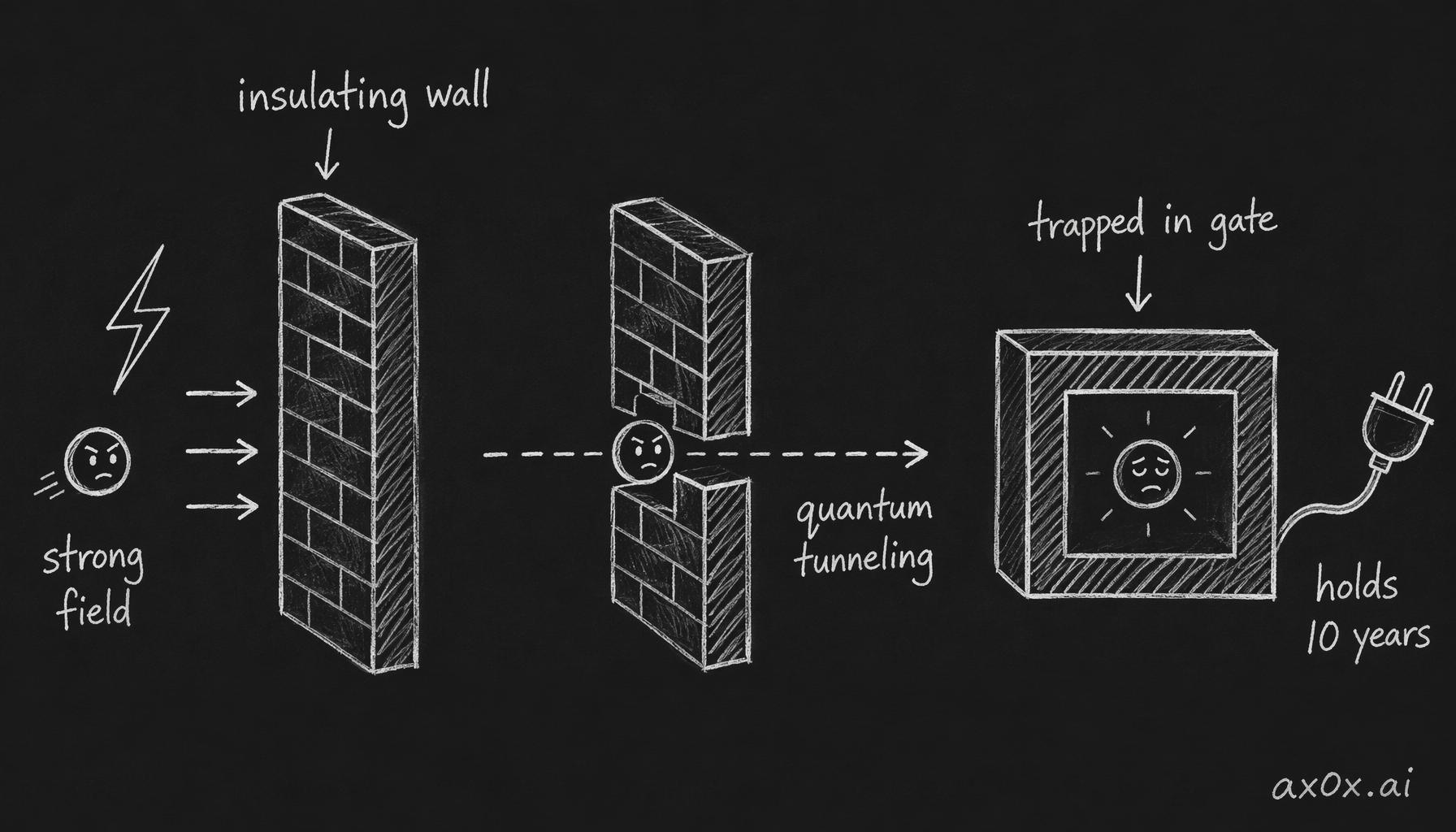 A floating-gate transistor: under a strong field an electron quantum-tunnels through the insulating wall and is trapped inside the fully-wrapped floating gate, holding for a decade even with the power off
One floating gate storing a single bit is SLC — fast and durable but pricey; cram in two bits and it's MLC, three TLC, four QLC, each cheaper but slower and more fragile. String these transistors into an array, and because the wiring matches a NAND gate's, it's called NAND flash — the Flash coming from Shoji Ariizumi, Fujio Masuoka's colleague at Toshiba, because erasing the chip reminded him of a camera flash. Then it went from flat 2D to stacked 3D, which is its own bloody saga. That deeper story — the NAND evolution, 3D stacking, and which makers lived or died — I covered in the Memory Stack series, so I won't repeat it here.
RAID: trading extra disks for reliability
Any single disk will eventually die. Team several together and you've got RAID.
The reckless one is RAID 0: chop the data into chunks, scatter them across several disks, read and write in parallel for a multiplied throughput — but lose any single disk and the whole set is gone, pure speed at the cost of safety. The safe one is RAID 1: write an identical copy to every disk, mutual backups, lose one and the other survives, at the price of two 8TB disks giving you only 8TB of usable space, half of it shadowing the other.
The contested middle is RAID 5. It also chops and scatters data, but for each group it computes a parity block from an XOR and tucks it in — XOR you can sloppily think of as "addition without the carry." The payoff: lose any one disk and you reconstruct the missing block from the parity plus the survivors, the array keeps running, and a fresh disk rebuilds it. Sacrifice one disk's worth of space to tolerate one disk failing — sounds great.
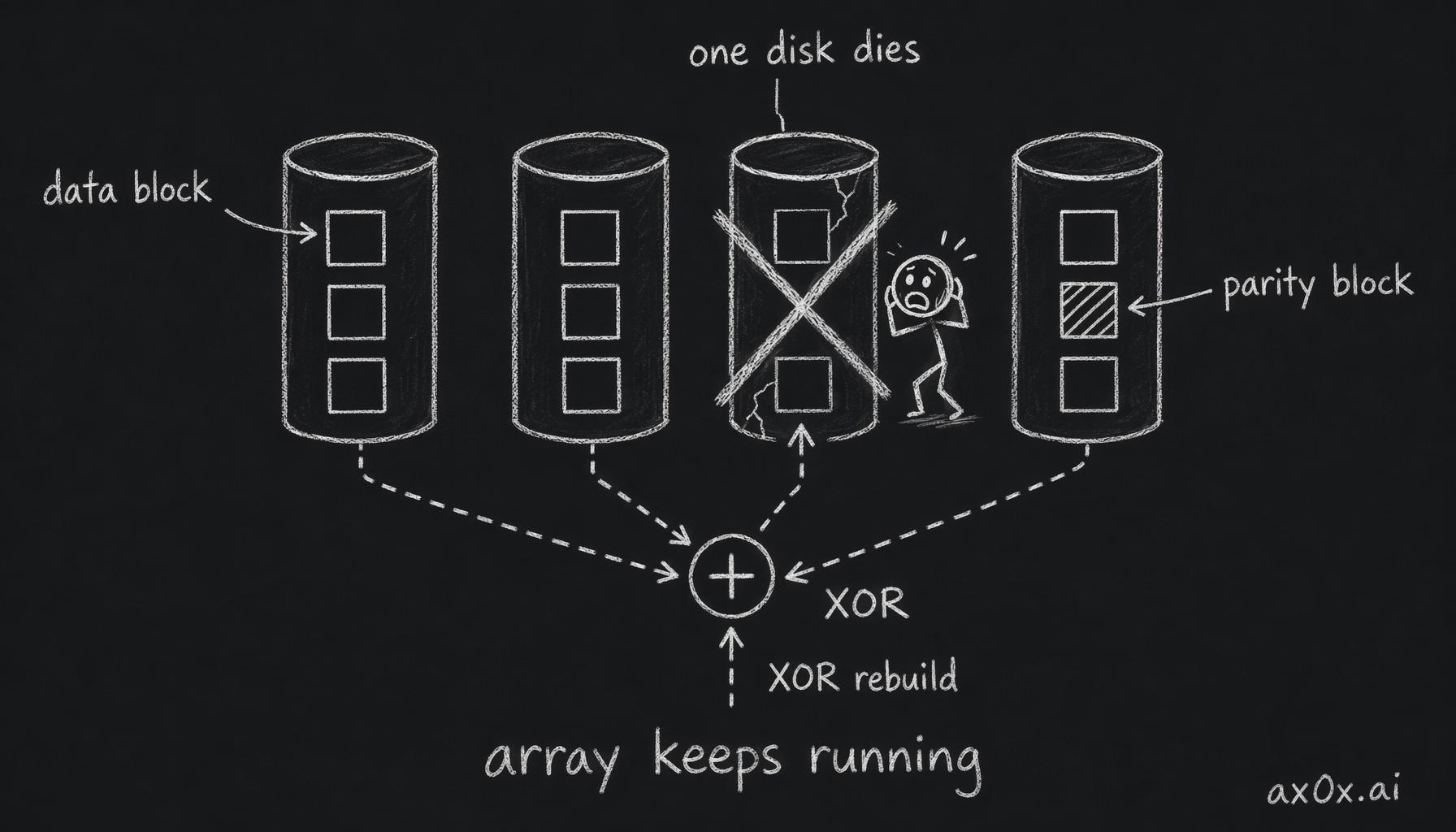 RAID 5 chops and scatters data with one XOR parity block per group; lose any one disk and you rebuild the missing block from the parity plus the survivors, and the array keeps running
Why RAID 5 keeps people up at night
Great until you hear the horror story: after RAID 5 loses a disk, the rebuild fails up to 99% of the time. Where does that come from?
Enter a concept called URE — unrecoverable read error. A drive will, with tiny probability, misread some bit. One drive's datasheet lists it as 1 in 10^14; small as that sounds, it works out to one miss for roughly every 12.5TB read. A RAID 5 rebuild has to read every surviving disk cover to cover. Say the array is six 12TB disks and one dies: the five survivors hold 60TB, and the odds of hitting at least one URE on the way through climb to about 99%. And once you hit one, a traditional array collapses. That's how the 99% nightmare is calculated.
But that math is too harsh. First, the datasheet URE is a conservative maximum; in practice it's not that frequent. Second, and more important: why should one bad data block doom the whole array? The problem is that the RAID layer on the array card only sees data blocks, not files. When it hits a URE it has no idea which file that block belongs to or whether you care, so an enterprise card's best move is to bail: stop the rebuild and call you in. So strictly speaking, a URE doesn't "collapse the array" — it "stops the rebuild and waits for you to fix it," and most of your data is still there. ZFS's RAIDZ1 goes further: it can see the file layer, so on a URE it tells you exactly which file broke and you make the call file by file.
Genuinely want more safety? Go RAID 6: a second parity group on top of RAID 5 lets it survive two simultaneous failures and tolerate UREs far better. The bottom line is that RAID never promises "your data can't be lost" — it promises "spend a few extra disks for a layer of redundancy." It is not a substitute for a real backup.
That covers where data lives. But for the CPU to use it at speed, it has to pass through main memory and video memory first — two things that, despite both storing data, took two completely opposite paths.
This series is compiled from the hardware-explainer videos of Bilibili creator Redknot-乔红. The shingled-drive "galaxy-brained hack" line and the RAID 5 URE accounting are both his, explained in more depth than I've kept here. I've only reorganized and written it up.