RAM and VRAM Both Store Data. Here's Why They're Nothing Alike.
A stick of RAM plugged into the motherboard, buffering data for the CPU. A ring of memory chips soldered around a GPU, buffering data for the graphics processor. The jobs sound identical, and yet the two parted ways long ago, with spec sheets that look nothing alike. This post is about why — same job, different families.
What main memory is made of: one capacitor, one transistor
DRAM stores a bit in a capacitor — charged is 1, empty is 0. But a capacitor wired straight into a circuit would leak charge everywhere and disturb its neighbors, so each one gets a transistor as a gate: transistor on, the capacitor talks to the outside; off, it sits quietly. One capacitor plus one transistor is the smallest memory cell.
The trouble is the capacitor leaks, the voltage slowly drains, and a 1 decays into a 0 — so DRAM has to read every cell and write it back on a schedule, which is called refresh. Reading and writing are already fussy, and on top of that it has to refresh constantly: that's the root reason DRAM is inherently slower than the CPU. I'm only using DRAM as a foundation here; the Memory Stack post on DRAM digs into the capacitor, the array, and the sense amplifiers properly.
Same origin — so why the split?
At first, video memory was main memory; graphics-card makers just used the DDR standard straight off the shelf. Then GPUs got hungry, DDR couldn't feed them, and NVIDIA teamed with ATI to fork off GDDR (the G is for Graphics). To see why they split, you have to look at how a CPU and a GPU differ in temperament.
A CPU has few cores but each is mighty; a GPU has many cores but each is weak. Take "brighten a dark photo." A CPU pulls the first pixel from memory, brightens it, writes it back, then the second, then the third — one trip at a time. A GPU has its controller hand out work to hundreds of cores at once — you take pixel 1, you take pixel 2 — and on one command they all dash to memory for their pixel, all compute, all write back together. One is carrying water by the bucket; the other is a thousand soldiers marching in lockstep.
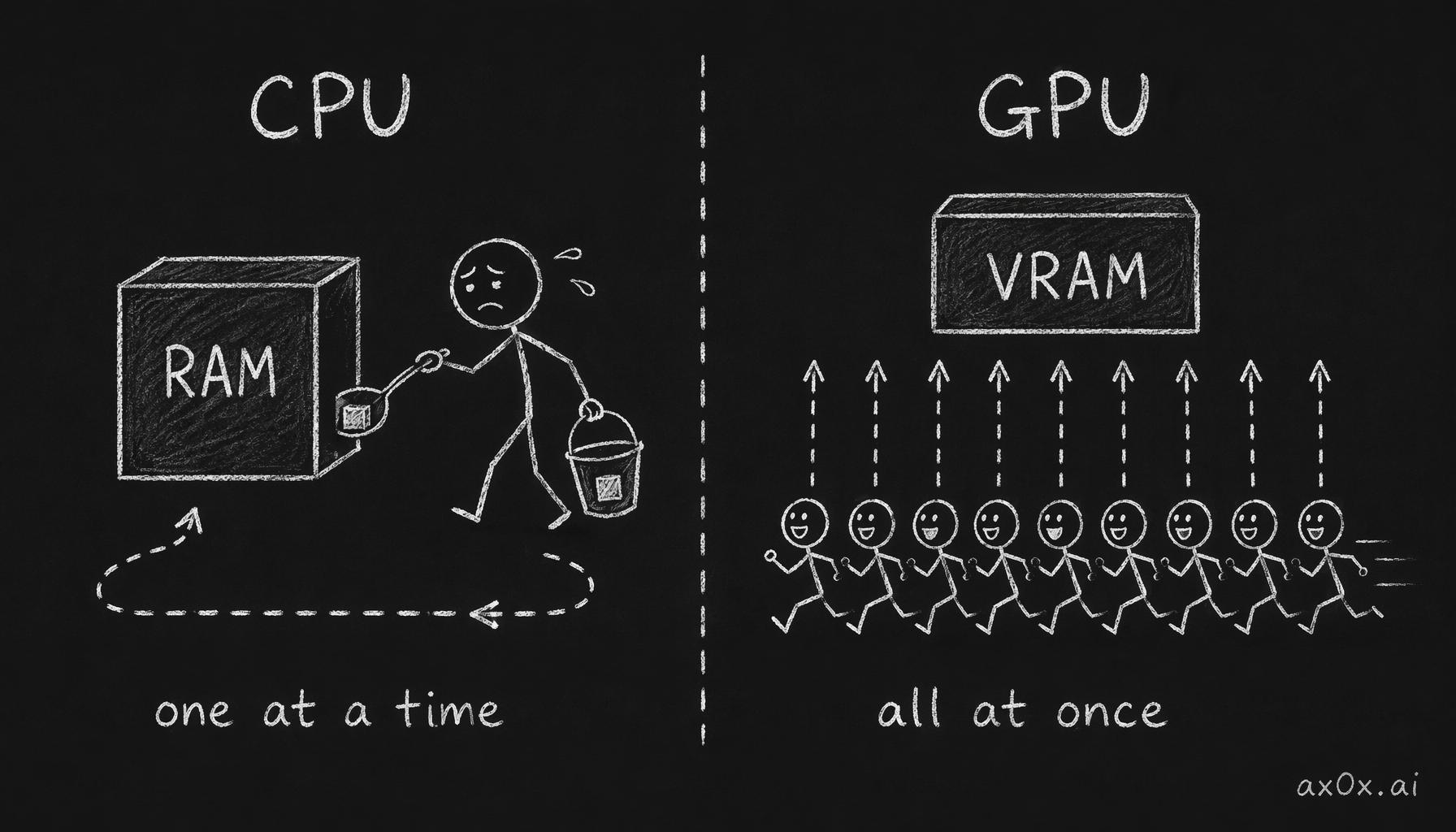 A few-core CPU carries pixels one bucket at a time while a many-core GPU dashes to memory all at once — the two access patterns are why RAM and VRAM split
Video memory grinds away at bandwidth
A GPU's "grab it all at once" appetite needs far more bandwidth than main memory does. Bandwidth equals transfer rate times bus width, and Redknot frames it as shipping freight between two cities: bus width is how many roads you build, transfer rate is how fast the trucks run on each.
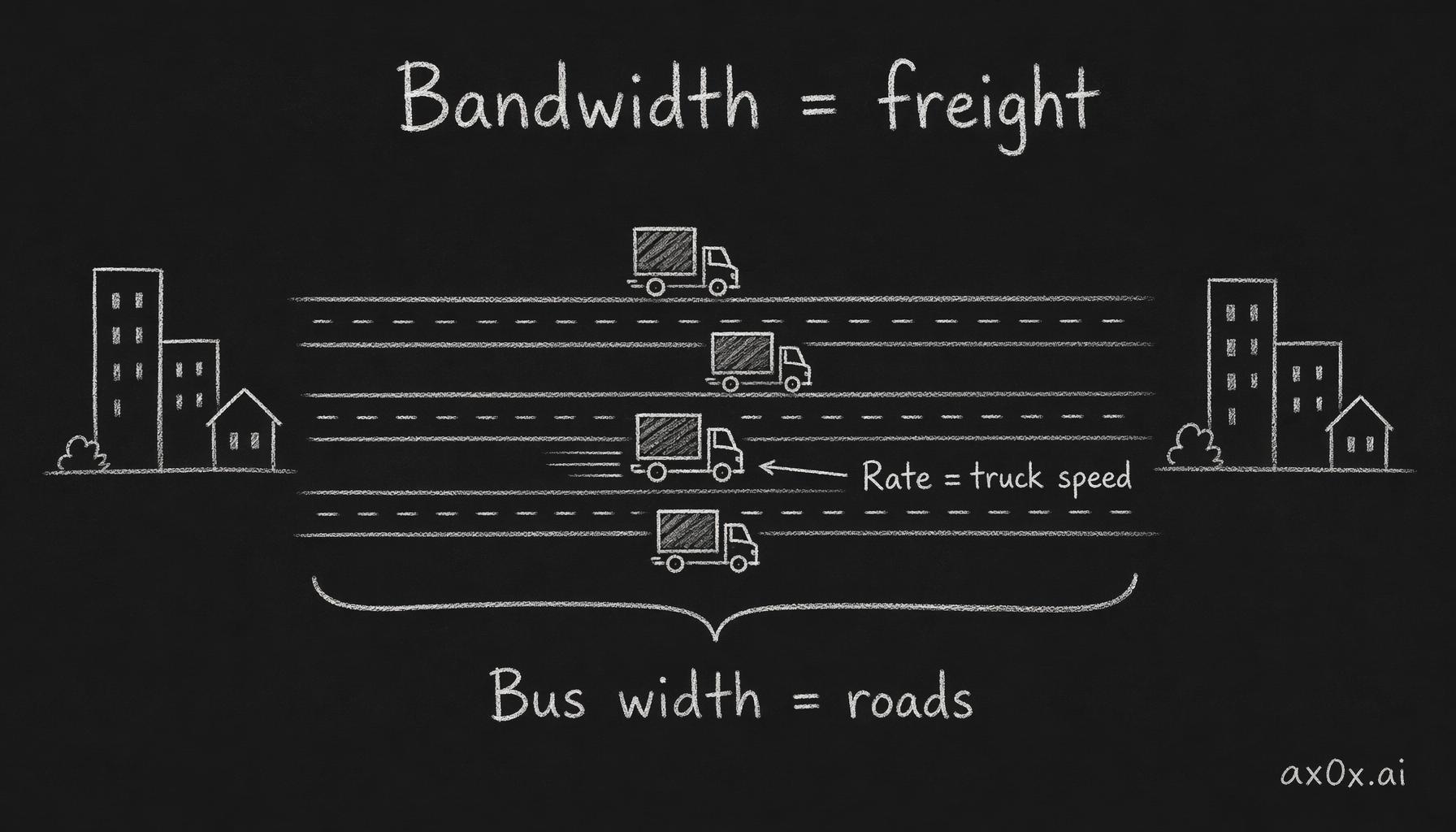 Bandwidth = bus width x transfer rate: bus width is how many roads connect two cities, transfer rate is how fast trucks run on each
On roads, video memory crushes main memory: RAM's bus width is usually 64 bits (128 in dual channel), the 4090 is 384 bits, the 5090 a flat 512. On speed it gets clever. Trucks topping out near the speed of light can't floor it any harder, so you cram more trucks into the gaps. The most traditional circuit transfers once per clock cycle (SDR); then you catch both the rising and falling edges of the clock and transfer on each — that's DDR (where main memory's DDR name comes from). Still not enough for video memory: GDDR5 copies the clock into four offset phases and transfers four times, GDDR6 does eight. To squeeze further, you make each truck carry more cargo: turn two voltage levels (high/low) into four, sending 2 bits at once — that's PAM4, and GDDR6X uses it to double again, to the equivalent of 16 transfers per cycle. As Redknot warns, though, take too big a step and you split your pants — PAM4 was aggressive, and GDDR7 retreated to the steadier three-level PAM3.
Main memory can't be bothered to chase bandwidth
Meanwhile main memory has done almost nothing new beyond using both clock edges. Bus width is forever 64 bits, and each generation just nudges the frequency. It's not laziness — bandwidth genuinely wouldn't help.
A CPU's work is mostly serial: summing 1 to 100, every step needs the previous step's result, so you can't split 99 additions across 99 cores. That kind of work goes one at a time, each step needing little data, so the bandwidth demand is low. What a CPU actually cares about is latency — the gap between asking for data and getting it — which piles up across access after access into a long total. Main memory latency runs fifty to eighty nanoseconds, which to a CPU is glacial, which is why CPUs keep bolting on cache to dodge memory trips.
A GPU doesn't care about latency. With that many cores all fetching at once, a longer wait barely slows the total because everyone's waiting together. Redknot skewers an old teacher's trick here: "you talking for one minute wastes one minute for all 45 classmates, so you wasted 45 minutes." It's one minute. With ten thousand classmates it's still one minute; the emperor himself shows up and it's still one minute. So video memory latency sitting above 200 nanoseconds is fine, and plenty of its bandwidth tricks were paid for with latency anyway. (Apple's unified memory, which mashes the two together, is a story worth its own post.)
Push bandwidth to the extreme and you get HBM
A gaming card's bandwidth still can't feed AI. AI chips want even wilder bus width, which is where HBM comes in. A regular GDDR7 chip is 32 bits wide; one HBM3E stack starts at 1,024. But 1,024 bits means over a thousand wires just for data, and with power, address, and clock lines, HBM3E needs close to four thousand wires — a normal fiberglass substrate can't fan that out. The fix is to swap in a slab of silicon polished smoother than a mirror as an "interposer," then stack memory dies and drill copper pillars (TSV) through them. One GB300 server node stacked this way holds over 1TB of HBM and costs 2 million RMB. Break down the manufacturing cost, though, and the GPU chip itself isn't the expensive part — the biggest share goes to the lump of HBM on its roof.
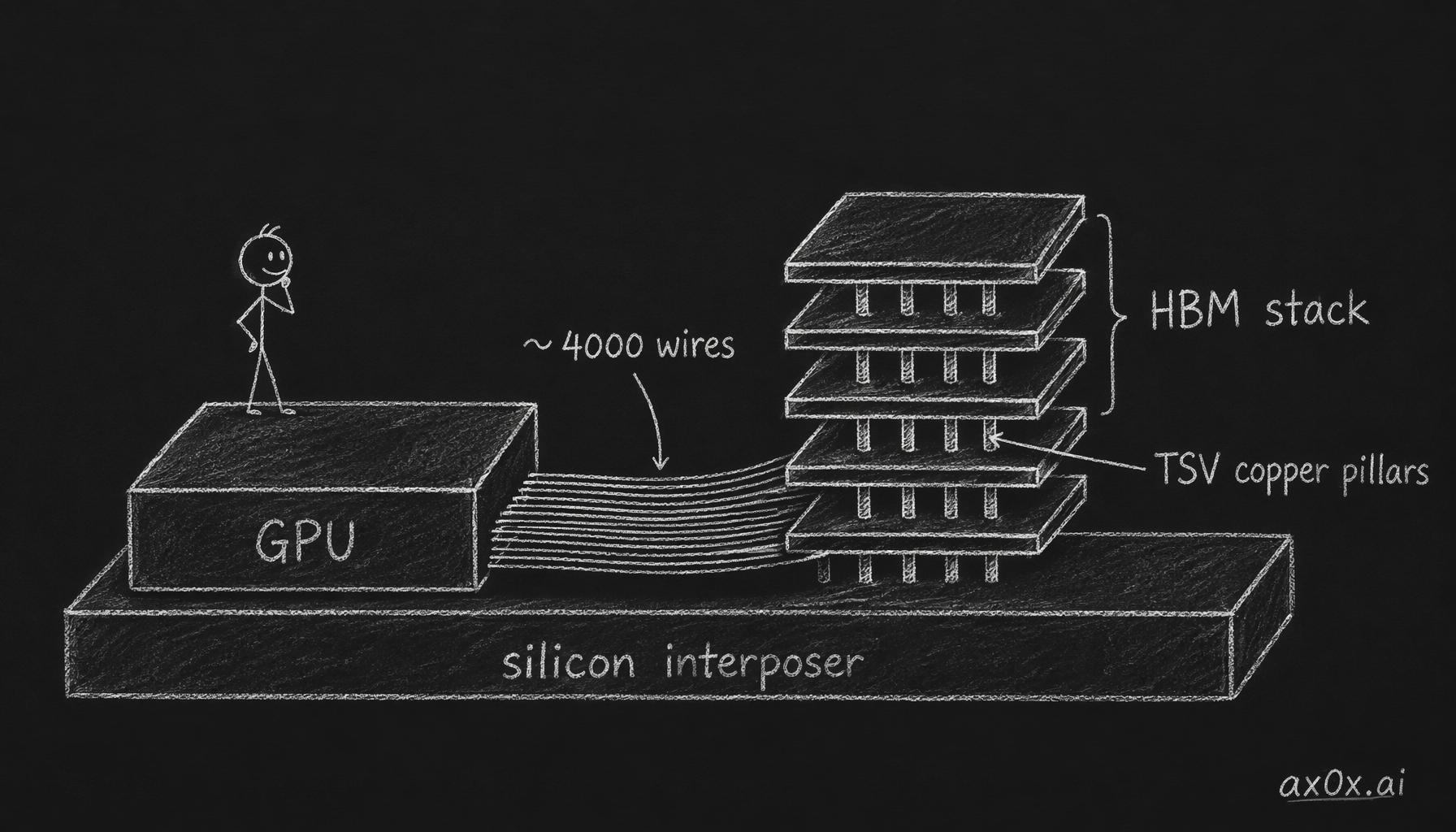 HBM drills copper pillars through memory dies stacked vertically on a silicon interposer beside the GPU, trading nearly four thousand wires for extreme bandwidth
The fine craft of that silicon interposer, the TSVs, and the vertical stacking — the Memory Stack post on HBM takes it apart, so I won't steal the scene. One side effect worth noting: HBM's production line overlaps heavily with ordinary memory, and when AI grabs the capacity, ordinary memory gets pricier. The extra money you paid on your last RAM upgrade was partly footing AI's bill.
That closes the storage thread. But whether it's a floating gate on a disk, a capacitor in memory, or this GPU itself, it all comes down to slabs of silicon that first have to be drawn into existence. Next: how humans use light to tame all of this onto a chip.
This series is compiled from the hardware-explainer videos of Bilibili creator Redknot-乔红. The freight-shipping bandwidth analogy and the "45 classmates" bit are both his — far easier to grasp than a wall of specs. I've only reorganized and written it up.