
Three Pipes Behind Every Token
An AI data center is a building with three pipes running through it. Electricity comes in, heat goes out, and data moves across tens of thousands of GPUs and back out to the people asking questions. The amount of useful work the building does is capped by whichever of those three pipes is narrowest. Buying more GPUs does nothing if you can't power them, and signing for more megawatts does nothing if you can't carry the heat away or keep the chips fed with data.
Right now the narrowest pipe is power. Satya Nadella said as much in late 2025, in an interview alongside Sam Altman. Microsoft had GPUs sitting in inventory that it couldn't plug in, because what it was short of was power, and buildings close to power. Once you see power as the cap, a lot of the industry's behavior stops looking strange, from gas turbines on site to the obsession with output per watt.
This series is my reorganized version of Kian's freeCodeCamp course on how these buildings work. His through-line, which I'm keeping, is that more GPUs or more megawatts don't automatically become more usable compute. The system is a chain, and the weakest link sets the output. This first part draws the whole map: the three pipes, the rack that everything is measured against, and the two or three numbers you need to read the rest.
Follow one token backward
Start with something familiar. You type a prompt into a chatbot or a coding agent. That request travels over fiber to a data center campus and enters at the campus edge, the handoff point where the outside network meets the site's own. From there it crosses the site's network to a rack of GPUs, where a model that was loaded earlier (pulled over the network, staged in the server's CPU memory, then copied into the GPU's own memory) runs your words through its weights and sends tokens back the same way.
That's the data pipe, and it has its own arithmetic. Kian gives a small worked example: moving an 8 MB chunk takes 6.4 ms on a 10 Gb/s link and 0.64 ms on a 100 Gb/s link, plus a fixed first-bit delay of, say, 10 µs that no amount of bandwidth removes. Multiply that by every step of every request and the network becomes part of how fast the service feels.
Now trace the electricity that made the token. It starts at a power plant, gets stepped up to a very high voltage for long-distance transmission (345 kV is the backbone voltage across Texas's grid), and loses about 5% on its way through the US transmission and distribution system. At the campus substation it gets stepped down to medium voltage, then flows into electrical rooms holding the UPS (uninterruptible power supply, the battery system that keeps the load running when the grid hiccups), then through a branching distribution system to each rack. The branching is deliberate: one cable fault should take down one rack, not the hall.
Then trace the heat. Every one of those watts ends up as heat in the chip. A metal cold plate pressed against each GPU passes that heat into a coolant. The coolant runs in a sealed loop to a CDU (coolant distribution unit), which is basically a heat exchanger. On the other side of it, a second, separate loop carries the heat out of the building to chillers, cooling towers, or fan-driven dry coolers. The two fluids never mix.
Those three paths also explain the floor plan. The hall where the racks live is called the white space. The rooms full of switchgear, transformers, UPS batteries, chillers, and generators are the gray space. The usual explanation for "white" is that the hall is kept clean, and in photos it often literally is. Kian shows a photo of a Google data hall in New Albany, Ohio, full of TPU racks, with power cables dropping to every rack and pipes overhead. What the photo leaves out is the gray space around the hall, which is where most of the limits on how many GPUs the hall can run come from.
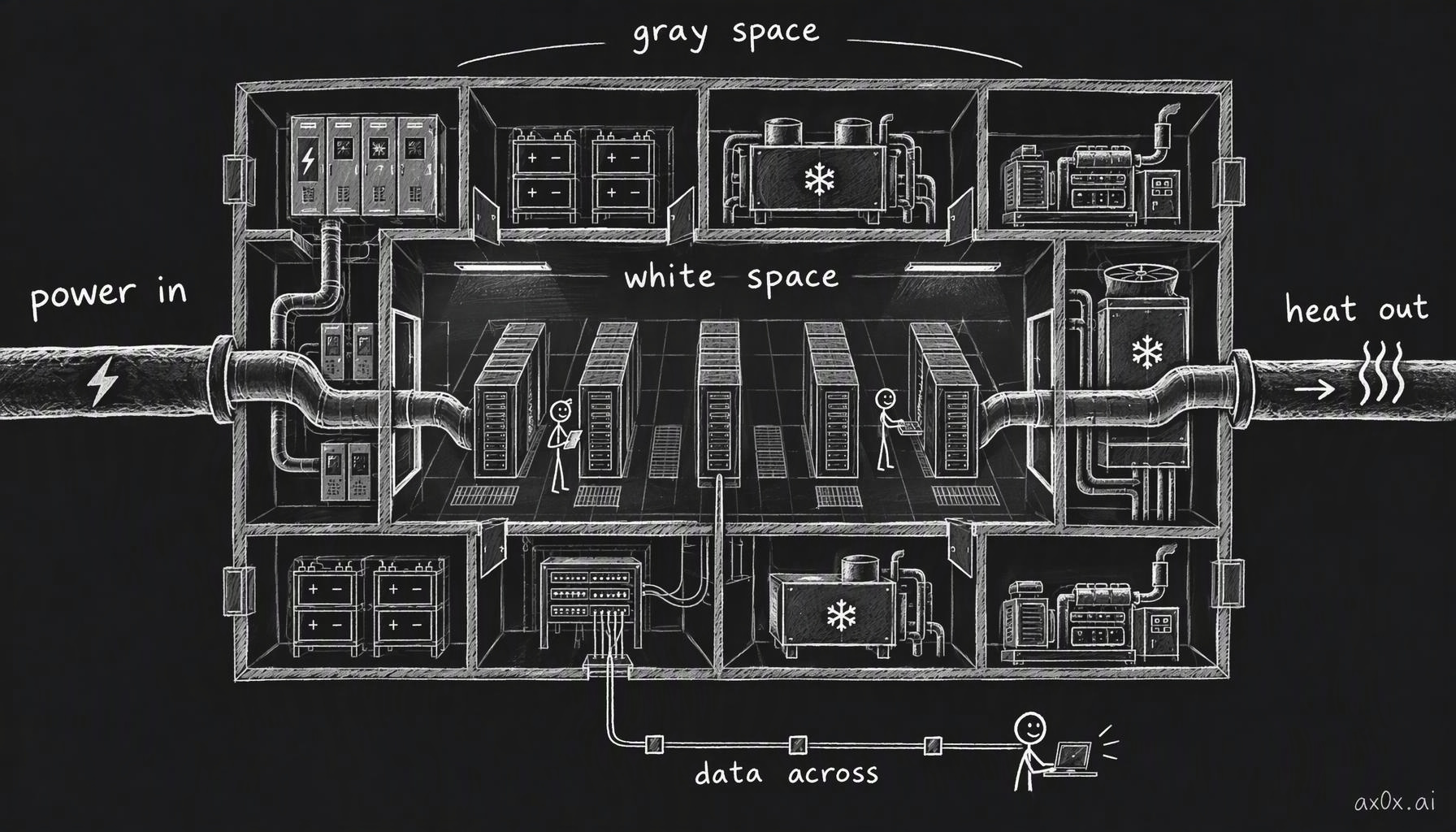 An AI data center is a building with three pipes running through it: power comes in, heat goes out, data moves across. The racks sit in the white space; the switchgear, UPS, chillers and generators around them are the gray space, and that is where most of the limits come from
One rack is the unit of everything
To make any of this concrete you need a unit, and the course uses NVIDIA's GB300 NVL72 rack. Almost every later number in the series is easier to reason about as "how many of these, and what do they need."
The name decodes cleanly. GB is Grace plus Blackwell: Grace is NVIDIA's CPU, Blackwell its GPU architecture, and the 300 marks the Blackwell Ultra generation. NVL72 means one NVLink domain of 72 GPUs. NVLink is NVIDIA's chip-to-chip link, and a "domain" is the group of GPUs that can talk to each other at full speed as if they were one big machine.
Inside the rack:
- 18 compute trays. Each is a flat 1U server drawer holding 4 Blackwell Ultra GPUs and 2 Grace CPUs. That's 72 GPUs and 36 CPUs in total.
- 9 NVLink switch trays. These wire all 72 GPUs to each other without bottlenecks. Each GPU gets 1.8 TB/s of NVLink bandwidth, and the rack has about 130 TB/s in aggregate.
- Power shelves. In the 8-shelf build, which is NVIDIA's reference design, each shelf supplies 33 kW through six 5.5 kW power supply units, so 48 PSUs and 264 kW in total. The shelves sit in two banks, one high in the rack and one lower down.
- A copper busbar running vertically down the back. The power shelves turn incoming AC into roughly 50 V DC and put it on this bar, which feeds every tray.
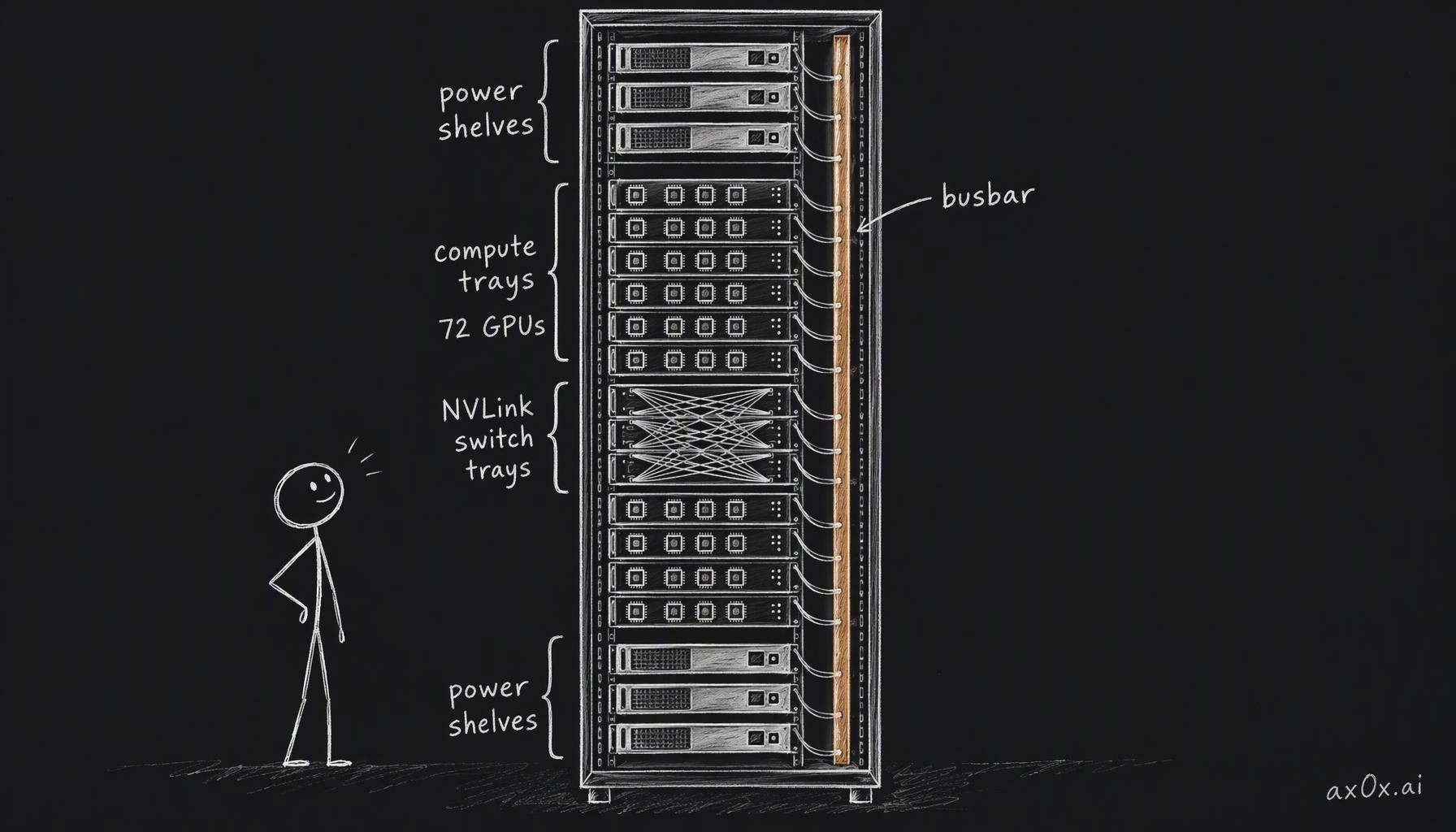 Inside one GB300 NVL72 rack: 18 compute trays holding 72 GPUs, 9 NVLink switch trays wiring them together, power shelves in two banks, and a copper busbar down the back feeding every tray
In practice the rack draws about 135 kW, with workload peaks around 155 kW (Lenovo's figures; NVIDIA's own planning number is "up to 142 kW"). Against that, 264 kW installed is about twice the typical draw. That margin is redundancy: a whole shelf can die and the GPUs keep running. The PSUs are also hot-swappable, meaning a technician can pull a failed one and slide in a replacement while the rack is live. Some OEMs sell a 6-shelf, 198 kW build that they describe as non-redundant, which tells you what the extra two shelves are for.
The rack weighs roughly 1.5 tonnes, which will matter when we get to floors. It's mostly liquid-cooled; Lenovo puts about 90% of its heat into liquid and the remaining 10% into air.
There's one detail where Kian's description and the spec sheets part ways. He describes the switches at the very top of the rack as the external networking. Those two switches are actually management switches, the out-of-band network operators use to monitor and control the hardware. The GPUs' real traffic to other racks leaves through network cards on every compute tray, at 800 Gb/s per GPU, and runs to switches outside the rack. That distinction sets up the vocabulary for the data pipe. Traffic inside the rack over NVLink is called scale-up. Traffic between racks, over InfiniBand or Ethernet, is scale-out. Beyond that sits the campus edge to other sites and users, and a storage network that holds model weights and data. Each tier has its own bandwidth and latency budget, and part six is about all of them.
The series uses NVIDIA racks as the unit for convenience. Google's TPUs are packaged differently: a TPU v4 pod is 4,096 chips arranged as 64 cubes of 64, and the cubes are joined by optical circuit switches, essentially steerable mirrors that redirect beams of light and can be re-aimed to route around a failed link. (TPU v4 is several generations old now; Google announced its eighth generation in April 2026. Kian picked v4 because it has good photos.) A TPU pod still needs power in, heat out, and data across, and the same weakest-link logic applies.
Why the voltage keeps going up
The power pipe has one law that explains a surprising amount of the series, and Kian teaches it with a toy circuit.
Put 12 V across a 6 Ω resistor and 2 A of current flows. The heat lost in the resistor is current squared times resistance: 2² × 6 = 24 W. Double the voltage to 24 V and the current doubles to 4 A, and the loss becomes 4² × 6 = 96 W. Twice the current, four times the heat.
Flip it around. Electrical power is voltage times current, so if you need to deliver a fixed amount of power, doubling the voltage halves the current, and halving the current cuts the wire loss to a quarter. That's the whole reason long-distance lines run at hundreds of kilovolts, and it's why the grid steps voltage up for travel and back down near the load. Very high voltage doesn't come into buildings because it needs big safety clearances, so the voltage comes down in stages as the power gets closer to the chips.
Now apply it to the last meter. A GB300 rack drawing 135 kW over a 50 V busbar is pushing about 2,700 A through one piece of copper. That's why the busbar is a solid bar rather than a cable, and it's the pressure behind the industry's move toward 800 V DC distribution, which part four follows from the substation all the way down to the one volt or so a GPU core actually runs on.
Two other pieces of the power pipe show up again later, so it's worth a sentence each.
The grid you plug into is AC, but chips run on DC, so somewhere there has to be a conversion. In the rack, that boundary is the PSUs in the power shelves. Each PSU connects to one phase of a three-phase supply, seeing about 277 V (the phase-to-neutral voltage of a 480 V system), and the PSUs are spread across the three phases so the load stays balanced. Three-phase power exists because the total delivered across three offset phases stays constant from instant to instant, which is what a rack drawing a hundred-plus kilowatts wants.
The UPS in the gray space looks pointless at first. It turns AC into DC and then back into AC, losing about 3–4% in a modern unit, and from the outside AC in equals AC out. The point is the battery sitting on the DC link in the middle. When grid power drops, the battery simply keeps feeding that link and the inverter never stops, so the load sees no gap at all. Backup generators take about ten seconds to start and pick up the load, and the UPS carries the building through that window. Kian treats this double-conversion design as the only kind that matters in a data center, and the layers of backup behind it are what part five is about.
Every watt in comes back out as heat
The heat pipe has an even simpler law. Essentially all the electricity that goes into a chip comes out as heat. If a GPU draws 500 W and its temperature is holding steady, the cooling system is removing 500 W. If it removes less, the chip heats up until something throttles or trips.
So the heat pipe's job grows exactly as fast as the power pipe's, and per-GPU power has been climbing every generation. The A100 drew about 400 W, the H100 about 700 W, the B200 around 1,000 W, and the B300 is configurable up to about 1,400 W. Rubin, the next generation, reportedly lands around 2 kW per GPU, though there's no NVIDIA datasheet figure for it yet.
You might read that as chips getting less efficient. Kian's point is that they aren't. They're getting bigger faster than they're getting more efficient. The data backs him up. Epoch AI finds that leading ML chips gain about 40% in energy efficiency per year, and a B200 does about three times the compute per watt of an A100. But a B200 is also 208 billion transistors across two reticle-sized dies, against the H100's 80 billion on one. Efficiency rises every year, but the chips have been growing faster, so the watts per GPU keep going up.
This is why the newest AI racks can't be air-cooled. Kian goes further and says air cooling is gone across data centers built in the past five years, which overstates it. The Uptime Institute's surveys still show most operators air-cooling most of their IT. It's the frontier AI racks that have moved to liquid, and even a GB300 still sends around a tenth of its heat to air, which is why fans and rear-door heat exchangers haven't disappeared.
The two-loop design from earlier is how the liquid gets organized. The inner loop, often called the technology loop, runs millimeters from chips that cost tens of thousands of dollars each, so its fluid is heavily treated and the loop is covered in leak sensors. The outer facility loop carries the heat outdoors and can be engineered to a less paranoid standard, because a leak there doesn't drip onto a GPU. In practice coolant enters the cold plates around 30 °C and leaves warmer, and GB300-class trays are rated to accept supply water as warm as roughly 45 °C. Warm water matters because it can sometimes be cooled by outside air alone, without a chiller. How and where the heat finally leaves the building, and how much water that costs, is part seven.
Reading the meters
With the pipes in place, there are three numbers you need to keep straight, because people mix them up constantly.
Nameplate is the hard ceiling on power you can get. It's either what the utility has contractually committed to deliver or the rated output of your own generation. Kian's worked example: a site with a 2 MW nameplate holds 10 racks budgeted at NVIDIA's 142 kW maximum (1.42 MW) plus 80 kW of networking and storage, so 1.5 MW of IT load. Add 300 kW of support load for cooling, lighting and office HVAC, and the total is 1.8 MW, which fits under 2 MW with some headroom. You plan below nameplate on purpose.
IT load is the equipment that does the computing: racks, network, storage. Support load is everything else that keeps it running.
Nameplate also hides something easy to miss. The cap applies to power at every instant, and a day's energy can look fine while one hour breaks the limit. Kian's second example puts a site at a 6.5 MW limit, already running a steady 4 MW of live inference. A batch evaluation job that runs at 4 MW for 12 hours would push the peak to 8 MW, so it can't run. Stretch the same job to 2 MW over 24 hours and the peak is 6 MW, which fits. Daily energy is 144 MWh in both cases. Only the peak changed, and the peak is what the pipe cares about.
PUE (power usage effectiveness) is the one number the industry uses to grade a facility's overhead. It's total facility energy divided by IT energy. The Green Grid introduced it in 2007, and it's now an ISO standard. If the facility uses 120 kWh while the IT uses 100 kWh, PUE is 1.2. In the 2 MW example, 1,800 kW over 1,500 kW is also 1.2, and halving the support load to 150 kW brings it to 1,650 over 1,500, or 1.1. A PUE of 1.0 would mean every watt you buy reaches the IT equipment, which can't happen because cooling always costs something.
For a sense of the real range: the Uptime Institute's 2025 survey puts the weighted-average PUE at 1.54, flat for six years in a row. Google reports 1.09 across its fleet for 2025, and Microsoft 1.17 for its 2025 fiscal year. That gap is probably a big part of why the large operators get more compute out of the same grid connection.
Kian ends his overview chapter with a knowledge check I liked, because it catches all three confusions at once. An analyst reads two meters, 12 MWh on the facility meter and 10 MWh on the IT meter, and reports "22 MW of useful compute." There are three mistakes in that sentence. The facility meter already includes the IT meter, so the total is 12 MWh, not 22. MWh is energy and MW is power, which are different things. And neither meter tells you how much useful work got done. All you can compute is a PUE of 1.2. Even the 10 MWh of IT includes networking and storage, so the energy that went into actual matrix math is something less than that.
That last point is the gap PUE can't close. A building with a PUE of 1.1 that wastes its GPUs on idle time and bad scheduling can produce less than a building at 1.3 that keeps them busy, because PUE only measures overhead and has no term for output.
When power is the cap, count tokens per watt
If power is the narrowest pipe, the obvious next question is how much output you get per unit of it. The industry's shorthand for that is tokens per watt.
Jensen Huang put the framing plainly in his keynote in Taipei during Computex, on 1 June 2026. A 1 GW factory can't draw more than 1 GW, so the only lever left is how much throughput you get out of each watt, and that throughput per watt is what sets the factory's revenue. Kian picks this up as the opening of his workloads chapter and calls tokens per watt one of the most important profitability metrics right now, precisely because power procurement is the binding constraint.
The units are worth spelling out, because "tokens per watt" is loose. A watt is a rate (a joule per second), so what's really meant is tokens per second per watt, which works out to tokens per joule. Multiply by the watts you have and you get tokens per second. Multiply by what you charge per token and you get revenue. That last multiplication hides a lot. The price depends on the speed tier you're selling, since a fast, interactive response costs more to serve than a slow batch one. And the whole product assumes the GPUs are actually busy. A rack that's idle half the time produces half the tokens on the same power bill.
I find this framing useful mostly as a way of reading the rest of the industry. When power is fixed, every improvement anywhere in the chain shows up as more tokens out of the same connection: a lower PUE leaves more watts for the IT, a faster network keeps GPUs from waiting, better cooling lets chips hold their clocks, and smarter serving squeezes more users onto the same hardware. Each of those is a later part of this series.
The rest of the map
Here is where the series goes from here, one sentence each.
Part two starts from the model: how a model serves its users decides how much memory and bandwidth each user eats, so the workload has to be designed in before the concrete is poured. Part three is about getting power at all, and why, when grid connections take years, speed matters more than price. Part four follows the voltage down from the transmission line to the one volt at the GPU, and shows that most of the trouble is in the last inch. Part five covers what happens when the grid flickers and what keeps a training run alive through it. Part six is the data pipe: how tens of thousands of GPUs get wired into something that behaves like one machine. Part seven is the heat pipe, and why the water argument is really about which cooling loop is open to the air. Part eight is the money, where electricity turns out to be a small line in the cost of a GPU-hour, and it ends with the Abilene campus in Texas, which shows every earlier part at once.
If you take one thing from this part, I'd make it this: when you see a headline about a "1 GW AI campus", that number is the size of the power pipe, the ceiling. How much compute comes out depends on how much of that gigawatt reaches the chips and how busy the chips stay, and the headline number tells you neither.
Next up, the model shapes the building.
This series is compiled from Kian's (@neuralkian) freeCodeCamp course "Inside an AI Factory – Power, Cooling, and GPUs Explained" (originally titled From Watts to Tokens; course notes at kiankyars.github.io/gigawatt). The framework and most examples are Kian's; I reorganized it by theme and re-checked the numbers, so any errors are mine. Companies are named only as examples, and nothing here is investment advice.