
How We Built a Machine Gun Crab Easter Egg Into Our Portfolio
It started with a link. A friend sent me pretext — a library that measures text layout without touching the DOM. The demos blew my mind: 100K-item masonry at 120fps, text flowing around animated dragons, characters exploding into physics particles.
I looked at my terminal-style portfolio site and thought: what if the text did that?
Six hours later, both my sites had particle physics, bouncing bullets, and an animated pixel-art crab.
The Terminal Site: Where Text IS the UI
My portfolio at xiax.xyz is a macOS terminal emulator — pure vanilla JS, zero dependencies. Text is the entire interface. This made it the perfect canvas (literally) for text effects.
Effect 1: Explosion on Tab Switch
When you click a new tab, every visible character becomes a physics particle. They scatter from the click point using inverse-square force (like a real explosion), with gravity, air resistance, and rotation. Each particle fades as it flies.
The physics are simple but feel right:
force = EXPLOSION_FORCE / (distance^2)
velocity *= AIR_RESISTANCE  // 0.965 per frame
velocity.y += GRAVITY * dt  // 580 px/s^2
rotation += angularVelocity * dt
After the explosion completes, the terminal typewriter kicks in for the new tab's content — preserving the terminal's signature feel.
The Character Extraction Challenge
The tricky part wasn't the physics. It was getting character positions from the DOM. Each terminal line has styled spans (green for username, blue for hostname, purple for path). I needed per-character positions and colors.
The solution: a hybrid approach. One getBoundingClientRect() per text node (not per character), then monospace math within each node. For the rare wrapped text, fall back to per-character Range measurement. This reduces DOM reads from potentially 5,000+ to about 200 — fast enough to be imperceptible.
Effect 2: Clawd the Machine Gun Crab
This is where things got fun.
I found clawd-tank — a repo full of animated SVG pixel-art crabs (the Claude mascot). The walking animation is pure CSS keyframes: body bobbing, legs alternating, arms swinging, eyes blinking. 24 animations in total, from typing to sleeping to juggling.
The interaction:
- Double-click anywhere → Clawd appears at cursor, cursor hides
- Move mouse → Clawd follows with smooth lag, faces movement direction (full 360)
- Click-hold → machine gun bullets spray in the facing direction
- Hold longer → fire rate ramps from 6/sec to 40/sec, spread widens
- Bullets hit characters → characters get velocity impulse, pushed away
- Bullets hit walls → bounce with 55% energy retention, keep scattering characters
- Release → characters spring back to home positions (spring physics + damping)
- Mouse out or Escape → Clawd fades, everything restores
The spring-back physics use a simple but satisfying formula:
velocity += (home - position) * SPRING  // 0.04
velocity *= DAMPING                      // 0.92
position += velocity
Characters oscillate around their home positions and settle naturally. The whole thing runs at 60fps with zero layout reflow because everything is canvas-rendered.
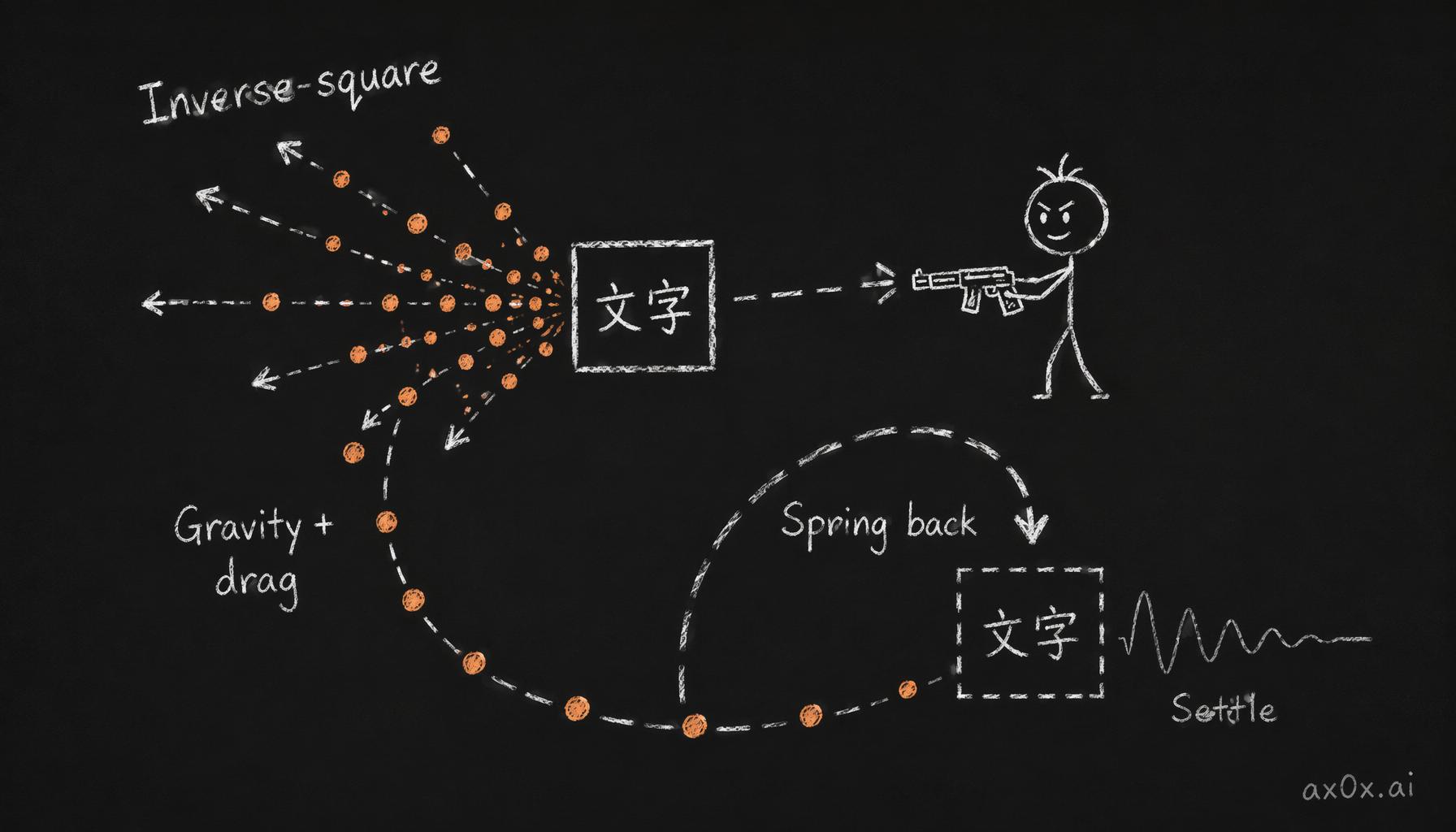 The character-effect physics loop: inverse-square force scatters characters, gravity and drag pull them down, then spring force snaps them home to settle
Porting to the Blog: A Different Beast
The blog (nlog.xiax.xyz) runs Next.js — a much more complex environment than the terminal's single-container vanilla JS. Porting Clawd revealed a fundamental lesson:
Extracting all page text to canvas works on simple layouts. It fails catastrophically on complex ones.
The terminal has non-overlapping monospace text in a single scrollable div. The blog has sticky headers, collapsed <details> elements, absolute-positioned UI, variable fonts, and multiple z-layers. Flattening everything onto one canvas produced garbled, overlapping text — no matter how I tried to hide the DOM (visibility, opacity, color transparency — all failed in different ways).
The Solution: Don't Canvas the Text at All
The blog version takes a fundamentally different approach:
- Canvas is transparent — only renders bullet particles (the orange dots)
- Clawd is a fixed-position
<img>— CSS animations play natively - Bullet impacts push DOM elements via CSS transforms — no text extraction needed
- Elements spring back when bullets pass
This means the page stays fully rendered by the browser. Links work. Images show. Layout is correct. Clawd and the bullets are just a layer on top, with impacts creating ripples in the actual DOM.
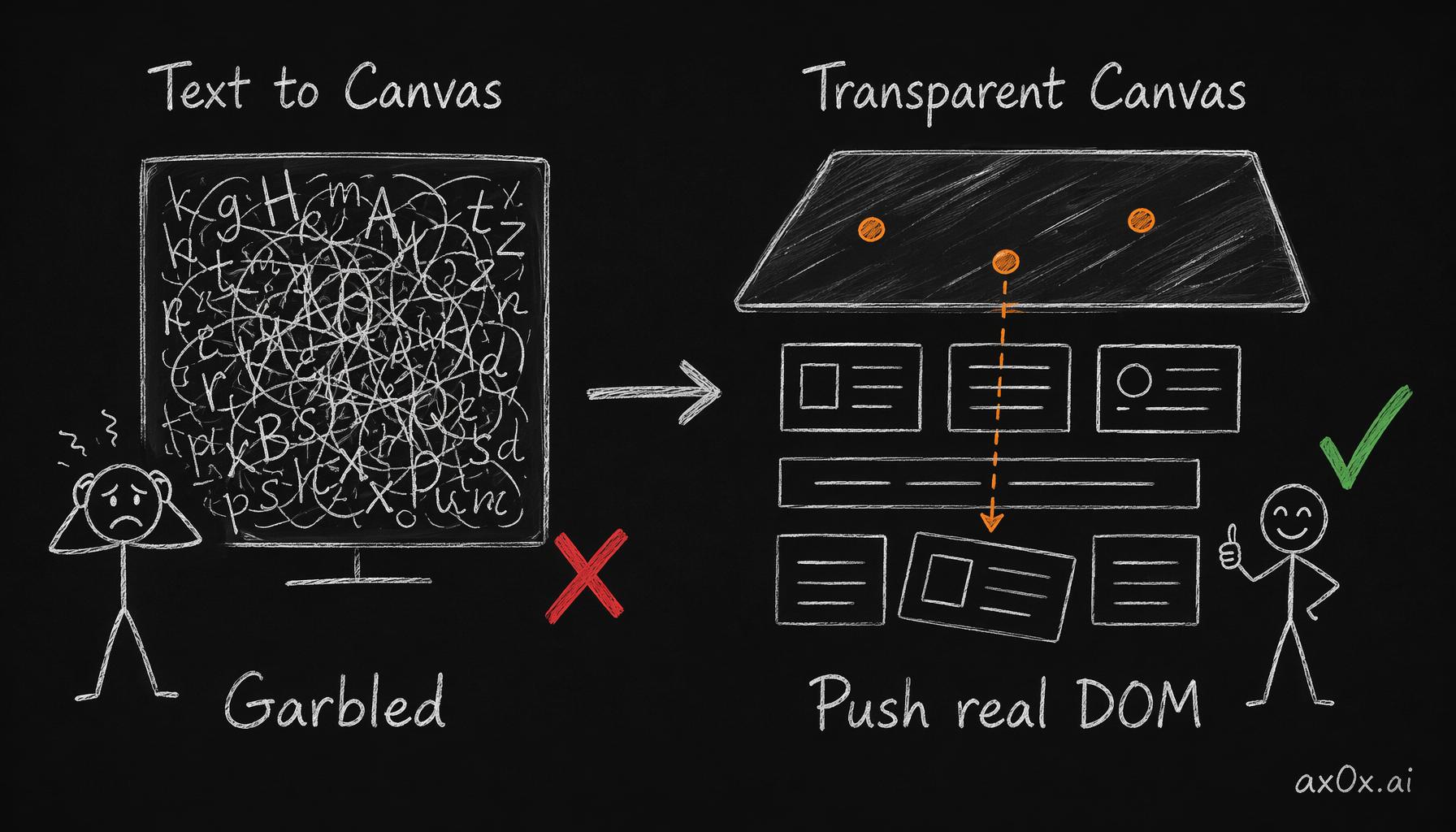 Extracting text to a canvas breaks on complex layouts; the fix is a transparent canvas that only draws bullets and pushes the real DOM via CSS transforms
The Full Effect List
Terminal Site (xiax.xyz)
| Effect | Trigger |
|---|---|
| Explosion | Click any tab — characters scatter with physics |
| Typewriter | New tab content types in character by character |
| Clawd Machine Gun | Double-click → crab + bouncing bullets |
Blog (nlog.xiax.xyz)
| Effect | Trigger |
|---|---|
| Clawd Machine Gun | Double-click anywhere on any page |
| Post Card Explosion | Click a post — card text explodes before navigating |
| Tag Cloud Physics | Click a tag — other tags scatter with elastic bounce |
| Code Block Explosion | Double-click a code block — characters scatter and reassemble |
| Reading Reward | Scroll to the end of any post — confetti burst |
| Konami Code | ↑↑↓↓←→←→BA — activates permanent Clawd mode (survives page loads) |
All effects use dynamic import() to avoid SSR issues, respect prefers-reduced-motion, and degrade gracefully if JavaScript is slow.
What Claude Code Actually Built
Every line of the effects engine — 900+ lines of canvas physics, character extraction, particle systems, and Clawd interaction — was written by Claude Code in a single session. The process:
- Research: Subagent fetched pretext's API, studied the explosive demo's physics, analyzed my terminal site's architecture
- Architecture: Designed the canvas overlay system, character extraction pipeline, DOM↔Canvas handoff
- Implementation: Created
effects.js, modifiedterminal.js, wired everything up - Iteration: Tuned physics parameters, fixed edge cases (mobile touch events, scroll locking, CSS specificity battles)
- Porting: Adapted for Next.js blog with a completely different rendering approach
The total: about 2,000 lines of new code across both sites, plus modifications to 10+ existing files. The hardest parts weren't the physics (those are well-understood). The hardest parts were the browser integration: canvas positioning, event delegation on hidden elements, mobile touch coordination, and the blog's DOM hiding saga.
Try It
Terminal site: Visit xiax.xyz. Double-click in the terminal area. Move your cursor. Click and hold to shoot. Drag to aim. Watch the bullets bounce.
Blog: Visit nlog.xiax.xyz. Double-click anywhere. Same deal — but here the bullets push the actual DOM elements around.
Konami code: On any blog page, type ↑↑↓↓←→←→BA. Clawd appears permanently. Survives page navigation.
The 404 page: Visit nlog.xiax.xyz/doesnotexist. The hint is right there.
Effects engine source: terminal-site/effects.js. Clawd SVGs from clawd-tank. Inspired by pretext and pretext-explosive.