
One Plan, Ten Tasks, Five AIs Working in Parallel
The Starting Point
Mio is an AI companion Telegram Bot I've been building — five distinct AI personas, each with their own personality config, memory system, and conversation style. The core features were already running, but three major modules had been sitting on the backlog: multimodal input (voice, images, video), enhanced onboarding (persona previews, custom backstories, user profile collection), and selfie generation.
Combined, these modules touched database migrations, a new media processing module, Telegram file downloads, config updates for all five personas, a rewritten onboarding flow, system prompt changes, and a selfie generation pipeline — spanning three architectural layers and over a dozen files.
Previously, I would've spent half a day splitting this into tasks, then worked through them one by one. Or I could throw the plan at Claude Code and let a single agent grind through it sequentially — but ten tasks in series would blow through the context window.
This time, I used Claude Code's Agent Team feature.
What Is an Agent Team
Agent Team is Claude Code's multi-agent collaboration mode. One Lead agent (the one you talk to directly) coordinates, while multiple Teammate agents work in parallel. Each Teammate is an independent Claude instance with its own context window, able to read/write files and send messages to report progress.
Core mechanics:
- TaskCreate / TaskUpdate: Create tasks, set dependencies, track status
- TeamCreate: Launch Teammate agents, assign tasks
- SendMessage: Communication channel between Lead and Teammates
- File ownership: Each Teammate only edits its assigned files, never touching others'
This isn't "break a big task into smaller pieces and run them sequentially" — it's genuine parallelism. Five agents writing code simultaneously, each committing their own work, with the Lead coordinating dependencies and scheduling in the middle.
Breaking Down the Plan
My input to Claude Code was a complete implementation plan — three steps, nine sub-steps, and a dependency-ordered execution table. Claude Code spent two minutes exploring the codebase, then decomposed the plan into ten tasks:
| # | Task | Depends On |
|---|---|---|
| 1 | DB migration (aboutUser, customStory columns) | — |
| 2 | Media processing module (transcribe, vision, process) | — |
| 3 | Telegram file download utility | — |
| 4 | Wire media pipeline into server | 2, 3 |
| 5 | Persona summaries + custom backstories + UI | — |
| 6 | Onboarding enhancements (backstory flow, user profile) | 1 |
| 7 | Wire aboutUser/customStory into system prompt | 6 |
| 8 | /reonboard with preset switching | 5, 6 |
| 9 | Selfie generation module | — |
| 10 | Wire selfie trigger into pipeline | 9 |
The key is the dependency graph. Tasks 1, 2, 3, 5, 9 are independent — they can start simultaneously. Task 4 waits on both 2 and 3. Task 6 waits on 1. Task 7 waits on 6. Task 8 waits on 5 and 6. Task 10 waits on 9.
This is a classic DAG (directed acyclic graph), and Claude Code automatically identified three waves of parallel execution.
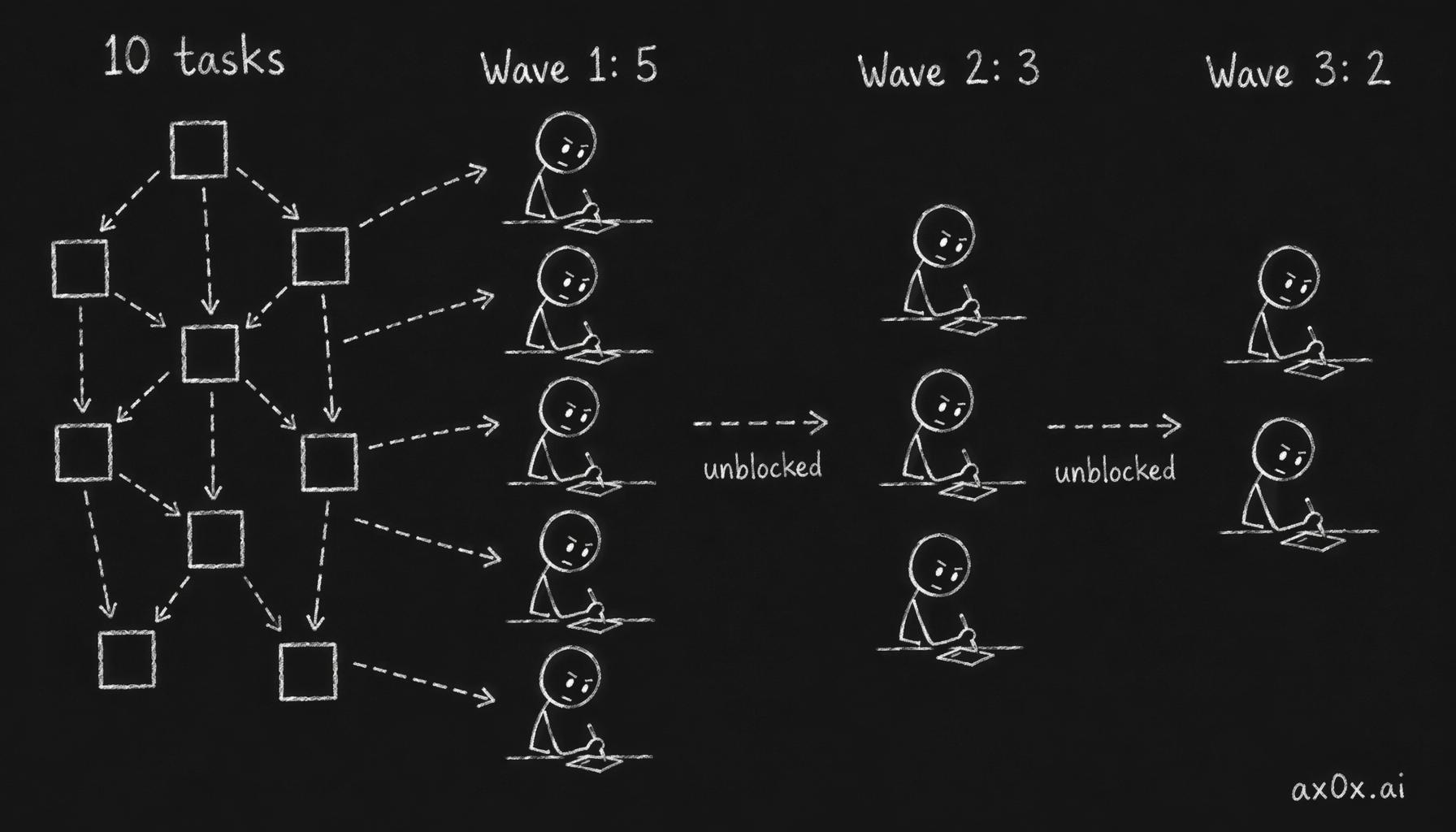 Ten dependency-linked tasks form a DAG that resolves into three parallel waves, each wave launching fewer agents as dependencies clear
Launching the Team
First wave — five agents launched simultaneously:
5 agents launched
├─ @schema-migrator     → #1 DB migration
├─ @media-builder       → #2 Media module
├─ @file-downloader     → #3 Telegram file download
├─ @preset-designer     → #5 Preset summaries + UI
└─ @selfie-builder      → #9 Selfie module
Each agent's task description included: which files to create/modify, which existing code to reference, and the exact implementation spec. More importantly — each agent was only permitted to edit specific files. schema-migrator only touched schema.ts, media-builder only touched files under media/. File ownership is the core mechanism for preventing conflicts.
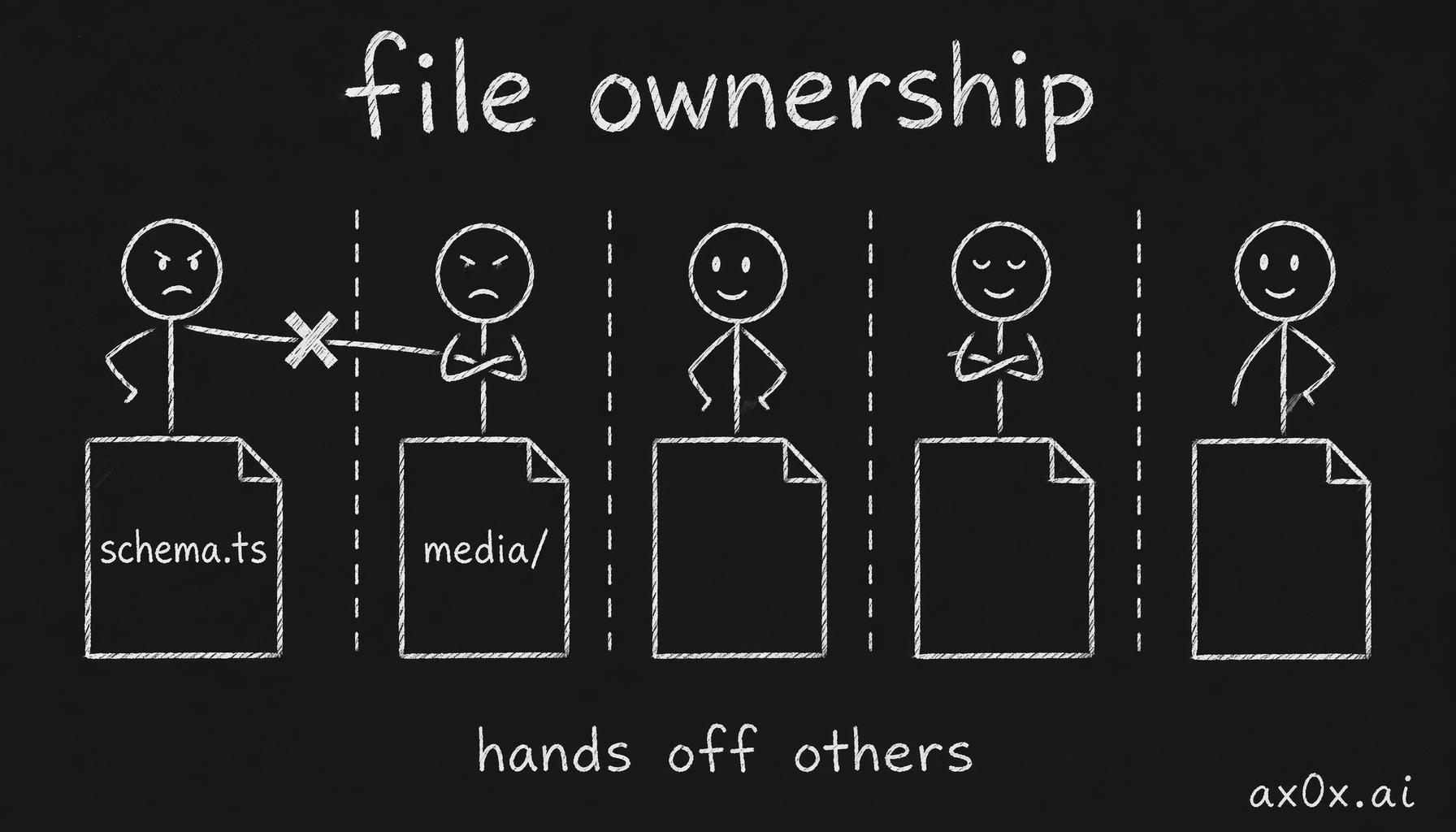 In parallel work each agent may edit only its assigned files, dashed lines fence off each one's territory, and reaching for another's file gets blocked — file ownership is the core conflict-prevention mechanism
The Lead's dashboard updated in real time:
┌─────────────────┬──────────────────────────────────────┬─────────┐
│      Agent      │                 Task                  │ Status  │
├─────────────────┼──────────────────────────────────────┼─────────┤
│ schema-migrator │ #1 - DB migration                    │ Running │
│ media-builder   │ #2 - Media module                    │ Running │
│ file-downloader │ #3 - Telegram file download          │ Running │
│ preset-designer │ #5 - Preset summaries + UI           │ Running │
│ selfie-builder  │ #9 - Selfie module                   │ Running │
└─────────────────┴──────────────────────────────────────┴─────────┘
What the Lead Actually Does
What happened next taught me what the "Lead" role really means.
Wave Scheduling
The first to finish was file-downloader — simple task, one file. Then schema-migrator completed.
At that moment the Lead made a key decision: #1 is done, which means #6 (onboarding enhancements) is unblocked. It immediately spawned a sixth agent:
● Task #1 done. That unblocks #6. Spawning onboarding-enhancer now.
No input from me needed. The Lead continuously tracked the dependency graph, and every time a task completed, it checked which blocked tasks could now start.
Then selfie-builder finished #9 — Lead immediately launched selfie-wirer for #10. media-builder finished #2 — combined with the already-completed #3, Lead launched media-wirer for #4.
The whole process unfolded in three waves:
- Wave 1 (parallel): #1, #2, #3, #5, #9 — 5 agents
- Wave 2 (dependencies resolved): #4, #6, #10 — 3 agents
- Wave 3 (dependencies resolved): #7, #8 — 2 agents
Handling Conflicts
Parallel work isn't free.
The project had Git hooks configured — if an agent was idle but the working directory had uncommitted files, the hook would fire a warning. The problem: five agents were writing code simultaneously, each only committing their own files, while other agents' uncommitted files also sat in the working directory.
The hooks started repeatedly alerting completed agents:
@file-downloader❯ Hook blocks me — uncommitted files belong to other teammates
@schema-migrator❯ Idle — uncommitted files belong to other teammates
The Lead's judgment: false positives. It didn't tell agents to commit files that weren't theirs, and it didn't disable the hooks — it recognized "expected noise from parallel work" and chose to ignore it while waiting for active agents to complete.
Server Disconnection Mid-Session
Something interesting happened during this session: the OAuth token expired and the server disconnected.
❯ continue on this task, server was down
⎿  API Error: 401 — OAuth token has expired
After reconnecting, the Lead's first action was git status and git log. It found the working directory was clean — meaning during the disconnection, the last two agents (prompt-wirer and reonboard-builder) had completed and committed on their own.
This reveals an interesting property of Agent Teams: Teammates run independently. They don't depend on the Lead's polling or confirmation to complete their work. The Lead goes down, Teammates keep going. When the Lead comes back, progress has already advanced.
Final Integration
After all ten tasks completed, the Lead ran final integration:
- Typecheck — ran
pnpm typecheck, found two TS18048 errors (ctx.callbackQuerypossibly undefined), fixed them directly - Tests — ran
pnpm test, confirmed no new test failures - Code review — verified all new files existed and exports were correct
- Documentation — spawned two more subagents to update docs and TODO in parallel
Final output:
┌─────┬──────────────────────────────────────┬────────────────────┐
│  #  │               Task                   │      Commits       │
├─────┼──────────────────────────────────────┼────────────────────┤
│ 1   │ Schema migration                     │ 10aa550            │
│ 2   │ Media module                         │ 8aec253, b39551b   │
│ 3   │ Telegram file download               │ f243f20            │
│ 4   │ Wire media pipeline                  │ 620829d            │
│ 5   │ Preset summaries + backstories       │ 3733f3b, e8903da   │
│ 6   │ Onboarding enhancements              │ bd148cc, 90da519   │
│ 7   │ System prompt wiring                 │ 0f94c71            │
│ 8   │ Reonboard with preset switch         │ 3d15317, af668b4   │
│ 9   │ Selfie module                        │ b749684            │
│ 10  │ Selfie trigger wiring                │ 387c378, b02f291   │
└─────┴──────────────────────────────────────┴────────────────────┘
Ten tasks, a dozen-plus files, three architectural layers, one session.
When to Use Teams, When Not To
After using Agent Teams several times, here's my decision framework:
Use Teams when:
- Tasks form a clear dependency DAG with 3+ parallelizable independent sub-tasks
- Changes span 3+ different directories or modules
- A single agent's context window can't hold everything needed
Don't use Teams when:
- Changes are concentrated in 1-2 files — just edit directly
- Tasks are fully sequential with no parallelism — a subagent suffices
- The work requires deep shared context (like the simulation debugging iterative loop) — each Team agent's context is isolated, they can't share debugging state
The biggest advantage of Teams isn't speed (though parallelism is indeed fast) — it's context isolation. Each agent only needs to understand the code it's responsible for, not load a dozen files into context. The Lead only needs to understand dependency relationships and final interfaces, not every file's implementation details.
This is the same principle that makes human teams work: good division of labor isn't about making each person faster — it's about letting each person focus only on their part.
Takeaways
Looking back on this session, what stands out most is the Lead's behavior pattern.
It's not a simple task dispatcher. What it actually does:
- Dependency tracking: Maintains a DAG, checking which downstream nodes are unblocked after each completion
- Resource scheduling: Completed agents get shut down, new agents spawn on demand
- Conflict identification: Distinguishes "real problems" from "expected noise of parallel work"
- Checkpoint recovery: After server disconnection, reconstructs progress from git state
- Final integration: After all Teammates finish, runs a unified pass of typecheck, test, and fixes
These aren't coding skills — they're project management skills.
I wrote in Part 6 of the Agentic AI series: "You are the manager." Agent Teams split that role into two layers: I'm the manager of the manager — I define the plan and acceptance criteria, the Lead is the project manager, the Teammates are the implementers. I didn't review a single agent's code during the entire session — only looked at the typecheck results at the end.
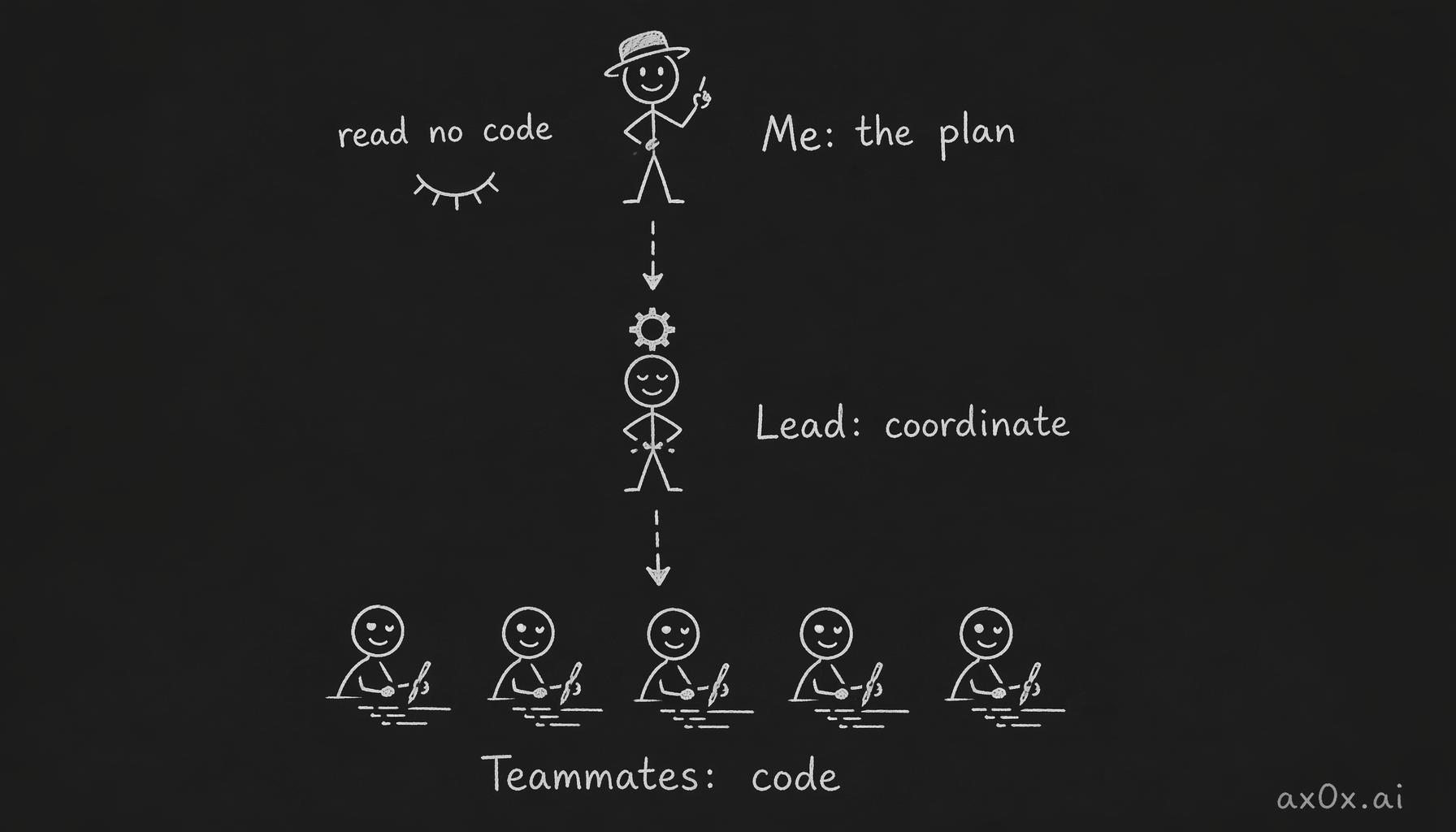 Three-layer collaboration: I set the plan and acceptance criteria at the top, the Lead coordinates dependencies in the middle, five teammates write code at the bottom, and the human reads none of it
This is a new way of working. Not one-on-one "human + AI" collaboration, but layered coordination: "human → Lead → Teammates." Human judgment sits at the top — defining what to build and what "done" looks like. AI handles the entire middle layer from decomposition to execution to integration.
One plan, ten tasks, five AIs, three waves.
That's Agent Teams.