
I Moved My Coding Agents Into My Phone — and Close the Lid
Cutting the last cord
Last time I got a few Claude accounts to roll over to the next one before hitting the five-hour wall — no re-login, no dropped session. But I was still tied to my laptop: the agents ran on my machine, and the moment I closed the lid, they were gone.
The picture I actually wanted: in the gap while something compiles, on the subway, lying in bed — pull out my phone, glance at what a few agents are doing, unstick the one that's blocked, hand out a new task, pocket the phone — and they keep running. The machine is always on in the cloud; whether my laptop's lid is open or not has nothing to do with it.
That means splitting three concerns apart: where the session runs, how agents talk to each other, and how the phone connects in. I picked one tool per layer.
Three pieces, one layer each
- herdr — the session layer. Think "tmux that understands agents." A headless server owns every agent's terminal (pane); close the viewer, drop the SSH, quit the phone app — the server and the agents inside keep running. Detach / reattach is its whole reason to exist. This is the always-on backbone.
- hcom — the messaging layer. It lets several
independent agents message each other (
@name,@group), summon each other, coordinate; you spawn agents withhcom claude/hcom codexonto a shared bus, and external scripts can drop tasks onto it too. In one line: a group chat for a bunch of peer agents. - Moshi — the phone layer. A native iOS terminal app that connects to the always-on box, shows panes, drives panes, receives pushes. That screen in your hand is your hand reaching into the machine room.
The key mental shift once you split it this way: your laptop is no longer the agents' home. It demotes to "a client you happen to use when you're at the desk." The real home is the always-on box. Long jobs go there; the laptop's lid can close whenever.
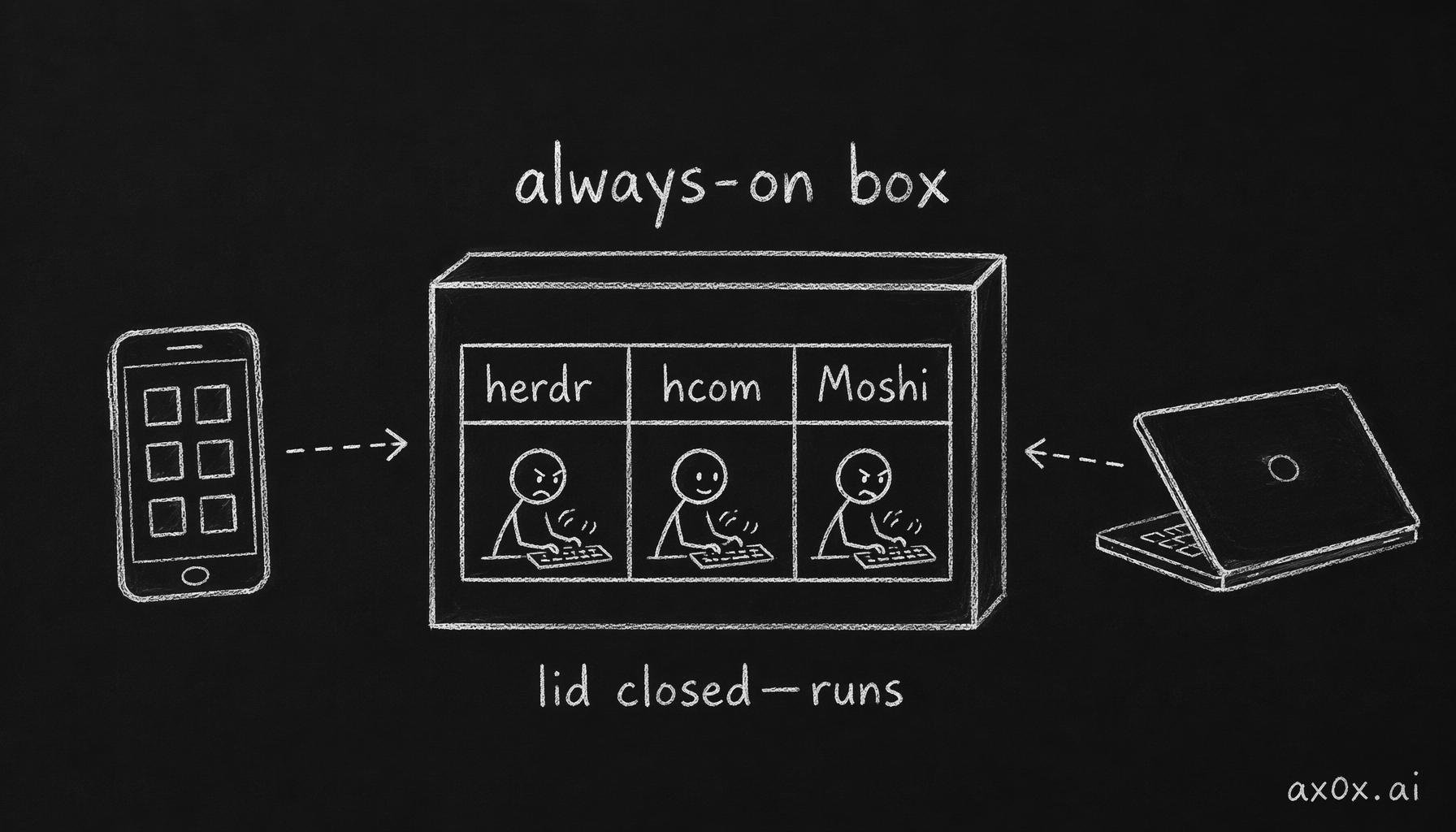 Three open-source pieces each own one layer — herdr the sessions, hcom the messaging, Moshi the phone — all living on one always-on box, while the phone and laptop are just clients that connect in.
You need an always-on machine
A cheap little cloud VM is enough (mine's an 8-core Linux box, but running agents barely touches CPU — what it needs is to stay on and have a stable network). A spare machine at home, anything above a Raspberry Pi, works too. Only two requirements: always on, and you can SSH in.
What to install: the agents themselves (claude, codex), the three pieces
(herdr, hcom, moshi-hook), plus whatever toolchain you normally lean on. Each
of the three is a one-line install script; check its repo.
Building it: four steps
Step 1 — make herdr a persistent service. This is the root of the whole "close-the-lid-and-it-survives" property. Run herdr's server as a systemd user service with linger enabled — so it doesn't depend on your login session and comes back on its own after logout, or even a reboot:
loginctl enable-linger "$USER"          # service outlives the login session
systemctl --user enable --now herdr.service
The service is three lines: ExecStart=%h/.local/bin/herdr server,
Restart=on-failure. There's a trap here I'll get to.
Step 2 — route hcom's spawns through herdr. After installing hcom, tell it to
use herdr as the terminal backend, so hcom claude lands the agent in a herdr pane
managed by the server:
hcom config terminal herdr
Step 3 — pair Moshi on the phone. Install Moshi, run moshi-hook host setup
once on the box to pair. After that the phone can connect into the box's herdr
session and see every pane.
Step 4 — smoke test. Connect from the phone, open a pane, type hcom claude
(or claude), hand it a task, watch it run. Being able to open a pane, run an agent,
and watch it work — from your phone — means layer one is up.
That screen in your hand — smooth or janky is one protocol away
I have to be very honest about one thing here, because it directly decides whether the experience feels buttery or not.
Free-tier Moshi only speaks SSH. SSH is TCP — no local echo, no predictive rendering. Every scroll, every keystroke on your phone gets sent to the remote, waits for it to repaint the whole screen, and streams the bytes back — a full round trip. Add any wifi jitter or packet loss and TCP retransmits, stalling the whole stream. The result is that jerky, one-frame-at-a-time scroll.
What actually makes it smooth is the mosh protocol (unlocked by Moshi Pro). Mosh runs over UDP (no packet-loss stalls, no TCP head-of-line blocking) plus local predictive rendering (you scroll, it draws locally instantly and reconciles with the remote afterward). This is exactly the problem "a terminal on your phone" was invented to solve. I measured it: the network path from phone to box is actually clean (direct, tens of milliseconds) — the lag isn't the network, it's SSH lacking prediction as a transport.
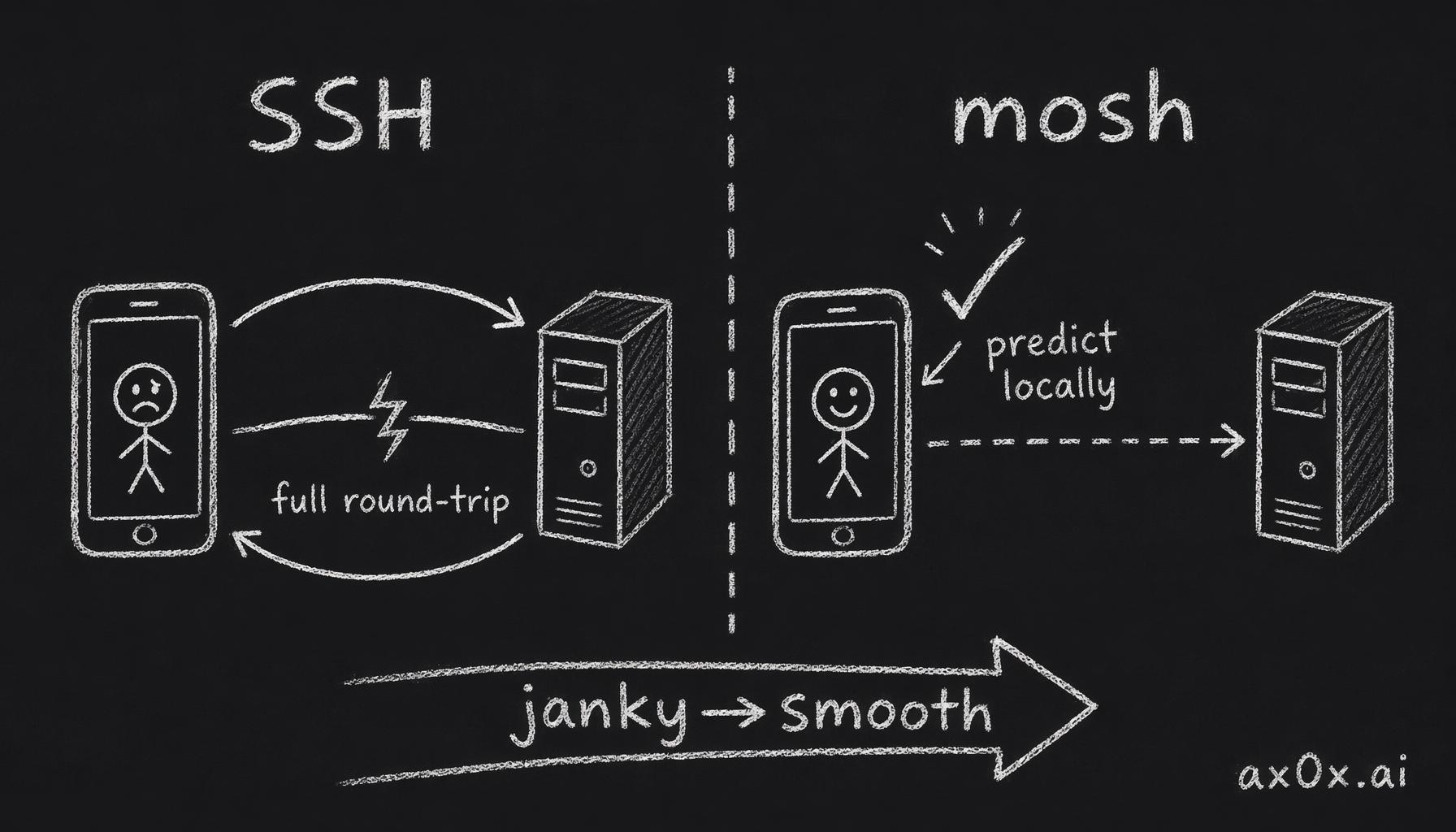 Why a phone terminal feels janky: SSH sends every action to the remote, repaints the whole screen, and streams bytes back — a full round trip; mosh runs over UDP with local predictive rendering, so it draws instantly and feels smooth.
So if you're serious about making the phone your primary controller, the mosh tier (Moshi Pro) is close to mandatory — it also throws in the native herdr session picker and "paste an image to the agent." Free tier is enough to validate the whole flow; once it's working, upgrade.
Closing the loop: it resumes itself when it hits the wall
At this point the phone can watch and steer. But "ultimate" is missing one piece: when it hits the wall, I shouldn't have to be looking.
This is where the account rotation from last time comes back in. On the always-on box I keep three Claude accounts, wired into a fallback chain, with the last account holding 30% in reserve. Plus a tiny watchdog: every time Claude's turn dies on the usage wall it fires a hook that drops a marker file; a timer that wakes every two minutes reads the marker, checks account headroom, switches to one with capacity (if the account manager hasn't already), and injects a "continue" into the stuck pane so it picks up where it left off. If that fails, it steps back and pings me in the group.
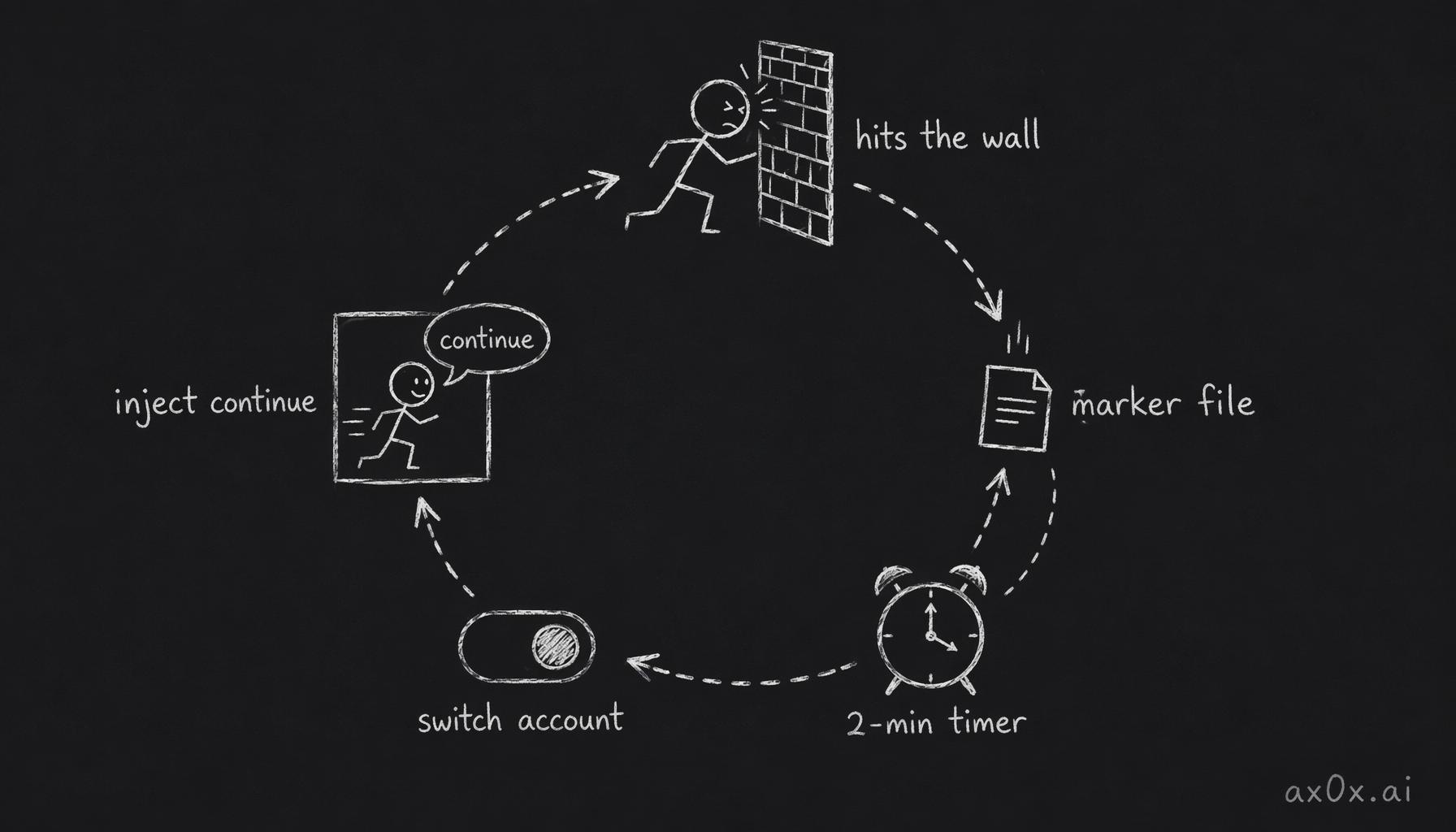 The self-resuming watchdog loop: a stuck agent drops a marker file, a timer waking every two minutes reads it, switches to an account with headroom, and injects 'continue' into the stuck pane.
So the full picture: I hand off a refactor on the subway and pocket the phone. It runs, hits the five-hour wall — the accounts underneath roll to the next one, the watchdog continues the task, and I never looked. By the time I'm off the subway, the work has moved a long way forward. Like a phone switching from Wi-Fi to cellular without dropping the call.
(That watchdog is glue I wrote myself, not something the three pieces ship. Amusingly, hcom is blind to the usage wall — none of its many hooks cover it — so detection has to ride Claude's own interruption hook, and hcom is used here purely as a notification bus. That "I assumed one tool covered it, turns out I had to fill a gap" detail is exactly where most of the time goes in building systems like this.)
A few honest trade-offs — and traps I hit
This box runs fully unlocked. Agents running unattended can't stop and wait for approval on every step, so Claude on this box is bypass-permissions and Codex is no-approval, no-sandbox. That's acceptable only because the box is single-purpose, personal-identity, network-locked — only I can reach it, it only runs my work. The flip side: never put work credentials or touch production from a box like this. The boundary of "fully unlocked" is that the machine physically can't reach anything that matters.
Detach is not durability. Quit the phone app, drop the SSH, log out — the agents all survive (that's herdr's whole point). But when the server process actually restarts (crash, reboot), the in-memory terminals are gone and the running agents die with them; the server comes back empty. This is common to every terminal multiplexer (tmux too). So long jobs belong on the always-on box, not the laptop — the laptop closing its lid is fine, but a reboot wipes everything.
That herdr persistence trap. herdr's server can manage a default session or a named one. I first had systemd start a named session — and the phone connected in to find it empty, because my agents all lived in the default session and the two didn't line up. Point the service at the default session and it's fine. Phone shows empty? Check this first.
Don't spawn from a non-interactive SSH. Spawning an agent with hcom from a
ssh box 'one-liner' tends to hang on launch_blocked; spawn from an interactive
session or the phone instead. The reason is that one-shot SSH doesn't load your shell
config, so the environment is missing pieces.
One cord, cut
Half of this I haven't seen tested for real yet: the hit-the-wall-and-resume-itself part is something I only wired up in the last couple of days. I've verified with a faked interruption signal that it switches accounts, injects "continue" into the stuck pane, and pings me in the group when it can't recover — but what the actual five-hour wall looks like the moment it hits, I haven't watched happen. That honesty stays in.
What I do verify daily is the "lid closed, still running" part. I shut the laptop at night, pull out my phone in the morning, and last night's task is still going on that box — or already done, waiting for me to review. That one small thing — not "the phone can reach the machine," but "I'm not there and it moves forward anyway" — is what dismantled the assumption that I have to be sitting at the computer to work. One cord, cut.